| Bookmark Name | Actions |
|---|
Creating an event
When you create an event, you need to determine the exit point, its type and the application, version, component or service it will be attached to.
Procedure
- In your Event Designer project, right-click the events folder and specify the name of the event. Ensure that the event name has the .event extension.
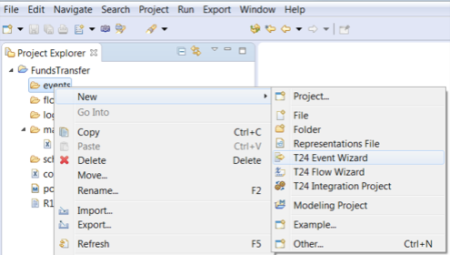
The Create new event wizard opens.
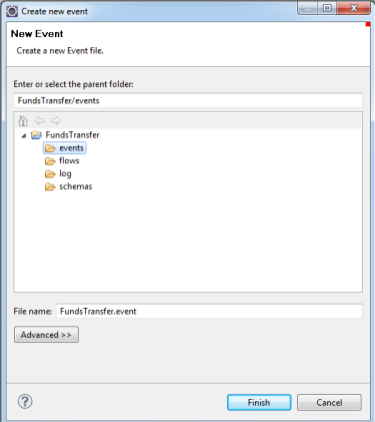
With a Transact connection available, Integration Designer retrieves the Transact data such as Versions, Applications, TSA services or component services as well as Exit Points, Application Fields and populates the relevant drop-down boxes.
- Click Finish.
- Define the exit point in the new event. The exit point can be any of the following:
- Input or authorization routine of a Version or an application. Currently, the INPUT.ROUTINE or AUTH.ROUTINE exit point informs at which stage the event will be triggered.
- Component Service operation.
- TSA.SERVICE to define events for COB or Service.
- Delivery Message to define an exit point for delivery messages.
- Activity or Activity class. This option defines an exit point for an AA Activity or an Activity Class.
- Select the exit point type. The respective section is enabled and you can now specify the exit point and the application or version name.
- Specify the exit point and the application and / or version name.
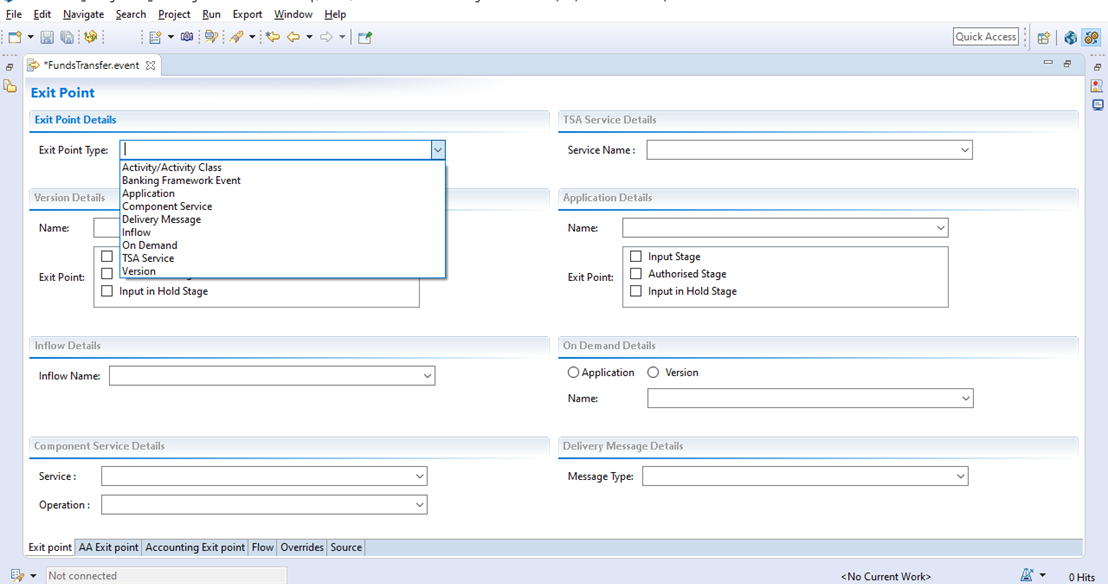 NOTE:
NOTE:- The component service option allows you to define the event for Transact components. For more information, see Defining events for a Component Service.
- The TSA Service option allows you to define the event for a COB or a service. For more information, see Defining events for a TSA service exit point.
- The Activity / Activity Class option allows you to define an exit point for an AA Activity or an Activity Class. For more information, see Defining an event for an Activity or Activity Class.
- The On Demand option allows you to create an on demand event. For more information, see Creating on-demand events.
- Banking Framework Event is a new exit point type. It is currently under development (R20).
Add Bookmark
save your best linksView Bookmarks
Visit your best links BACK
BACK


Are you sure you want to log-off?