| Bookmark Name | Actions |
|---|
Stack 8 Cloud AWS
R20 Runbook | Version 4.1 February 2020
Introduction
This Stack 8 Cloud AWS Runbook will guide you through creating the AWS Transact architecture shown in the diagram below.
This runbook covers:
-
Creating an RDS instance by restoring it from a snapshot.
-
Creating a VPC.
-
Creating an Amazon MQ broker.
-
Creating an ECS Fargate cluster.
-
Creating task definitions for services.
-
Creating subnets for services.
-
Creating a load balancer (ELB).
-
Setting up and configuring Transactweb, application and API services.
NOTE: This runbook does not cover creation of container images or restoring a Transact database in RDS. To find out how to do this, see Saving Database Images as EBS AWS Snapshots.
Prerequisites
To use this guide effectively, there are a few requirements regarding your AWS environment. You need:
-
Access to an AWS account.
-
An existing Transact Oracle database in RDS.
-
Transact app, web and API containers stored in ECR.
AWS Transact architecture diagram
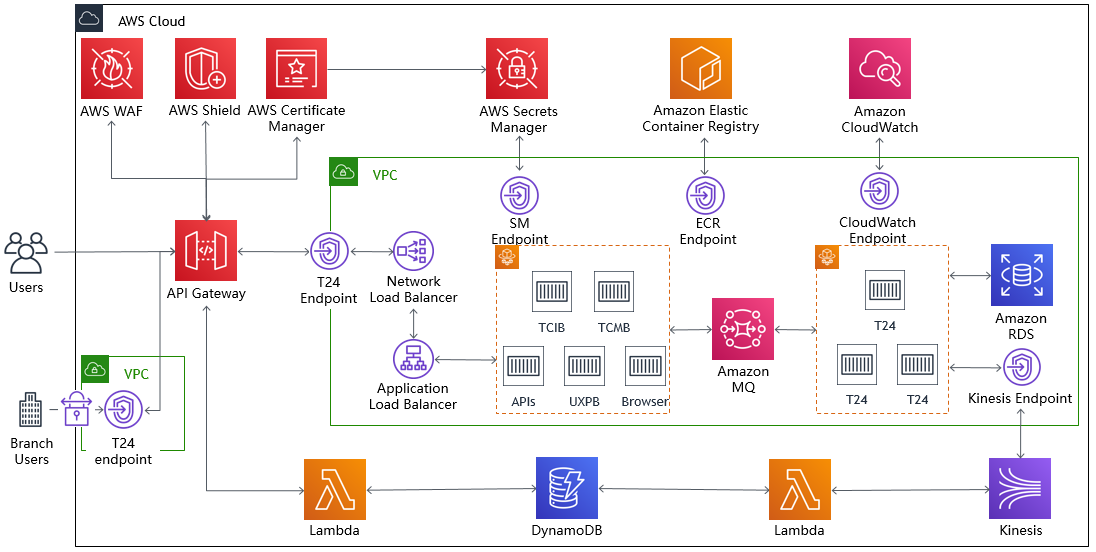
The architecture consists of three services - a Transactapplication service, a BrowserWeb service and a PSD2 payments API service. BrowserWeb and the API are accessed from outside the VPC through the API gateway and load balancers that you will set up using this guide.
We will deploy a CloudFront (a content delivery network service) distribution in front of the API gateway to mitigate issues that the BrowserWeb redirects can cause. From there, BrowserWeb and the API services will communicate with the Transactapplication service through an Amazon MQ broker.
Terminology
In this guide, you will create a cluster, task definitions, and then services to run instances of the task definitions in the cluster.
Cluster
A cluster is a regional grouping of one or more container instances on which you can run task requests. Each account receives a default cluster the first time you use the Elastic Container Service (ECS).
It is possible to associate Virtual Machines with a cluster to run tasks on, but we are only using Fargate services, and the cluster automatically provisions hardware for the tasks belonging to Fargate services.
Container
A container is an environment in which a piece of software can run, isolated like a virtual machine but more lightweight.
Task Definition
A task definition sets the parameters for a task. The definition sets the name of the task, the amount of allocated hardware for the task to utilise, and one or more container configurations. Each container configuration section defines the name of the container within the task, the container image to be used, the network ports to be exposed, and environment variables. (It is approximately equivalent to a deployment in Kubernetes.)
Service
A service lets you specify how many copies of your task definition to run and maintain in a cluster, and what network subnets to run them in. You can optionally use an Elastic Load Balancing load balancer to distribute incoming traffic to the tasks in your service. Amazon ECS maintains that number of tasks and coordinates task scheduling with the load balancer.
Task
A task is a running instance of a task definition in a service. It consists of one or more containers. (It is equivalent to a pod in Kubernetes.)
Container Image
A container image is what the container defined in a task definition will run. The images used in this reference architecture consist of an operating system (typically CentOS or Alpine Linux), and installed software.
In this reference architecture, the images used will have OpenJDK, WildFly, and T24/TAFJ installed and configured. The image also contains a command that is executed when the image is run in a task. In this case, the command starts the WildFly servers, which run the Temenos products (BrowserWeb, TAFJJEE and so on.).
NOTE: In this guide, you will create a cluster, task definitions, and then services to run instances of the task definitions in the cluster.
Add Bookmark
save your best linksView Bookmarks
Visit your best links BACK
BACK


Are you sure you want to log-off?