


| Bookmark Name | Actions |
|---|
Installing Traceability Microservice in Docker
This section helps you to install the Traceability Microservice in Docker.
Procedure:
- Install Docker engine in your deployment environment (See Docker site).
- Copy the generated zip file (from target folder) to the installation directory.
- Extract the zip file.
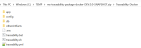
- Open a command prompt in the same location.
- Execute the below command for creating images and docker container for that image,
- For Windows : traceability.bat up --build -d

- For Linux : traceability.sh up --build -d

- For Windows : traceability.bat up --build -d
- Confirm that all below docker instances have started successfully by executing docker ps –a.

- Execute the below command to stop and remove the existing container.
- For Windows : traceability.bat down
- For Linux : traceability.sh down

Post Installation Verification
You can open the home page using the below URL.
http://localhost:8086/ms-traceability-api/
The Traceability API link is available on the home page, which allows you to open the swagger and it displays all the APIs available in traceability microservice.
Traceability Microservice is a Sql-based microservice and it is available as single release bundle (For example, ms-traceability-package-j2ee-<release no>.zip).

Add Bookmark
save your best linksView Bookmarks
Visit your best links BACK
BACK


Are you sure you want to log-off?