| Bookmark Name | Actions |
|---|
Deploying MDB
This section helps you to deploy Traceability Message Driven Bean (MDB) component in DEV environment.
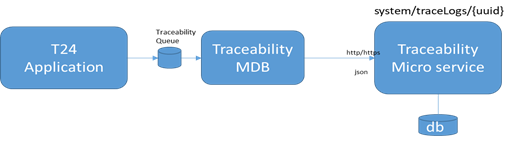
Temenos Transact product components can make use of JMS based interface to log the transaction information in Traceability Microservice.
Procedure:
- Download ear (See Maven site).
- Perform one of the below process:
 Deploy Ear
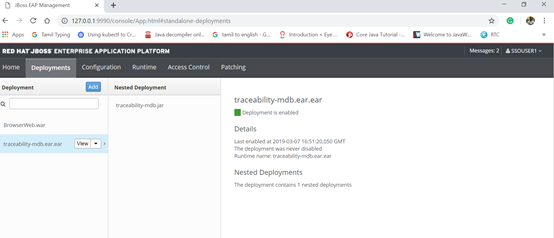
- Place the shared ear (traceability-mdb.ear.ear) in the <%JBOSS_HOME%>/standalone/deployments path.
- Place the Standalone.xml file in the <%JBOSS_HOME%>/standalone/configuration path.
- In Standalone.xml file, add the Traceability queue as shown below.
<jms-queue name="Traceability" entries="queue/Traceability java:jboss/exported/jms/queue/Traceability"/>
Create JMS Queue from jboss-cli.bat- Run jboss-cli.bat from the <%JBOSS_HOME%>/bin/jboss-cli.bat path.
- Once command prompt open, type connect to login standalone local host.
- Execute the below query.
jms-queue add --queue-address=Traceability --entries=queue/Traceability,java:jboss/exported/jms/queue/Traceability
You have generated the queue.
- In setenv.bat, set trace.host and trace.port for the jboss system property.
-Dtrace.host=localhost -Dtrace.port=8085
Example@SET "JBOSS_STARTUP=--server-config=standalone-utp.xml -Djboss.http.port=9089 -Djboss.node.name=node1 -b 0.0.0.0 -Djboss.as.management.blocking.timeout=1200 - Dtrace.host=localhost -Dtrace.port=8085 -Djboss.server.log.dir=%LOG_HOME% -Dbrowser.options.seleniumTestMode=Y -Dt24.helptext.xml.directory=%UTP_HOME%/HELP.TEXT/HelpText -Doverride.LOG_FOLDER=%LOG_HOME%/ -Dcom.edgeipk.librarypath=%MANUAL%/edge,%GENERATED%/edge -DedgeSystemPropertyUpdaters=com.temenos.connect.system.BRPRuntimeProperties -Doverride.IRIS_MAP=%MANUAL%/edge/data/HrefComponentManualMap.properties,%GENERATED%/edge/data/HrefComponentMap.properties -Dcom.temenos.interaction.config.dir=%GENERATED%/iris -Dcom.temenos.interaction.config.dir.TCIB=%GENERATED_TCIB% -Doverride.SLANG_FOLDERS=%MANUAL%/edge/data/slang/manual,%GENERATED%/edge/data/slang/generated,$$PROJECTHOME$/WEB-INF/data/slang/default -Dcom.edgeipk.checkForUpdates=Y -Doverride.ENABLE_COMMAND_LINE=Y -Diris.cache.index.file=%UTP_HOME%\workspace\BRP-models-gen\lastChange -Diris.skip.validation=true -Dorg.apache.tomcat.util.buf.UDecoder.ALLOW_ENCODED_SLASH=true -Dorg.apache.catalina.connector.CoyoteAdapter.ALLOW_BACKSLASH=true -DRTP_REAPER_MEM_USED_PERCENT_ABORT=99 -Djava.awt.headless=true -Diris2.mock-responder.test-data=%IRIS2_DATA% -Diris2.api.workspace=%IRIS2_API_WORKSPACE% "
- Start the server in Jboss Standalone.xml (in the path <%JBOSS_HOME%>/standalone/configuration).
Verification
You can check the following to verify the installation process.
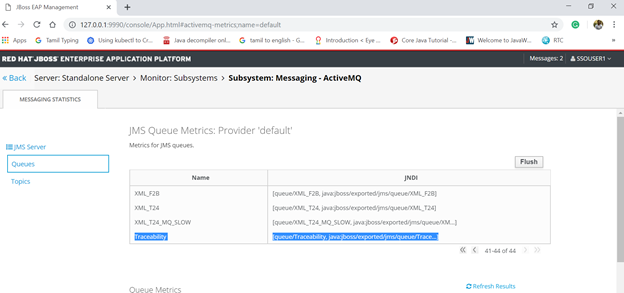
Queue Confirmation
You can check Subsystem:Messaging-ActiveMQ section in the JBoss admin console.
JMS Queue Input format
You should send the message in one of the below formats with the UUI and TraceType in the message header.
Sample Input Format 1
{ "categories": [

    "CATEG.TXN.ID: FT1234568901",

    " CATEG.COMP.CODE: JPMCBANK",

    "CATEG.USER.ID: MSUSER1"

  ],

  "message": {

   "encoding": "base64",

    "content": "mRvM0RTIi8+IDwhLS1PcHRpb25hbCBvdmVycmlkZSBlbGVtZW50IHRvIGlnbm9yZSBwcmVzZXQgZHluYW1pYyAzRFMgcnVsZXMtLT4KICAgIDwvb3JkZXI+CiAgPC9zdWJtaXQ+CjwvcGF5bWVudFNlcnZpY2U+IA=="

  }

}
Sample Input Format 2
{"categories": [

 "CATEG.TXN.ID: FT1234568901",

 "CATEG.COMP.CODE:JPMCBANK",

  "CATEG.USER.ID: MSUSER1"

  ],

  "message": {

    "encoding": "none",

    "content": {

      "TRACE.ORIG.MSG": "DSH33123124#$$%*DSFSD34",

      "TRACE.SIGNATURE": "erwer2314&%$ds6%4dsdf",

      "TRACE.ORIG.MSG2": "jfkl239%h5$"

    }

  }

}
Add Bookmark
save your best linksView Bookmarks
Visit your best links BACK
BACK


Are you sure you want to log-off?