| Bookmark Name | Actions |
|---|
APIs
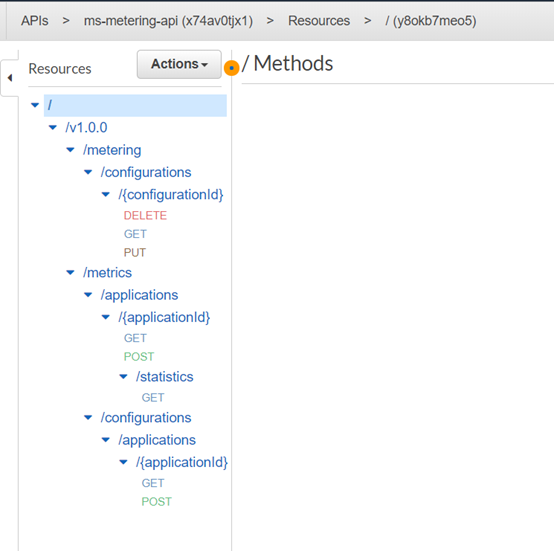
This section covers the details of the APIs supported by Metering microservices.
Metering Microservice has:
Configuration APIs
The Configuration APIs are:
Get Application Configuration by Application ID and Resource ID
It is used to get all the metric configuration stored in the metricConfig table. It is just a plain get, which queries and returns the response to the user.
GET/v1.0.0/metrics/configurations/applications/{applicationId}?
Sample Response
{
    "items": [
        {
            "configId": 0,
            "resourceId": "ACCOUNTS",
            "metricType": "COUNT",
            "statisticsType": "C",
            "description": "string",
            "additionaldata": {
                "additionalProp1": "string",
                "additionalProp3": "string",
                "additionalProp2": "string"
            }
        }
    ]
}
create Application Configuration
This API is used to get all the metric configuration stored in the metricConfig table. It is just a plain get, which queries and returns the response to the user..
POST/v1.0.0/metrics/configurations/applications/{applicationId}
Sample Request
{
  "configId": 1,
  "resourceId": "CONTRACTS",
  "metricType": "COUNT",
  "statisticsType": "C",
  "description": "string",
  "additionaldata": {
    "additionalProp1": "string",
    "additionalProp2": "string",
    "additionalProp3": "string"
  }
}
Sample Response
{
    "configId": "1",
    "applicationId": "KONY_UI",
    "metricResourceId": "CONTRACTS",
    "status": "Created"
}
Get Application Configuration by ID
This API is used to get a single configuration stored in the database, as it can used to update any configuration if needed.
GET/v1.0.0/metering/configurations/{configurationId}
Sample Response
{
    "configId": 0,
    "resourceId": "CONTRACTS",
    "metricType": "COUNT",
    "statisticsType": "D",
    "description": "string",
    "additionaldata": {
        "additionalProp1": "string",
        "additionalProp3": "string",
        "additionalProp2": "string"
    }
}
Delete Application Configuration
This API is used to delete a single configuration stored in the database.
DELETE/v1.0.0/metering/configurations/{configurationId}
Response
{
    "configId": "1",
    "status": "Deleted"
}
update Application Configuration
This API is used to update the existing configuration in the database.
PUT/v1.0.0/
Sample Request
{
	"applicationId": 0,
	"resourceId": "CONTRACTS",
	"metricType": "COUNT",
	"statisticsType": "D",
	"description": "string",
	"additionaldata": {
		"additionalProp1": "string",
		"additionalProp2": "string",
		"additionalProp3": "string"
	}
}
Sample Response
{
    "configId": "0",
    "applicationId": "INFINITY",
    "metricResourceId": "CONTRACTS",
    "status": "updated"
}
Logging APIs
There are two APIs to the logging part. The functionality of the logging APIs is to log the metering passed to this API. This section has a GET and POST for storing and retrieving the information.
Get Metric Log Data by Application ID
This API is used to get all the information about logs stored in the metering database.
GET/v1.0.0/metrics/applications/INFINITY/?fromDate=2020-03-10&toDate=2020-03-10&resourceId=CONTRACTS&metricId=holdings
Sample Response
{
    "items": [
        {
            "resourceId": "CONTRACTS",
            "metricId": "holdings",
            "meteredDate": "2020-03-10 00:00:00.0",
            "usedCount": 0,
            "isIncremental": true,
            "additionaldata": {
                "additionalProp1": "test",
                "additionalProp3": "string",
                "additionalProp2": "string"
            }
        }
    ]
}
create Metric Log Data
This is the main api for the metering microservice which will log the array of incoming metrics, while inserting into the database, it does calculation based on the statistics type defined for that particular application in configuration table, it calculates the statistics and inserts into the statistics table..
POST/v1.0.0/metrics/applications/{applicationId}?requestId=f732bf06-300d-4719-8775-08dd580419d8
Sample Response
{
    "items": [
        {
            "resourceId": "CONTRACTS",
            "metricId": "holdings",
            "meteredDate": "2020-03-10 00:00:00.0",
            "usedCount": 0,
            "isIncremental": true,
            "additionaldata": {
                "additionalProp1": "test",
                "additionalProp3": "string",
                "additionalProp2": "string"
            }
        }
    ]
}
Statistics APIs
Get Metric Statistics by Application ID
This is administration API, which gets the statistical information for the getusage statistics table for the given fromDate, toDate and the applicationId.
GET/v1.0.0/metrics/applications/{applicationId}/statistics?fromDate=2020-03-10&toDate=2020-03-10
Sample Response
{
    "items": [
        {
            "applicationId": "INFINITY",
            "resourceId": "CONTRACTS",
            "metricId": "holdings",
            "meteredDate": "2020-03-10",
            "totalUsageCount": 25
        },
        {
            "applicationId": "INFINITY",
            "resourceId": "CONTRACTS",
            "metricId": "holdings",
            "meteredDate": "2020-03-10",
            "totalUsageCount": 87
        },
        {
            "applicationId": "INFINITY",
            "resourceId": "CONTRACTS",
            "metricId": "holdings",
            "meteredDate": "2020-03-10",
            "totalUsageCount": 99
        }
    ]
}
Scheduler for Metrics
A Scheduler is used to get the data from Temenos Transact and insert into the log table.
By default, the scheduler is part of the metering microservice package. This can be scheduled in different time for different systems. So in the scheduled time, this scheduler will call the IRIS api which will give the payload to insert in the metering table
The API details are given below.
|
URI |
http://localhost:8080/ms-transact-api/api/v1.0.0/metrics/application/{applicationId} |
|
Path param |
applicationId |
|
Query param |
meteredDate |
|
Sample response |
[{
	"resourceId": "CONTRACTS",
	"metricId": "holdings",
	"meteredDate": "2020-03-10",
	"usedCount": 99,
	"isIncremental": false,
	"additionaldata": {
		"additionalProp1": "test",
		"additionalProp2": "string",
		"additionalProp3": "string"
	}
}]
|
The response of the above URI inturn calls the logging and statistics API implementation of the microservice internally.
Scheduler Enabler
 Docker Environment
The scheduler service is configured in the yml file, which has all the environment variable through which you get the deployment time information. Apart from the database connection parameters, the following two parameters are used:
- temn.metering.transact.base.url: http://localhost:8080/ms-transact-api/api/v1.0.0/metrics/application/{applicationId}
- temn.msf.scheduler.transact.cron.trigger.time: 0/120 * * * * ?
The above two variables are used to configure the base url and cron trigger time based on the requirement.
J2EE Environment
The properties for the j2EE deployment is maintained in a properties file. It has following environment variables:
- temn.metering.transact.base.url: http://localhost:8080/ms-transact-api/api/v1.0.0/metrics/application/{applicationId}
- temn.msf.scheduler.transact.cron.trigger.time: 0/120 * * * * ?
AWS Environment
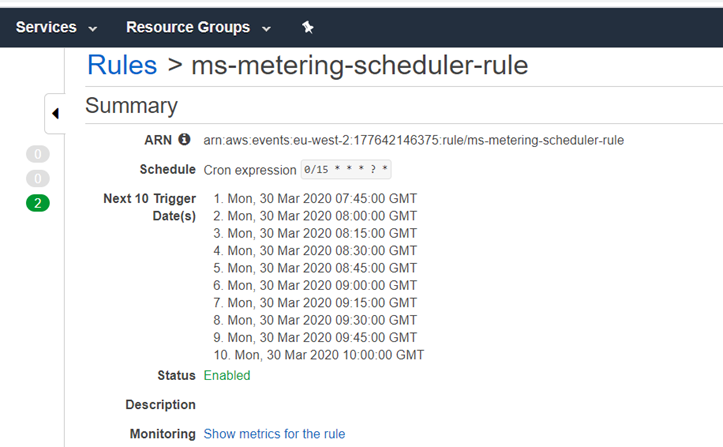
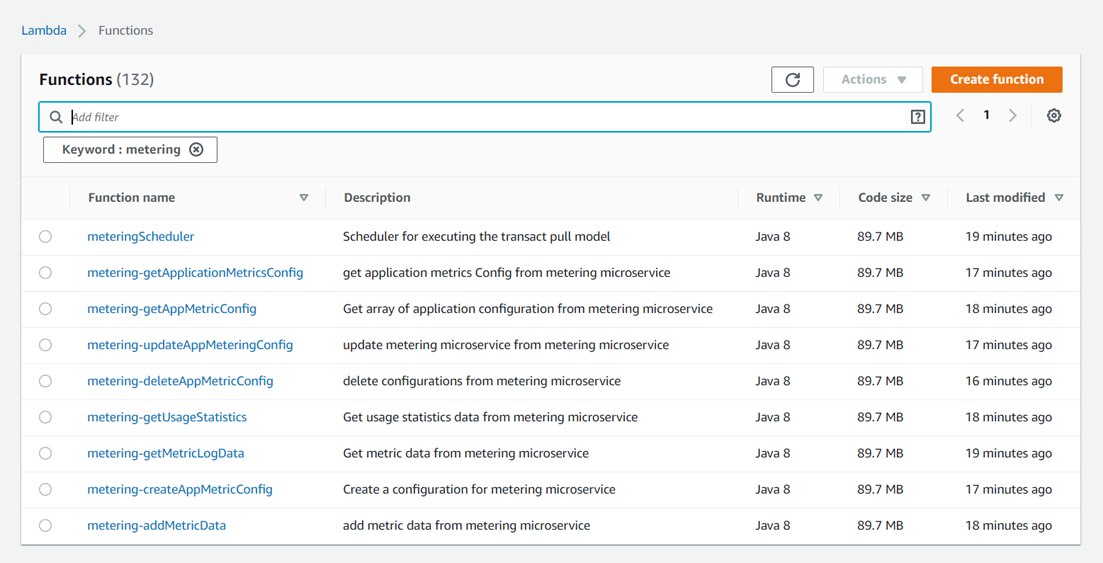
The Scheduler for Metering Microservice is available in Aws Environment and you can set the cron trigger time of the scheduler.
Procedure:
- Log in to the AWS Console.
- Choose the CloudWatch service and rules in the context menu section.
- In the Cloud Watch rule, choose ms-metering-scheduler-rule and you can modify the trigger time for the metering scheduler.
The lambda function mapped to the scheduler is metering scheduler and it will be triggered based on the cron trigger time set in the cloud watch rule linked to the lambda function
Now, you can check the information in the usage statistics table and cloudwatch logs whether the scheduler has run.


Add Bookmark
save your best linksView Bookmarks
Visit your best links BACK
BACK


Are you sure you want to log-off?