| Bookmark Name | Actions |
|---|
External API Interface
This section helps you to make an external call from microservice with samples.
Microservices APIs are exposed as services to user Front end applications through the Temenos IRIS framework. To expose microservice business APIs, IRIS uses its API infrastructure to route the request from the client application and interacts with the API gateway layer of microservices.
Similarly, to fetch data or execute any API interfaces synchronously in any of the Temenos products, it uses service adapter infrastructure of microservice to invoke IRIS API.
Using Service Adapter
Service adapter is used to make synchronous API call from the microservices framework. You can configure the external service either through microservices developer or by deployment manager.
Microservices framework provides support for handling HTTP request or response, and it is extensible to support other protocols.
You can make an external call from microservice.
Procedure:
- Build HttpClientRequest.
- Use ServiceAdapter to make an external call by passing HttpClientRequest.
- Process the response returned from ServiceAdapter.
 Sample Codes
The sample codes to make a specific call are given in the following:
Sample code to make GET API call
(http://10.93.42.12:9089/irf-provider-container/api/v1.0.0/product/products/1234)
HttpClientRequest request = new HttpClientRequest.Builder().basePath("http://10.93.42.12:9089/irf-provider-container/api/").resourcePath("v1.0.0/product/products/1234").build();
Response<String> response = ServiceAdapterFactory.getServiceAdapter().get(request);
process(response.getBody().toString());
Sample code to make PUT API call
HttpClientRequest request = new HttpClientRequest.Builder().body(“Sample payload”).addHeader("Content-Type", "application/xml").basePath("http://10.93.42.12:9089/irf-provider-container/api/").resourcePath("v1.0.0/product/products/1234").build();   //Default Content - Type: appliction/json
Response<String> response = serviceAdapter.put(request);
process(response.getBody().toString());
Sample code to make POST API call
HttpClientRequest request = new HttpClientRequest.Builder().body(“Sample payload”).addHeader("Content-Type", "application/xml").basePath("http://10.93.42.12:9089/irf-provider-container/api/").resourcePath("v1.0.0/product/products/1234").build();       //Default Content - Type: appliction/json
Response<String> response = serviceAdapter.post(request);
process(response.getBody().toString());
Sample code to make DELETE API call
HttpClientRequest request = new HttpClientRequest.Builder().basePath("http://10.93.42.12:9089/irf-provider-container/api/").resourcePath("v1.0.0/product/products/1234").build();
Response<String> response = serviceAdapter.delete(request);
process(response.getBody().toString());
Support for IRIS API
IRIS API requires security headers that are mandatory to process or forward the request to the external calls.
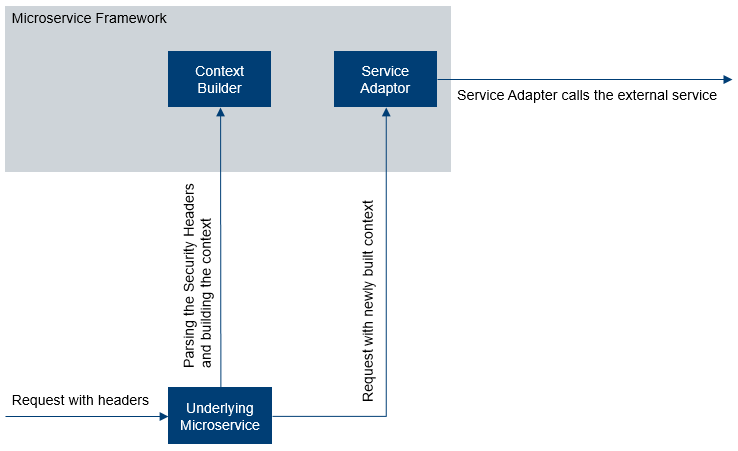
Sample code to support IRIS Security Headers is given below:
HttpRequest<String> request = new HttpClientRequest.Builder().context(context)
                                                .basePath("http://localhost:8080/iris").build();
Response<String> response = serviceAdapter.get(request);
Configurable Properties
The configurable properties of environment variables are shown below.
| Property | Description | Configuration | Default Value |
|---|---|---|---|
| HTTP_BASE_PATH | It is a base url of the external service API configured in microservices implementation code, environment variable or system property. | Optional | Empty string |
| HTTP_RESOURCE_PATH | It is a resource path of the external service API configured in microservices implementation code, environment variable or system property. | Optional | Empty string |
| HTTP_CONNECTION_TIMEOUT | It sets a specified timeout value, in milliseconds, to be used when opening a communications link to the resource referenced by this URLConnection. It is configured in environment variable or system property. | Optional | 2000 |
| HTTP_READ_TIMEOUT | It sets a specified timeout value, in milliseconds, to be used when opening a communications link to the resource referenced by this URLConnection. Configured in environment variable or system property. | Optional | 5000 |
| HTTP_MAX_RETRIES | It sets a specified maximum retry value, to be used when getting the error response. Configured in environment variable or system property. | Optional | 3 |
| HTTP_ERROR_STATUS_CODES | It sets a specified error response status code for which retry occurs. Configured in environment variable or system property. | Optional | 503,504 |
Microservice Framework classes
There are three types of microservice framework classes:
- ServiceAdapter - It is a generic adapter interface to make synchronous calls to external service. (example: get(), put(), post(), send(), receive(), ...)
- HttpServiceAdapter - It is an implementation of ServiceAdapter, which invokes external HTTP APIs. (handles retries, timeouts)
- ServiceAdapterFactory - It is used to get ServiceAdapter implementation. (This factory produces only HttpServiceAdapter.)
You can implement microservice specific integration with external service as shown in the following.
IntegrationService - define an interface for microservice specific contract.
EXAMPLE: Implementation of the methods such as callsgetMarketingCatalogInfo(), updateExchangeRates(), createFunds() etc., use framework ServiceAdaptor to make external.
IntegrationServiceImpl is an implementation class of IntegrationService which in turn uses microservice framework ServiceAdapter to call external service.
A sample IRIS API client code in Marketing Catalog service is given below. It builds request, call IntegrationServiceImpl methods and get the response.
IntegrationService service = IntegrationServiceImpl.getInstance();
Response<String> response = service.getMarketingCatalogInfo(buildHttpRequest(requiredDetails));
processResponse(response.getBody().toString());
Data Streaming Platform Integration
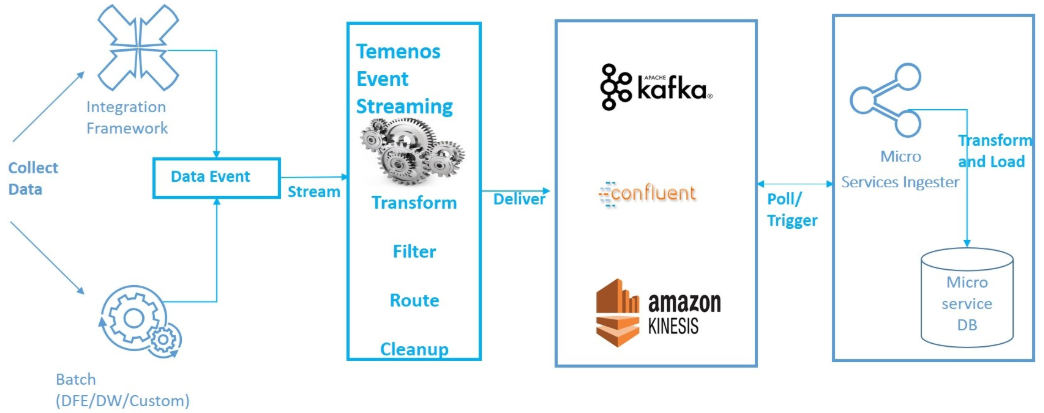
Microservices rely on data streaming based platform to receive data events from the Product system. In the case of Temenos Transact, DES platform of Temenos Transact is used to receive Events.
Add Bookmark
save your best linksView Bookmarks
Visit your best links BACK
BACK


Are you sure you want to log-off?