
| Bookmark Name | Actions |
|---|
Upgrading TAFJ
This section will guide you to upgrade TAFJ libraries in the existing area.
Completing the Prerequisite Tasks
Before you begin with the TAFJ upgrade, make sure that the required environment variables are set in your system.
Procedure
- Launch a command prompt.
- Set JAVA_HOME. Ensure you use the JDK 1.8 version.
For 64 bit machines: SET JAVA_HOME=C:\Temenos\Development\3rdParty\jdk\jdk1.8.0_121
For 32 bit machines: SET JAVA_HOME=C:\Temenos\Development\3rdParty\jdk\jdk1.8.0_32bit
- Set TAFJ_HOME as shown below.
Set TAFJ_HOME=C:\LocalArea\201806\TAFJ
- Set ECLIPSE_HOME as shown below.
SET ECLIPSE_HOME= C:\LocalArea\201806\TAFJ\ECLIPSE
Upgrading the TAFJ Libraries
Procedure
- Download the latest TAFJ version zip file (TAFJ.DEV.PB201810.0.tar.gz).
- Unzip the file into your chosen folder.

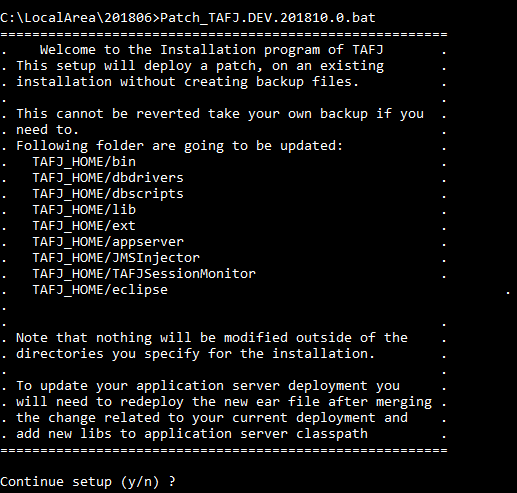
- Run the Patch_TAFJ_xxx.bat/sh.NOTE: For upgrading on Windows, you will need to run Patch_TAFJ_xxx.bat. For upgrading on other operating systems, you will need to run Patch_TAFJ_xxx.sh.

This will upgrade the necessary folders with the new contents from the new release.
- Restart your Eclipse. This will load the new JARs for the users to use.
NOTE: For application servers like JBoss, the following files should be replaced with the existing files under JBOSS_HOME/server/<context>/deploy. Where context can be default or a specific folder (that is, for modelbank_tafj, context is R12).
- TAFJJEE_EAR.ear. This file can be found under TAFJ_HOME/appserver.
TIPS: In case of bugs or modifications, it is necessary to replace your database java stored functions. You can view the version of the java stored functions by running tDiag.
NOTE: DBImport creates all VIEW records, when you upgrade from TAFJ R19 to TAFJ higher release by using the H2 or NuoDB database.
Add Bookmark
save your best linksView Bookmarks
Visit your best links BACK
BACK


Are you sure you want to log-off?