| Bookmark Name | Actions |
|---|
JDBC Driver
This section provides detailed instructions for the configuration and deployment of the jBASE JDBC 2.0 Driver.
The jBASE JDBC 2.0 Driver is a jBASE component implementing the JDBC API. The JDBC API is part of the JavaTM 2 Platform Standard Edition 5.0 (J2SETM).
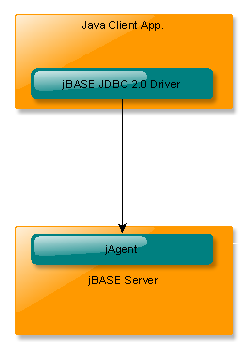
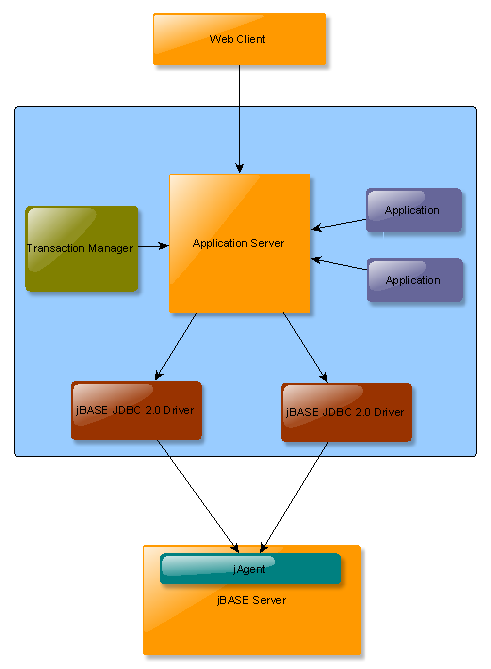
The following diagrams show two of the most common deployment scenarios. In both cases, the JDBC API implemented by the jBASE JDBC 2.0 Driver provides client applications with the ability to perform SQL queries against a jBASE server.
 Two-tier Model
This model represents deployment scenarios where a Java Client Application has the responsibility to create and manage connection, transaction and security resource.
Three-tier model
This model often involves an application server hosting different application components such as EJBs, servlets, etc. Deploying the jBASE JDBC Driver on a J2EE application server does not only allow those applications to perform SQL queries against jBASE, but also allows the application server to manage its connections, transactions and security aspects.
Deploying the JDBC Driver
This section shows the deployment of JDBC Driver on JBoss application server.
The jBASE JDBC Driver is packaged as a Java Archive (JAR) file. To use the JDBC Driver from a non-managed client application, it necessary to place this archive inside your CLASSPATH. To deploy this archive on a managed environment, it is necessary to configure a deployment descriptor specific to the application server.
Deploying the jBASE JDBC Driver in JBoss
Procedure
-
Modify the jbasejdbc-ds.xml file based on the deployment needs. The following deployment descriptor is used by JBoss to load the jBASE JDBC Driver, as specified by driver-class.
<?xml version="1.0" encoding="UTF-8"?> <!--========================================================================== --> <!-- --> <!-- JBoss deployment descriptor for jBASE JDBC Data Sources --> <!-- --> <!-- ========================================================================= --> <datasources> <!—jBASE JDBC Data Source --> <local-tx-datasource> <jndi-name> jdbc/jBaseJdbcDS </jndi-name> <connection-url> jdbc:jbase:thin:@127.0.0.1:20002/mytestaccount </connection-url> <driver-class> com.jbase.jdbc.driver.JBaseJDBCDriver </driver-class> <user-name> test </user-name> <password> test </password> </local-tx-datasource> </datasources> -
Copy the jBASE JDBC Driver (jbasejdbc.jar) archive to the lib directory of the JBoss default configuration.
-
Copy the JBoss deployment descriptor to the deploy directory of the JBoss default configuration.
Developers Guide
The following section provides a detailed guide on how to connect and access the jBASE server.
jAgent
jBASE jAgent is a server-side jBASE component which must be listening on a user-defined TCP port on the remote jBASE instance. It accepts socket connections to process incoming requests from the JDBC Driver. Please refer to the jBASE jAgent user guide for more information on how to configure and start jAgent.
Connecting to jBASE
JDBC provides two mechanisms to establish a connection to a data source:
-
DriverManager: This class requires an application to load the specific JDBC driver, which in our case would be the jBASE JDBC Driver. This interface is typically used on a non-managed two-tier deployment scenario where a Java naming service is not available.
-
DataSource: This interface is preferred on managed scenarios because JNDI is typically used to lookup a data source. The advantages of having a data source managed by the application are connection-pooling, security and distributed transaction processing for XA-compliant JDBC drivers.
DataSource and DriverManager provide the following methods to create a new connection. For more information on these methods, refer the JDBC API documentation.
-
getConnection(String url): Obtains a new connection for the specified connection string. Connection properties must be specified inside the connection string.
-
getConnection(String url, String user, String password): Obtains a new connection for the specified connection string. Connection properties, except user and password must be specified inside the connection string.
DriverManager provides the following additional method:
-
getConnection(String url, Properties info): Obtains a new connection for the specified connection string. The second parameter specifies the connection properties.
Authentication
jAgent will attempt to authenticate a user given the user credentials provided to the getConnection() method.
The jBASE JDBC Driver implements the following connection properties to provide user credentials:
-
user: Specifies the user to be authenticated.
-
password: Specifies the user’s password.
Encryption
jAgent can be configured to use SSL encrypted connections for deployment scenarios which require enhanced security.
The jBASE JDBC Driver implements the following connection properties:
-
SSL: Specifies whether the connection should use SSL encryption. SSL should only be used if the jAgent instance running on the jBASE server has also been configured to accept SSL connections. The default value is false.
-
enableNaiveTrustManager: This property forces the JDBC Driver to trust all server certificates. The default value is false.
Examples
The example below uses the DataSource interface:
Connectioncx = null;
try {
    InitialContext ic = new InitialContext();
    Object cxfObj = ic.lookup("java:comp/env/jdbc/jBaseDB");
    DataSource cxf = (DataSource) cxfObj;
    cx = (Connection) cxf.getConnection();
} catch(NamingException e) {
    // error
}
The example below uses the DriverManager interface:
//Load jBASE JDBC Driver
Class.forName("com.jbase.jdbc.driver.JBaseJDBCDriver");
//Set connection properties and request a new connection
String url = "jdbc:jbase:thin:@127.0.0.1:20002";
Properties cxProps = new Properties();
cxProps.setProperty("user", "test");
cxProps.setProperty("password", "newpassword");
cxProps.setProperty("SSL", "true");                  //Enable SSL
cxProps.setProperty("NaiveTrustManager", "true");
Connection cx = DriverManager.getConnection(url, cxProps);
Another example below that uses the DriverManager interface:
//Load jBASE JDBC Driver
Class.forName("com.jbase.jdbc.driver.JBaseJDBCDriver");
//Set connection properties and request a new connection
String url = "jdbc:jbase:thin:@127.0.0.1:20002/MyTestAccount?user=test&password=newpassword&SSL=true&NaiveTrustManager=true";
Connection cx = DriverManager.getConnection(url);
Closing a Connection
You can close the connection using the following method:
cx.close();
JDBC API Reference
The jBASE JDBC 2.0 Driver implements a subset of the JDBC 2.0 API. Refer the JDBC specification documentation or refer to the JDBC API javadoc documentation for further information.
The following example shows how a client application can execute an SQL SELECT query and display the obtained result set:
Statement stat = null;
try {
    //Create an SQL statement and perform a SQL SELECT query
    stat = cx.createStatement();
    ResultSet rs = stat.executeQuery("SELECT NAME FROM MYTABLE");
    //Obtain the meta data associated to the result set to print the no. of columns
    ResultSetMetaData rsMetaData = rs.getMetaData();
    System.out.println("Number of columns: " + rsMetaData.getColumnCount());
    //Fetch all rows and display the first column
    while(rs.next()) {
        System.out.println("NAME: " + rs.getString("NAME"));
    }
} catch(SQLException e) {
    throw e;
} finally {
    closeDB(stat);
}
Add Bookmark
save your best linksView Bookmarks
Visit your best links BACK
BACK


Are you sure you want to log-off?