| Bookmark Name | Actions |
|---|
Installing Callback Registry Microservices in Docker
This section helps you to install the Callback Registry Microservice in Docker.
Procedure:
- Install Docker of latest version.
- Copy the zip file into the installation directory.
- Extract the zip file.
- Open the command prompt from the same location.
- Execute the below command, which creates an image and docker container for the image.
- For Windows: callbackregistry.bat up --build -d
- For Linux: callbackregistry.sh up --build -d
- Execute the below commands to check the log for database logs.
- For windows: callbackregistry.bat logs -f db-service
- For Linux: callbackregistry.sh logs -f db-service
- Execute the below commands to check the log for api module logs.
- For windows: callbackregistry.bat logs -f api
- For Linux: callbackregistry.sh logs -f api
- Execute the below commands to stop and remove the existing container.
- For Windows: callbackregistry.bat down
- For Linux: callbackregistry.sh down
Post Installation Verification
If all the installation process is done, you can check by launching the Microservice home page for docker using the below URL.
http://localhost:8095/ms-entitlement-api/.
The Callback Registry API link on the home page launches the OAS definition of the service.
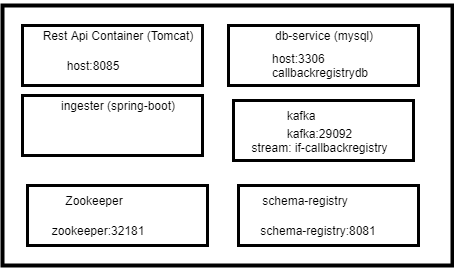
Callback Registry Docker images are shown below.
Add Bookmark
save your best linksView Bookmarks
Visit your best links BACK
BACK


Are you sure you want to log-off?