


| Bookmark Name | Actions |
|---|
Designing an inflow without PW
This topic shows you how to design an inflow that is not based on a process definition. The inflow request is similar to the Service XML requests of adapters.
Procedure
-
Create an inflow design.

On the Inflow Design screen, the Application, Version and Function fields are enabled, allowing you to create an Inflow without PW.
-
If the request is being sent for an application, select the Application. If it is for a version, select the Version.
From the Function drop down box, I, A, R, D and S can be selected.
-
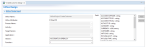
Select I to input fields. This will populate Fields with the fields from the Transact object. Only fields marked as editable in STANDARD.SELECTION will be displayed.
-
From Fields, select the required fields and click Add.

-
Use the other options in Function as required.
-
Save your changes.
- Publish the inflow. For more information, see Publishing inflows to Transact.
Add Bookmark
save your best linksView Bookmarks
Visit your best links BACK
BACK


Are you sure you want to log-off?