| Bookmark Name | Actions |
|---|
Delivering events in TAFJ
Choose one of the following methods to configure the delivery of events in TAFJ.
Delivering events to the default queue
Procedure
- Create the queue in JBoss.
- Specify the queue name in the DESTINATION.STATIC property.
- Start the Integration service to get the events delivered to this queue.NOTE:
You can provide the queue name with connection factory like queueName#connectionFactory.
Delivering messages to a specific queue
Procedure
- Configure EVENT.TYPE.DEST with the event type and EVENT.DEST with the queue name.
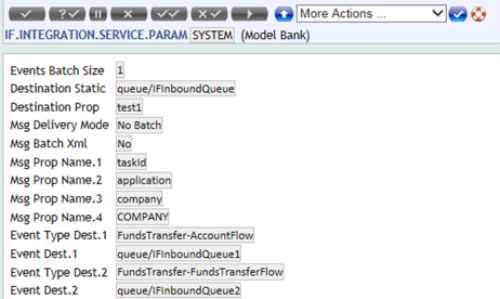
- Ensure that these queues are available in the application server.
- Execute the Integration Service to get the message delivered to the queue.NOTE:
When FILTER.TYPE is selected as WHITE.LIST the events type mentioned only in EVENT.TYPE.DEST will be ignored.
Delivering messages to a common queue
Procedure
- Ensure that the queue name specified in DESTINATION.STATIC is available in your application server.
- Execute the Integration Service to get the message delivered to the queue.
Delivering messages to multiple queues based on the DESTINATION.PROP setting
Procedure
- Set DESTINATION.PROP to any of the XML element names like the one shown below.
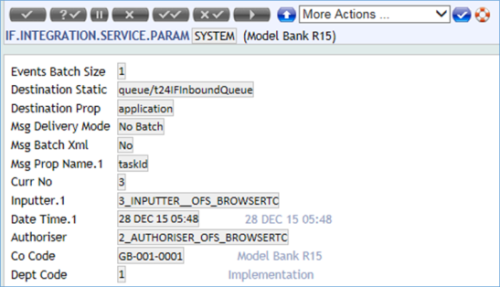
- Define queues for each of the values that the element specified in the DESTINATION.PROP field can have in the application configuration file. In the above configuration record the DESTINATION.PROP value is application, the common value that holds the name of the application that triggered the event. The values could be CUSTOMER, ACCOUNT etc. Hence one queue per application needs to be defined in the application server and the queues. Step 3 explains the configuration in detail.
- Configure logical queues.
In order to use logical queue names to perform event delivery, the logical queue name needs to be mapped to the physical queue name in ejb-jar.xml and jboss.xml of TAFJJEE_MDB.jar. You must do the mapping of logical name to JNDI name for the TAFJPhantomListener MDB because the program is executed as a servlet.
- Define the queue in application server. Here, it is JBoss EAP 7.

- Configure TAFJEE_MDB.jar for logical queues: specify the virtual queues names in ejb-jar.xml.
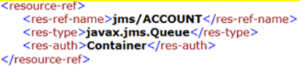
- Map the virtual queue to the physical queue in jboss3.xml.
Here, the virtual queue name (provided in res-ref-name) used jms/ACCOUNT and is based on the example Integration Service Param configuration. It could be jms/CUSTOMER, jms/SECTOT etc. In general, the virtual queue name should follow the format below:
jms/A_value_that_the_DESTINATION.PROP_field_can_hold
The physical queue name is mentioned in jndi-name and it should be the queue that is already defined in the application server. Here it is t24ACCQueue.
- Define the queue in application server. Here, it is JBoss EAP 7.
- Configure TAFJEE_MDB.jar for logical queues as shown below*
- Specify the virtual queues names in ejb-jar.xml.
- Map the virtual queue to the physical queue in jboss3.xml.

In steps 4 a and 4 b ACCOUNT is used as the queue name. The res-ref-name should be jms/A_value_that_the_DESTINATION.PROP_field_can_hold.
- After this setup all the events that are triggered for a transaction in the ACCOUNT table will be delivered to the t24ACCQueue queue. The rest of the events will not be delivered as no mapping is done for other applications and application is one of the elements that any event will hold. You should take a great care when you configure the DESTINATION.PROP field.
Guard queues in TAFJ
You implement Guard Queue when you use TAFJ to ensure that events are delivered to a queue only once.
To use the guard queue functionality the value in DESTINATION.STATIC or EVENT.DEST need to be provided as queue_name#connection_factory#guarded_queue_name. As the field size is limited to 65, these two fields are modified as multi value fields where each of the # separated values can be provided as a multi value field and it will be VM Separated. There is no validation of the data in this field, but a wrong configuration will not deliver the events to the queue. Also, a new field TIME.TO.LIVE is introduced to specify how long the correlation ID is to be stored in guard queue to avoid a duplicate message. An empty value in this field means that the correlation IDs need to be removed manually from the queue. The value of this field is in milliseconds.
Add Bookmark
save your best linksView Bookmarks
Visit your best links BACK
BACK


Are you sure you want to log-off?