| Bookmark Name | Actions |
|---|
Creating an Event Designer project
You need to create the Integration Framework project and specify the most important connection parameters.
Procedure
- In the Event Designer top navigation menu, click File >New > Project. A wizard opens.
- Expand T24 Integration Studio, select T24 Integration Project and click Next. A new page opens.
- Specify the name of the project and select Enable project specific settings.
- If your runtime is TAFC, select Agent as the connection method and provide the connection parameters for connecting to Transact.
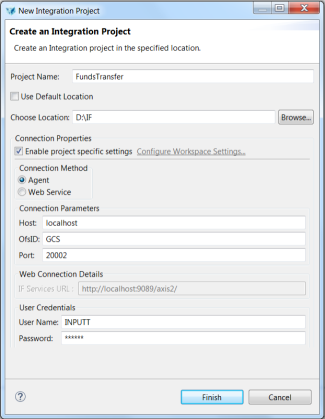 NOTE:
NOTE:Credentials are optional when you connect to Transact that is running in TAFC.
- If your runtime is TAFJ:
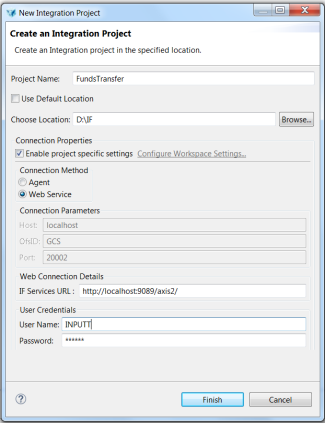
- Specify Web Service as the connection method.
- Provide the connection parameters for connecting to Transact with the Web Service interface.
NOTE:
To be able to use the Web Service option, pack the following components as an Apache Axis2™ web archive and then deploy them in a supported application server such as JBoss, WebLogic or WebSphere.
- t24-IF_IntegrationLandscapeService-tafj-jws.aar
- t24-IF_IntegrationFlowService-tafj-jws.aar
- t24-EB_CatalogService-tafj-jws.aar
These .aar files are available as part of Transact upgrade or update pack under the extensions folder. For more information about deploying a component in a J2EE application server, see the topic Deploying Component Service that is in Temenos online user guides.
- Provide the Integration Framework service URL. The format of Integration Framework service is http://host_name/jar_name.
- Specify the user credentials for connecting to Transact.
- If your runtime is TAFC, select Agent as the connection method and provide the connection parameters for connecting to Transact.
- Click Finish.
For more information about deploying a component in a J2EE application, see Deploying Component Service.
Add Bookmark
save your best linksView Bookmarks
Visit your best links BACK
BACK


Are you sure you want to log-off?