| Bookmark Name | Actions |
|---|
Configuring the JBoss application server
You will need to perform a number of steps to configure the JBoss application server.
Configuring standalone.xml for Temenos Transact
Procedure
-
Open standalone.xml.
-
Make the following changes to the configuration for the t24RODS used by Temenos Transact. These are required so that Relational Replication enquiries using the browser can access the database.
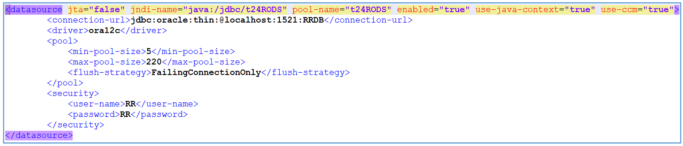
Relational Replication has three java components (Config, ETL and Purge). Each of these components requires a list of configurations in the application server
Configuring the Config component
Procedure
-
You need to create a new folder, which will be a clone of the Temenos Transact standalone folder. Create a new folder called standalone-rr-config.
-
Copy the configuration and deployments folders from the Temenos Transact standalone folder to standalone-rr-config.
-
Copy standalone.xml from the Temenos Transact standalone folder to standalone-rr-config and rename it standalone_sql_rr_config.xml.
-
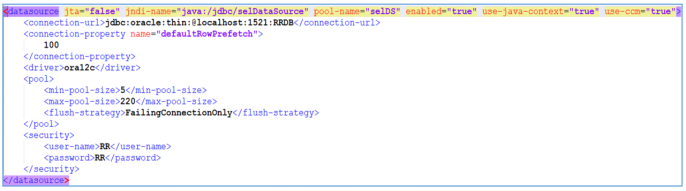
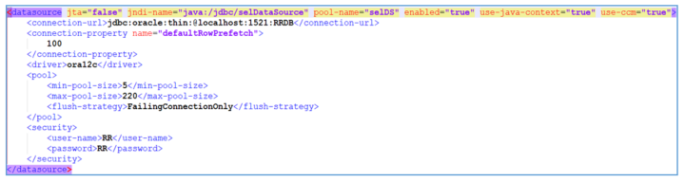
In standalone_sql_rr_config.xml, configure the following data sources.
Data source What it should point to jdbc/confDataSource The CONFIG schema in the Relational Replication database. jdbc/metaDataSource The MDATA schema in the Relational Replication database. jdbc/selDataSource The RR schema in the Relational Replication database. jdbc/t24DS The Temenos Transact database. 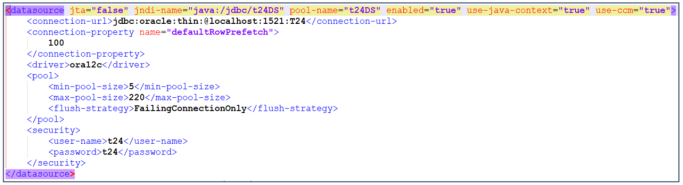
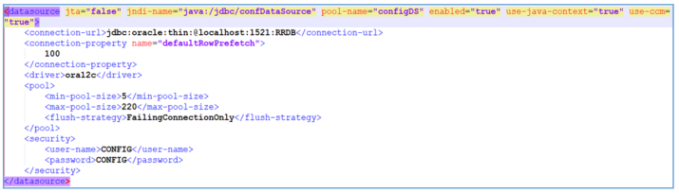
-
In the deployments folder, delete the existing files belonging to the Temenos Transact configuration.
-
Obtain file rr-config-xxxxxx.x.x.ear from either Distribution or the Maven repository and copy it into the deployments folder.
-
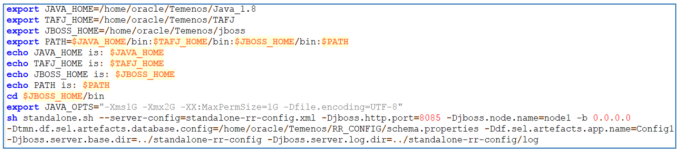
In order to launch the Config application you need a startup script. Create a startup script called, for example, launch-jboss-RR-Config.
-
Configure the parameters in this script as per the table below.
Parameter Description --server-config=standalone_sql_rr_config.xml The standalone configuration xml file used by the Relational Replication config. This file will be picked up from the path specified in -Djboss.server.base.dir. -Dtmn.df.sel.artefacts.app.name=Config1 If there are multiple instances of Relational Replication Config, this provides a unique name for each instance. -Djboss.server.base.dir=../standalone-rr-config A standalone folder used by Relational Replication config. -Djboss.server.log.dir=../standalone-rr-config/log The location of the logs folder for Relational Replication config. -Dtmn.df.sel.artefacts.database.config= /home/oracle/Temenos/RR_CONFIG/schema.properties The location of the schema.properties file.
Configuring the ETL component
-
Create a new folder standalone-rr-etl.
-
From the standalone folder used by Temenos Transact, copy folders configuration and the deployments to this new folder.
-
Copy the Temenos Transact standalone.xml file to a new file in this folder called standalone_sql_rr_etl.xml.
-
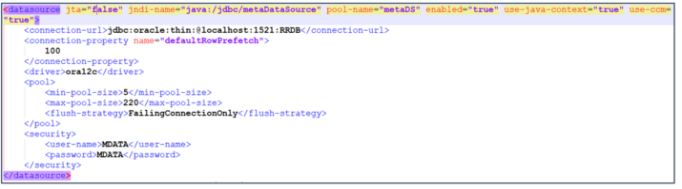
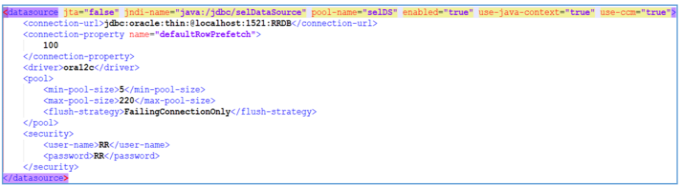
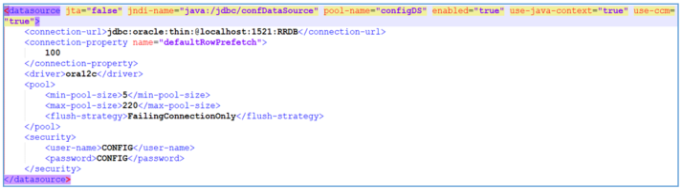
In standalone_sql_rr_etl.xml, configure the following data sources.
Parameter What it should point to jdbc/confDataSource The CONFIG schema in the Relational Replication database. jdbc/metaDataSource The MDATA schema in the Relational Replication database. jdbc/selDataSource The RR schema in the Relational Replication database. jdbc/t24DS The Temenos Transact database. 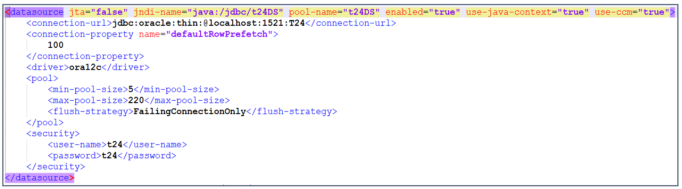
-
In the deployments folder, remove the existing files belonging to the Temenos Transact configuration.
-
Obtain file rr-etl-xxxxxx.x.x.ear from either the Maven repository or from Distribution and copy it into the deployments folder.
-
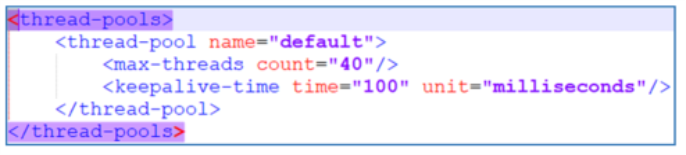
In standalone_sql_rr_etl.xml configure the EJB threads. This will determine the number of jobs and threads that are created by ETL processes using this configuration.
-
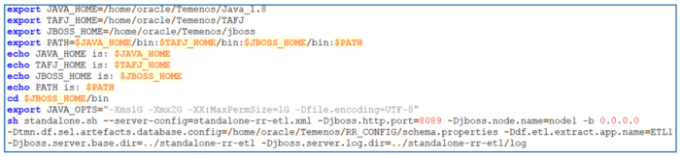
Create a startup script called launch-jboss-RR-etl that can be used to launch the ETL application.
-
Configure the following parameters in launch-jboss-RR-etl.
Parameter Description --server-config=standalone_sql_rr_etl.xml The standalone configuration xml file used by the RR ETL. This file will be picked up from the path specified in -Djboss.server.base.dir. -Ddf.etl.extract.app.name=ETL1 If there are multiple instances of ETL, this provides a uniqute name for each instance.
-Djboss.server.base.dir=../standalone-rr-etl A standalone folder used by ETL. -Djboss.server.log.dir=../standalone-rr-etl/log The location of the ETL logs folder. -Dtmn.df.sel.artefacts.database.config= /home/oracle/Temenos/RR_CONFIG/schema.properties The location of the schema.properties file.
Configuring the Purge component
Procedure
-
Create a new folder standalone-rr-etl.
-
From the standalone folder used by Temenos Transact, copy folders configuration and the deployments to this new folder.
-
Copy the Temenos Transact standalone.xml file to a new file in this folder called standalone_sql_rr_purge.xml.
-
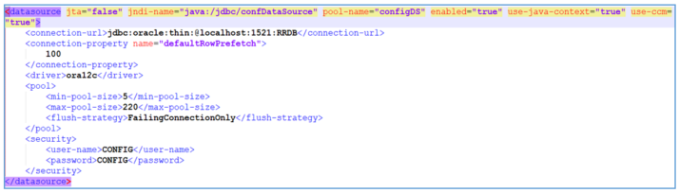
In standalone_sql_rr_purge.xml, configure the following data sources.
Parameter What it should point to jdbc/confDataSource The CONFIG schema in the Relational Replication database. jdbc/t24DS Temenos Transact database. 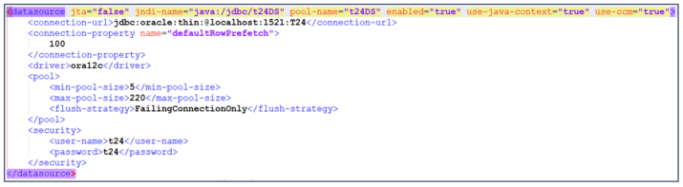
-
In the deployments folder, remove the existing files belonging to the Temenos Transact configuration.
-
Obtain file rr-purge-xxxxxx.x.x.ear from either the Maven repository or from Distribution and copy it into the deployments folder.
-
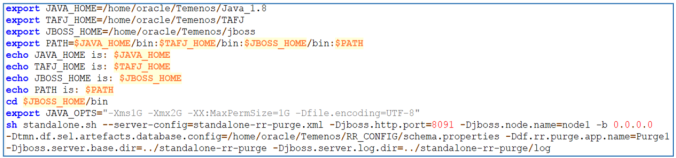
Create a startup script called launch-jboss-RR-purge that can be used to launch the Purge application.
-
Configure the following parameters in launch-jboss-RR-purge.
Parameter Description --server-config=standalone_sql_rr_purge.xml The standalone configuration xml file used by the RR Purge. This file will be picked up from the path specified in -Djboss.server.base.dir. -Ddf.rr.purge.app.name=Purge1 If there are multiple insances of Purge, this provides a unique name for each instance.
-Djboss.server.base.dir=../standalone-rr-purge A standalone folder used by Purge. -Djboss.server.log.dir=../standalone-rr-purge/log The location of the Purge logs folder. -Dtmn.df.sel.artefacts.database.config= /home/oracle/Temenos/RR_CONFIG/schema.properties The location of the schema.properties file.
Add Bookmark
save your best linksView Bookmarks
Visit your best links BACK
BACK


Are you sure you want to log-off?