| Bookmark Name | Actions |
|---|
Moving Data from RO to ARC
Archiving of data from the Non-Volatile database (NVDB) read-only (RO) tables to archival (ARC) tables is possible by specifying the retention period (number of months). You can stop the data archival for some tables by excluding them from the archiving process. This section provides brief about the archival process methods, configuration of DLM RO database archival tables for various databases and data movement from RO to ARC database.
You can archive data by either moving the data to ARC tables or deleting the data completely from the tables chosen for archival. A supervisor and concerned businessperson need to approve the configuration you have defined, before the actual archival process begins. The archival process methods can be of two types.
 Full Solution
In this method, the decision making for archival of the record is based on the PDATE column in each of the main table in NVDB. This method does not require any additional validation to move or delete data from NVDB.
Trickle Feed
In this method, the decision making for archival of the record is based on the Temenos Transact archival rules for each of the NVDB table defined. A Temenos Transact routine confirms the eligibility of each PDATE column for archival after which the system archives or deletes the associated data in the partition as per the user configuration. This method requires business validation before moving or deleting the record from NVDB.
Configuring DLM Read-only Database Archival Tables
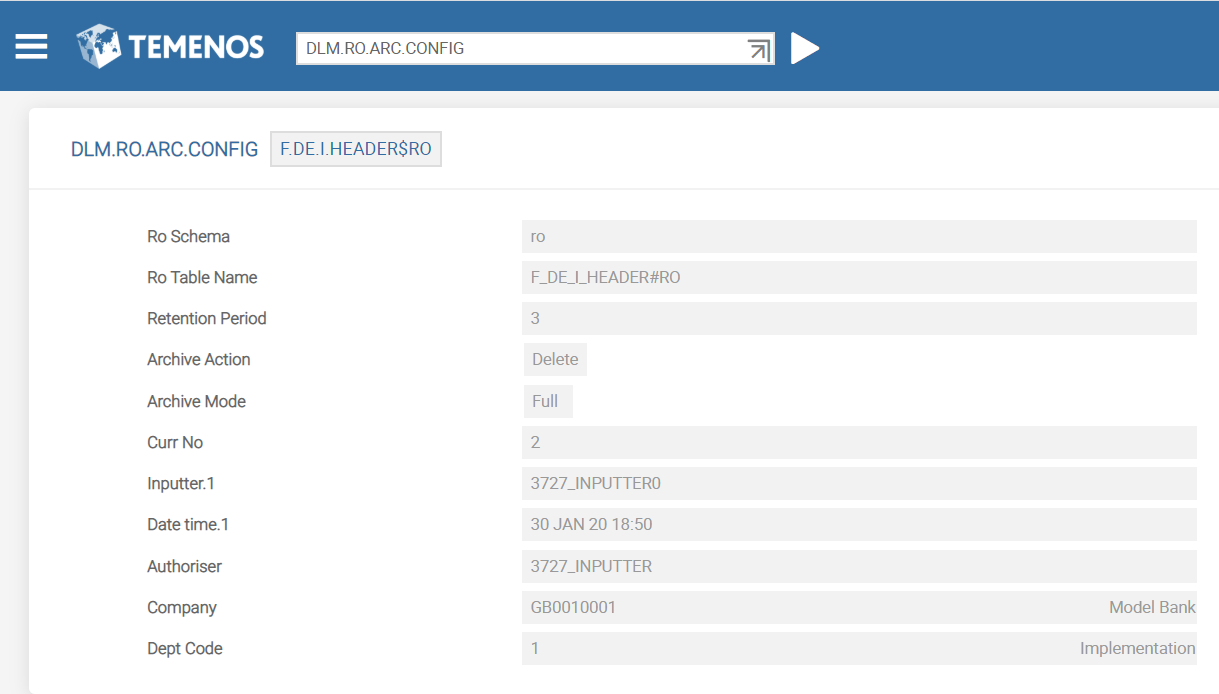
The DLM.RO.ARC.CONFIG application enables you to configure the tables required for RO to ARC movement. This application accepts a valid $RO VOC record.
You need to define Retention Period (number of months) for the data in the Read Only (RO) database in nn format. The database archives the records older than the defined retention period. For example, if the current date is 13/06/95 and retention period is three months, the records before 13/3/95 will be archived.
The Archive Action field indicates if the data needs to be deleted or moved to NVDB ARC. You can use either of the archival process methods to move the data from the LIVE database to RO database.
Oracle
To enable data archiving in Oracle, you need to do the following:
- Get the DL_SeparationTemplate pack from Distribution.
- Execute the RO to ARC configuration scripts available in DL_SeparationTemplate\Scripts\TafjArtefacts\DLMFull\templates\oracle\RoToArc in the following order:
- TableAndFunctionCreation
- ROARCPartitionStatusProcedure
- CloneTablePromotedColumnProcedure
- ROARCExchangePartitionProcedure
MSSQL
To enable data archiving in Microsoft SQL (MSSQL), you need to do the following:
- Get the DL_SeparationTemplate pack from Distribution.
- Execute the RO to ARC configuration scripts available in DL_SeparationTemplate\Scripts\TafjArtefacts\DLMFull\templates\mssql\RoToArc in the following order:
- TableCreation.sql
- ValidatePartitionBoundariesProcedure.sql
- ROARCPartitionStatusProcedure.sql
- CloneTableProcedure.sql
- CreateStagingTableProcedure.sql
- RO-ScriptPromotedColumnFunctionArc.sql
- CloneTablePromotedColumnProcedure.sql
- CreateStagingTablePromotedColumnProcedure.sql
- CheckPartitionEmptyProcedure.sql
- ArchiveTablePartitionProcedure.sql
- ArchivePartitionProcedure.sql
- SlideWindowControlProcedure.sql
- SlideWindowProcedure.sql
- SlideWindowWrapperProcedure.sql
Data Movement from RO to ARC Database
This section explains the movement of data from read-only database to archival database for Microsoft SQL (MSSQL) using the ROARCPartitionStatus.sql script.

RO to ARC Partition Status Procedure
Based on the user-defined field values in DLM.RO.ARC.CONFIG, the system relates the same information with the table architectural information stored in the database metadata tables and verifies the boundaries of the appropriate tables configured.
- If the boundaries are in alignment with the current date, the system does nothing.
- If the boundaries are lesser than the current date, the system adds subsequent monthly partition until current date.
Based on the current partition boundaries and retention period, the data is stored in the RO_ARC_PARTITION_STATUS table.

The following screen capture displays the RO_ARC_PARTITION_STATUS table output as per the configuration in DLM.RO.ARC.CONFIG.

The system executes this procedure only on the successful completion of the previous schedule. Else, the system displays appropriate message and logs an entry in the RO_ARC_STATUS_REPORT table. The logging tables are created and this procedure is compiled in NVDB under respective schema in which the NVDB table is created.
The RO_ARC_PARTITION_STATUS table has partition wise records. The primary key for this table is the table name and partition name. The records from this table flagged as PARTITION_IDENTIFIED and ARCHIVAL_STATUS=’N’ are considered further to get all RECID, which fall under the respective partitions. Such records are stored in the F_RO_ARC_KEYLIST table.
The following screen capture displays the key list generated using the Trickle Feed method.

For efficient processing, a maximum of 100 RECID are stored in one row mapped against every partition. If there are more than 100 RECID, the system groups and stores them in the subsequent rows in a sequential manner.
Finally, you need to execute the stored procedure by passing the @ROTableSchema parameter, which indicates the schema name of the RO table (if known). The control table should be updated as COMPLETED after successful completion of the status procedure.

DLM Partition Validation Service
The DLM.VALIDATE.PARTITION service validates the records in F_RO_ARC_KEYLIST and decides whether the partition is eligible for movement. The eligible records in RO.ARC.PARTITION.STATUS are marked as ARCHIVAL.IDENTIFIED and ARCHIVAL.STATUS is set to Y. The RO.ARC.CONTROL table status is set to COMPLETED.

The following screen capture displays the F_RO_ARC_CONTROL table status after the service execution.

Slide Window Control Procedure
This procedure populates the partition scheme mapped to every table and logs them in the RO.SLIDE_WINDOW_CONTROL table.
The following table lists the parameters required for this procedure.
| Parameter Name | Description |
|---|---|
|
@ARC_FG |
Indicates the name of the file group where the archive tables are to be created, if they do not exist already. |
|
@ARC_SCHEMA |
Indicates the schema name of the archival table (if known). If the name is unavailable, this parameter is set as DEFAULT indicating that the tables need to be created in the default schema. |
|
@InsertChunkSize |
Indicates the batch size value for records processing. The default value is 100000, if this parameter is left blank. |
|
@RODatabaseName |
Indicates the name of the non-volatile database (NVDB). |
This procedure is executed only if the status of ROARCPartitionStatusProcedure.sql and DLM.VALIDATE.PARTITION service execution is marked as COMPLETED in the control table.

 Data Movement
This activity uses the sliding window mechanism. There are twelve pre-defined procedural steps interlinked with each other and the SlideWindowWrapper main procedure invokes these steps. This procedure acts as a wrapper, which triggers the process to do the following:
- Switch partition between main and work table
- Purge or archive data from the work table
- Prepare the filegroup to accept new boundaries
- Split the right most partition based on a new boundary
- Merge the old partition with the new boundary

The SlidingWindowWrapper procedure moves forward the partitions by a month and archives all the records in the oldest partition of every table in the partition scheme classified as ARCHIVAL_IDENTIFIED and ARCHIVAL_STATUS=’Y’. This further loops all the identified tables or partition schemes and requires no additional parameters. The EXECUTE [RO] SlideWindowWrapper command executes this procedure. This command pre-validates the F_RO_ARC_CONTROL table for records with COMPLETED status.
The sliding window procedure creates #ARC table including the promoted columns, if not existing already and moves or deletes the data as per the definition in DLM.RO.ARC.CONFIG.

The following screen captures display the results of data movement.
- Data count after the procedure execution in #ARC.

- Count in #RO table all the records moved to #ARC.

- Data count after the procedure execution in #ARC.

- Data deleted from #RO as per the configuration in DLM.RO.ARC.CONFIG.

Add Bookmark
save your best linksView Bookmarks
Visit your best links BACK
BACK


Are you sure you want to log-off?