| Bookmark Name | Actions |
|---|
Oracle
The Temenos Transact Oracle Direct Connect driver is a middleware component between Temenos Transactand Oracle database. It enables Temenos Transact to send to and retrieve data from Oracle database storage. The data is stored in Oracle server as either XML columns or BLOBs (Binary Large Objects) for internal or work files. This section provides details about the database configuration, commands, transactions and driver environment variables involved in multiple database access and table details.
Having huge Temenos Transact data in single server or database hinders the performance of the database in both transactional and reporting services. Therefore, this data need to be separated categorically as per the business needs.
The Temenos Transact data is classified into volatile (transactional) and non-volatile (read-only) data. The data is separated and stored in different databases, which:
- Boosts the performance of the transactional processing
- Enables timely retrieval of the historical (non-volatile) data for the reports.
The Oracle Direct Connect Driver (DCD) enables you to configure and access maximum of ten databases. Each database can be configured with its own credentials. A table can be created in a specific database for an easier and accurate access. Each table has two columns as listed in the following table.
|
Column |
Description |
|---|---|
|
RECID |
Holds the primary key of the table |
|
XMLRECORD |
Holds the table data |
If the XMLRECORD is of XML type, the data will be converted from the internal dynamic array format into an XML sequence for insertion into the Oracle database. If the record is of BLOB type, the data will be stored directly in the XMLRECORD column in binary format.
On retrieval of data, the row information from the XMLRECORD column is converted back from an XML sequence into the internal dynamic array format for use by the application.
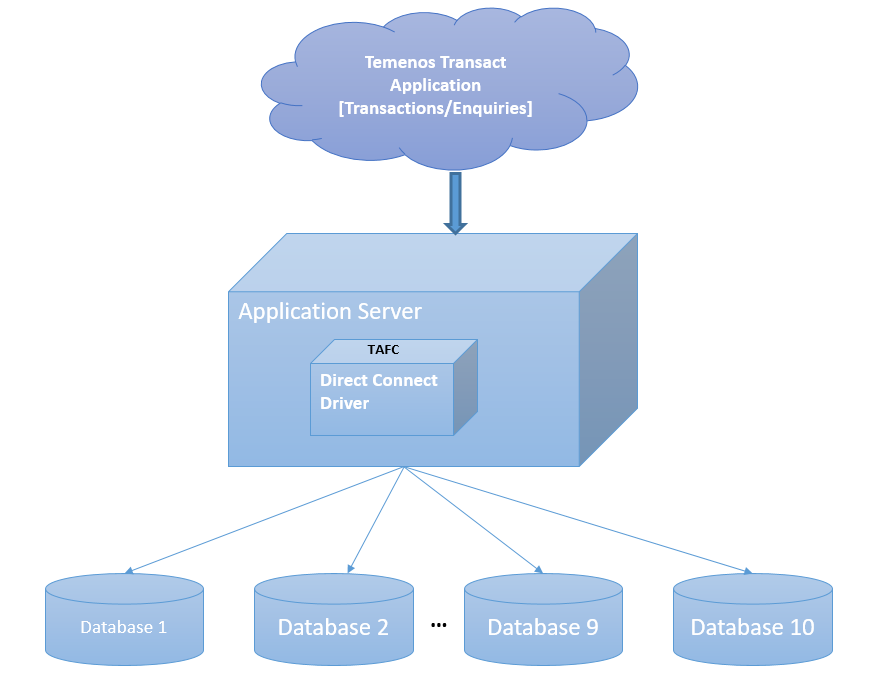
Database Configuration
This section provides configuration for the Windows version of Oracle. However, the same configuration is applicable for the Linux version as well. You need to make changes corresponding to the operating system while setting the following environment variables.
- SET ORACLE_HOME= D:\app\oracle\product\11.2.0\dbhome_1
- SET LD_LIBRARY_PATH=%ORACLE_HOME%\lib
- SET PATH=%ORACLE_HOME%\bin:%PATH%
- SET TNS_ADMIN=%ORACLE_HOME%\network\admin
- SET NLS_LANG=AMERICAN_AMERICA. AL32UTF8
NOTE: For Linux, you need to use EXPORT instead of SET.
To access the database, you need to use the Oracle command line tool sqlplus.

The XMLORACLE Driver is located in %TAFC_HOME%\XMLORACLE folder. The following table lists the libraries and executables available in the driver.
|
Libraries |
Executable |
|---|---|
|
config.XMLORACLE.dll config-XMLORACLE.dll |
Dynamic linked library Oracle Driver |
|
config.XMLORACLE.exe config-XMLORACLE.exe |
Executable used for the Oracle driver configuration |
|
libTAFCtransformer.dll |
Dynamic linked library for TAFC transformers |
|
libTAFCora.dll |
Dynamic linked library for TAFC- Oracle utils |
|
libTAFCorautils.dll |
Dynamic linked library for TAFC utils |
The following commands enable you to edit .profile or remote.cmd.
- SET DRIVER_HOME=%TAFC_HOME%\XMLORACLE
- SET JBCOBJECTLIST=%JBCOBJECTLIST%;%DRIVER_HOME%\lib
- SET PATH=%PATH%;%TAFC_HOME%\bin;%DRIVER_HOME%\bin
You can configure the Oracle Direct connect driver using the config-XMLORACLE executable. This creates the jedi_config driver configuration file at %TAFC_HOME%\config, which stores all the data entered through this executable.

 Database Settings
You can configure the server for the database by entering the machine name or IP address of the Oracle server.
NOTE: The driver does not support the databases residing in multi-server.
The first database is considered the default database. For default database, you can set the server name using the Set Server option in Database menu. You can set the user name and the password for this database using User Settings. You can also configure the username and password for all additional databases. You need to set the server name for the database as the name of the database.

You can list or change the current settings using the options in Database menu.

You can add or edit the database settings as required using the Set Database option in Database menu.

You can also set data and index tablespaces using the corresponding options in Database menu. The following screen captures show the data and index tablespaces set to T24DATA and T24INDEX, respectively.

 User Settings
You can use this option only for the configuration of the default database.
You can configure the user credentials of the first (default) database using the Set DB login user name and Set DB login password options in User menu. If you do not configure the user credentials for other databases, the user credentials of the first database is made available for all the databases.
You can store the password in either in jedi_config or external vault. To store the password in an external vault, the following environment variable must be set.
set/export JEDI_XMLDRIVER_ENABLE_EXT_PWD=1
The library should be named as libUserAPI.so (for *nix) and libUserAPI.dll (for Win) and placed in the $TAFC_HOME/lib folder. The library should contain the API, which returns the password.
The signature of the user defined API should be in the following format.
char * getExtPassword (char* database, char* schema ,char* username)
If the external vault option is enabled, DCD consumes the password provided by the user API. Otherwise, it will consume the API stored in jedi_config.
You can list or change the current settings using the options in User menu.

Installation Script
The install.sql script is available at %DRIVER_HOME%\sql. When the path is given, config-XMLMSSQL loads the scripts, invokes sqlcmd at the command prompt and executes the script.
The install.sql script creates the following.
- STUBFILES table for table creation cross reference
- T24LOCKTABLE to store the locks
- Functions like numsort, numcast
- View for the stubfiles

Connection Testing
The driver tries to connect to all the configured databases. If the Connection successful… message appears for all the databases, the driver will be able to connect to Oracle. If the connection fails, you need to check the database, its credentials and reconfirm whether the service and listener are running.

Commands for Multiple Database Access
This section provides examples of commands that can be used with the Oracle driver and expected output. These commands are mostly built in the Temenos Transact environment, which you can execute with the necessary options when required.
Create File
You can use the CREATE-FILE command with a type qualifier (TYPE) to define the file to be created as a table in the Oracle RBDMS database. For example, TYPE=XMLORACLE.

The above command generates the following tables in the Oracle RBDMS database.
|
Table |
Description |
|---|---|
|
D_EXAMPLE_TABLE |
This table equates to the dictionary section |
|
EXAMPLE_TABLE |
This table equates to the data section. The naming convention shows that the dots in the file name are converted to underscores in table name. |
Both the tables have two columns as listed in the following table.
|
Column |
Description |
|---|---|
|
RECID |
Holds the primary key of the table |
|
XMLRECORD |
Holds the table data |
Generally, the dictionary files are held as NOXMLSCHEMA types (BLOB) as these files are not usually queried.
For each table a cross reference entry is created in the STUBFILES table with the Oracle RDBMS database. In addition, a native file stub is also created for each table in the specified file path (in the above example, it is the current directory). The stub files are used to locate and invoke the correct driver for the corresponding table.
Based on the conversion, the stub file information may alternatively be contained within VOC, (which in turn can also be an RDBMS table), ensuring that all the related information is completely contained within the database.

The file is created in the default database.
File Creation in a Different Database
You can create a database in any other database using the DATABASE qualifier. The following table lists the options that can be used in CREATE-FILE.
|
Qualifier |
Value |
Description |
|---|---|---|
|
TYPE |
XMLORACLE |
Indicates the type of the file to be created |
|
DATABASE |
User specified |
Indicates the name of the pre-existing database in which the table needs to be created |
|
TABLE |
User specified |
Indicates the name of the table |
|
READONLY |
YES |
Indicates if the table is to be considered as read-only (applicable only for the data file). |
|
DATATABLESPACE |
User specified |
Indicates the name of the tablespace where the data needs to be stored |
|
INDEXTABLESPACE |
User specified |
Indicates the name of the tablespace where the indexes needs to be stored |
|
KEY |
VARCHAR[User specified length in integer] or INTEGER |
Indicates the key to alter the data type and length of RECID |
|
NOXMLSCHEMA |
YES |
Uses BLOB data type instead of XML data type to write the XML data |
|
XSDSCHEMAREG |
YES |
Registers XSD SCHEMA in the database. |
|
XSDSCHEMA |
User Specified |
Uses XSD schema to describe the data layout required for long tag XML format data. |
|
ASSOCIATE |
YES |
Indicates if the table has an associated read only table. |
The following example shows a table created in the RODB database.


The VOC of the table gives the information about the location of the table as follows.
VOC of EXAMPLE.TABLE

VOC of EXAMPLE.TABLE.RODB

EXAMPLE_TABLE Describe

The two cross reference table entries are created in the RDBMS STUBFILE table.

After the table is created, you can add the sample data to the table using standard tools like the command line editor ED or screen editor JED.

You can then view the sample XML data using the Oracle SQL select statement with the XMLRECORD column.

Delete File
You can use the DELETE-FILE command to delete the file. This command deletes both the DICT and DATA parts of the corresponding table in the database and deletes the reference from the stub.
The Oracle driver detects the table in any of the database and deletes the table, cross reference and even the stub file entry.

The STUBFILE table update is as follows.

File Deletion in a Different Database
There is no change in the deletion of the file. The driver picks up the name of the database in which the database resides from VOC and deletes it.
Create View
The CREATE-VIEW command enables you to create a view of the table such that, the column names can be used within SQL statements to refer the underlying XML. The command will process all the extended dictionary entries related to the file and generates the appropriate view in the Oracle RDBMS database. You need to use the verbose option (-v) to output the generated view to the terminal. This command will be executed against the table on a rebuild of the Temenos Transaction Standard Selection.

If the corresponding file is not the default file in another database, VOC is used to resolve the location of the table.
Create Extindex
The CREATE-EXTINDEX command enables you to create indexes in the Oracle RDBMS tables. You need to execute this command manually from the command line, as it is not invoked by any Temenos Transact action.
The following table lists the options to be used with the CREATE-EXTINDEX command.
|
Options |
Description |
|---|---|
|
x |
Creates an XML index |
|
f |
Creates function based index |
The following screen capture displays the extindex for the table in the default database.

You can use the CREATE-EXTINDEX command to create index on tables of the other databases as well in the similar way. The following example screen capture shows a functional index created on a table.

You can invoke a verbose display of the index creation process using the verbose (-v) option on the CREATE-EXTINDEX command line.

List Extindex
The LIST-EXTINDEX command enables you to display all the indexes created on a table.

Delete Extindex
The DELETE-EXTINDEX command enables you to delete all the indexes created on a table. You can use this command on any table irrespective of the location of their database.

Table Creation Using Long Tag XML
The XML Schema Definition document (.xsd) is required for Oracle and XML Schema Definition is registered, by default. However, you can use the long tag elements as per the Temenos Transact XML Schema Definition (.xsd) document and store the definition within the table. The short tag XML is the default format.
NOTE: There is an overhead to system while using the long tag format in the amount of data and the performance of the system.
You can invoke the long tag table XML format by specifying the XSDSCHEMA qualifier when creating the table.
The XML Schema Definition (ACCOUNT in this case) must be:
- Generated by the Temenos Transact Standard Selection Rebuild (See XSD Schema Generation User Guide)
- Placed in the Oracle Driver schema directory

By default, the XML Schema Definition is not registered in the Oracle RDBMS Database. To de-register the XML Schema Definition manually, you can add the additional qualifier XSDSCHEMAREG with the CREATE-FILE command line set to NO. For example, XSDSCHEMAREG=NO. This creates an XML CLOB type table but uses long tag XML format for data storage.
The following screen capture displays an Oracle describe, which shows the table type to be different from the short tag XML CLOB table description

The following screen capture shows an example of a data record in the long tag structured storage format.

The following screen capture shows an example of index creation on a long tag xml table. It is similar to creating indexes for normal files.

Table Querying
You can use the general jBase Query Language (JQL) queries used to query a J4/JR file, to query the tables as well. The driver converts these queries to the corresponding underlying database query and fetches the data. The translated query is logged in the log file. If the translated query is to be displayed on the standard output, you need to set JEDI_XMLDRIVER_DEBUG_DISPLAY. The following are the different commands involved in querying tables.
Select
The following format is used for the select command.
Select <filename> [WITH <ATTR> = <VALUE>]
The following sample shows @ID (Right justified) comparing with a number.

The following sample shows ACCOUNT.TITLE.1 (left justfied) comparing with a string.

Count
The following format is used for the count command.
Count <filename>

List
The following format is used for the select command.
List <filename> [ATTR1] [ATTR2]….. [ATTRN] [WITH <ATTR>= <VALUE>]

Read-Only Associate Tables
The Temenos Transact data is classified into volatile (transactional) and non-volatile (read-only) data. The volatile data is retained in LIVE or default database. The non-volatile data is moved to the second database referred to as non-volatile DB.
You can create read-only tables in any of the configured database. However, you cannot do the following.
- Create a DICT file for the read-only table
- Write, clear or delete a record from the READ-ONLY table. It results in a coredump and generates a log


The Temenos Transact table will have an associated RO table if the LIVE file contains an ASSOCIATE flag in VOC. This RO table can reside in any of the configured databases. The VOC entry of the LIVE table evaluates the name and location of the ASSOCIATED RO table of the LIVE file.


The LIST-EXTINDEX command on the LIVE table gives the details about the indexes created on the associate RO table as well.

If the LIVE database has an associated RO table in non-volatile DB, the driver queries both the tables and displays the data.
The RO table can be of any name. However, the RO file created should be <“live” file$RO>. A nickname has to be created in the LIVE database as <RO table name> for the RO table.
The user of the first database should have the permission to access and run the scripts on the second database.


When a query is executed on the LIVE file, the records are displayed from both the LIVE file and associated file avoiding the duplicates, by default. If you want to change the default functionality, you need to set the JEDI_XMLDRIVER_ASSOCIATE_FILE variable to any of the following values, as required.
|
Value |
Functionality |
|---|---|
|
1 |
Disables the redirection and query to the ASSOCIATE table |
|
2 |
Disables query for ASSOCIATE table, but redirection is active |
|
4 |
Disables PDATE in the query, but redirection and ASSOCIATE table query with UNION will be active |
NOTE: PDATE is a real column in the RO table used for Data Separation. These RO tables are created using the DL.INITIAL.SEPARATION utility tool and not manually.
If the query returns an error message as shown in the following screen capture, you need to check whether the nickname is pointing to the valid object.

Querying a file without Indexes
Creation of indexes on the files affects the query translation from JQL to SQL. When indexes are not created, the query is translated as shown in the following screen capture. The status of query translation is failure. The select statement is modified to the default selection of the table ignoring the criteria.

Querying a file with Indexes
You can create an index on an attribute in LIVE or RO table. The driver looks up for the index on an attribute in both LIVE and RO tables. The index will be used for the query translation to enhance the data retrieval process.
The following example shows the query translation of the query with search criteria on CATEGORY. A function-based index is created on CATEGORY in non-volatile DB and not in LIVE.

If an attribute has different types of indexes in LIVE and RO, the justification of the attribute is used as the criteria to translate the query.
For example, consider a right justified attribute CATEGORY. It has xpath index in LIVE and function-based index in RO. The driver ignores the xpath index and uses the function-based index for query translation, since the attribute is right justified.

For left justified attributes XPATH index will be applied.

Data Sorting
To enable the database sort, you need to set JEDI_XMLDRIVER_ENABLE_DB_SORT=1. The status of query translation depends on the index of the attribute used in the search criteria and its justification.
SSELECT

SORT on RECID with search criteria

SORT on attribute with search criteria
The query translation status is Partial. Only the search criteria are translated and sorting is done by JQL.

Similarly, when SORT is on RECID with search criteria, but RECID is right justified the query translation is partial.

Transaction in Multiple Databases
When a WRITE or UPDATE action is performed within the transaction boundary (between TRANSTART and TRANSEND), it is termed a transaction. The transaction starts only with WRITE, so only the database where the data is written is in the transaction. The transaction can also read a file from one database and write to another file from a different database.
The transaction aborts on updating or writing data to the files of multiple databases resulting in a coredump.
Driver Environment Variables
You need to configure the following environment variables in .profile located in the bnk.run directory to be used with the Oracle Direct Connect Driver.
Internationalisation
- JBASE_I18N=1 (Mandatory)
- JBASE_CODEPAGE=utf8
- JBASE_LOCALE=en_US
- JBASE_TIMEZONE=Europe/London
TIP: You can use the jtimezones keyword to list all the possible values for JBASE_TIMEZONE configuration.
Optional
The following table lists the optional variables and their functionality.
|
Command |
Functionality |
|---|---|
|
JEDI_XMLDRIVER_TRACE=1 |
Traces all driver functions |
|
JEDI_XMLDRIVER_DEBUG_DISPLAY=1 |
Traces only query translations |
|
JEDI_XMLDRIVER_NO_SPACE_PRESERVE=1 |
Indicates that the white space is not preserved in xml Trace |
|
JEDI_XMLDRIVER_PREFETCH_ROWS = n |
Indicates the number of rows to be pre-fetched in each fetch. The default value is 500. |
|
JEDI_XMLDRIVER_ENABLE_DB_SORT=1 |
Enables the DB sort instead of JQL Sort |
|
JEDI_XMLDRIVER_DISABLE_RECID_NUMSORT=1 |
Ignores the data type of the RECID while sorting on RECID |
|
JEDI_XMLDRIVER_ENABLE_EDICT_TYPE=1 |
Enables the EDICT data type detection |
|
JEDI_XMLDRIVER_DISABLE_DATABASE_LOCKS=1 |
Disables the DB row locks |
NOTE: Some of the above listed settings tend to affect the performance and generate large volumes of trace information. Hence, these variables are enabled only for diagnostic purposes under the direction of Temenos personnel.
Add Bookmark
save your best linksView Bookmarks
Visit your best links BACK
BACK


Are you sure you want to log-off?