| Bookmark Name | Actions |
|---|
Database Troubleshooting
This section provides troubleshooting details for MSSQL, Oracle, and DB2 databases.
All the logs will be logged in %TAFC_HOME%/log/<database> folder.
You can turn on this functionality by either of the following ways.
- Setting JEDI_XMLDRIVER_TRACE to 1
- Configuring the tafc.ini file available at %TAFC_HOME%/config
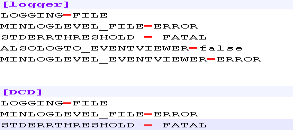
The component name is set as [DCD]. You can monitor three levels of logging—ERROR, WARN and INFO. By default, the log level is ERROR. Each record created in the log folder provides clear explanation about the cause of failure.

The following screen captures show a sample log of MSSQL and Oracle, respectively.


Add Bookmark
save your best linksView Bookmarks
Visit your best links BACK
BACK


Are you sure you want to log-off?