| Bookmark Name | Actions |
|---|
The following are the configuration options the system offers in Interest Rate Swap:

SWAP.TYPE
The SWAP.TYPE file has definition of all types of swap contracts handled by the system.
For example, IRS, CIRS and so on.
The file has the following information required for the deal:
- Description of the
SWAP.TYPE - Product category code and product category hedge for trade and hedge type of deals
- Transaction index to indicate the characteristic of the swap in single leg transaction, such as deposit or loan
- Balance sheet to indicate whether the swap can be treated as on balance or off balance sheet instrument
- Internal category code for the provision of unrealised profit or loss generated by revaluation
- Revaluation type
- Booking of unrealised profit required or not
- P&L category for revaluation profit or loss
- Option to process the deal in Start of the day (SOD) instead of Close of Business (COB)
- If the deal should be processed and limits to be updated during SOD (instead of COB)
NOTE:
If you specify the category code on either one of the fields and leave the other one blank, then the system will apply the mentioned category code on both the fields, irrespective of the trade type.
The examples below illustrate IRS and CIRS SWAP.TYPE:
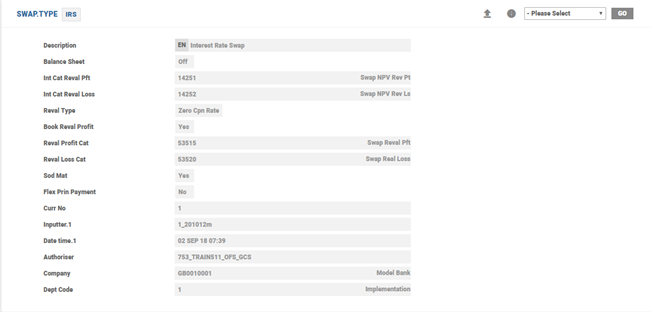

There are two other standard SWAP.TYPE records released with this module, which cater to simple loan and deposit contracts:
- LOAN – Asset side of swap
- DEPOSIT – Liability side of swap
The following example illustrates the Loan in SWAP.TYPE:

The following example illustrates the Deposit in SWAP.TYPE:

SWAP.SCHEDULE.TYPE
This file defines the schedules permitted in a swap contract. The first two characters of the ID determine the type of schedules. The schedule type are fixed and the details are given below:
| Type | Description |
|---|---|
| AC | Interest accrual current month (system generated) |
| AM | Interest accrual previous month (system generated) |
| AY | Interest accrual previous year (system generated) |
| CI | Contract initiation (system generated) |
| CM | Contract maturity (system generated) |
| NR | NPV revaluation (system generated) |
| RL | Currency revaluation (system generated) |
| PX | Principal exchange |
| RX | Principal re-exchange |
| PI | Principal increase |
| PD | Principal decrease |
| PIN | Notional principal increase |
| PDN | Notional principal decrease |
| IP | Interest payment |
| RR | Rate reset |
| PM | Payment (premium, interest purchased and so on) |
| RV | Receipt (premium, interest received and so on) |
| IS | Issue price |
| AP | Annuity payment |
Below is an illustration of SWAP.SCHEDULE.TYPE record:
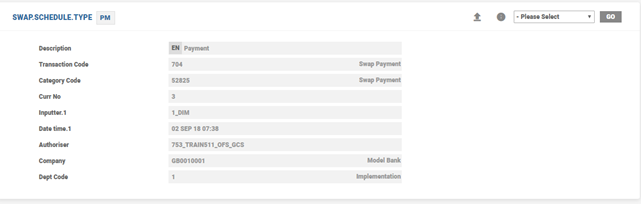
Different schedules can be added but the first two characters must be one amongst the above-defined codes. For each schedule defined, the following associated information are held:
- Description of schedule
- Transaction code to be used on entries (mandatory except: CI, CM, NR, RL and RR. If IS, it needs to be unique)
- P&L category code (Mandatory: if PM, RV or IS)
- Charge codes
- Fee codes
SWAP.AGREEMENT.TYPE
SWAP.AGREEMENT.TYPE file stores different types of agreements used in swap contracts, for example, ISDA, BBAIRS, and MASTER, and so on. Every contract is linked to an agreement type and the agreement type that is linked, is validated against the definition on SWAP.AGREEMENT.TYPE file and enriched with the associated description. Swift confirmation messages (that is, MT 360 and MT 361) require this information to be exchanged with the counterparty.
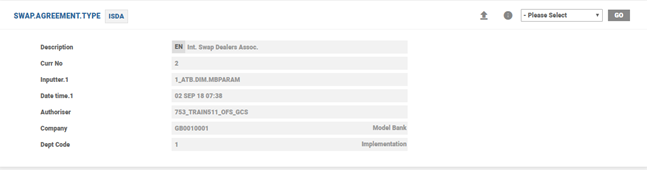
The module has few swap agreement type records and they are:
- ISDA – ISDA Definition
- OTHER – Specific to products, such as simple loan and deposit contracts
SWAP.PARAMETER
This file holds the system level parameters for the processing of swap transactions, in a single SYSTEM record. This is the highest-level file within the Swap module and is set up before any data is entered into the module. The SYSTEM record consists of the following:
- Interest income accrual categories
- Interest expense accrual categories
- Additional data such as transaction code to use on net payments, date and frequency of accruals and categories of upfront allocation of P&L
NOTE:
Accruals are not performed until a valid accrual cycle is defined.
The allowed values in Mat Payment Date field are Yes, No and Null. Validations for No and Null are the same. If set to Yes, then, when the maturity date of a contract falls on a non-working day, the events scheduled for the contract maturity will reflect the next working date as the value date (payment date). This happens when Convention field in SWAP application is set either as Following or Modified (Following where the holiday does not fall on the last day of the month).
Subsequently, when the holiday is declared, the swap schedules corresponding to the maturity date gets rebuild if the contract is revisited for any purpose. Otherwise, the schedules and the forward statement entries continue to show the original maturity date until the COB of the maturity process.
Maturity Payment Date field in SWAP application defaults from SWAP.PARAMETER with an option to override the same.
Defer Ol PM Upd and Defer Ol Sched Acc fields help to improve the deal recording time during input and modification of swap contracts. If set to Yes, generation of data related to Position Management and Accounting entries are separated from deal capture and handled using an online service in near real time.
SWAP.ACTIVITY
SWAP.ACTIVITY file controls the delivery output on SWAP module. The records on this file define activities that produce delivery output. These activities relate to specific events during the life of the contract. The delivery relating to each of these events can be produced prior to the event (if required). The number of days prior to the event is defined on this file.
Whenever delivery output is generated using the SWAP module, the activity code of the relevant advice is recorded on the contract. When the contract is subsequently viewed, these activity codes are displayed and enriched with the description recorded on this file.
The ID of the file is a three-digit code that represents the following activities:
| ID | Description |
|---|---|
| 101 | Contract confirmation |
| 102 | Principal exchange |
| 103 | Principal increase or decrease |
| 104 | Contract amendment |
| 105 | Interest payment |
| 106 | Contract maturity |
| 107 | Contract reversal |
| 108 | Rate reset |
| 109 | Principal re-exchange |
| 110 | Payment of premium |
| 111 | Receipt of premium |
| 112 | Issue price |
| 113 | Annuity payment |
| 114 | Rate reset |
| 115 | Rate reset amendment |
| 202 | Payment |
| 210 | Advice to receive |
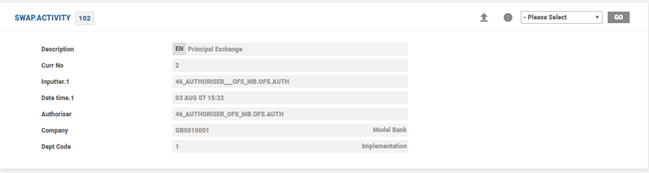
A sample SWAP.ACTIVITY record is illustrated below:
SWAP.ADVICES
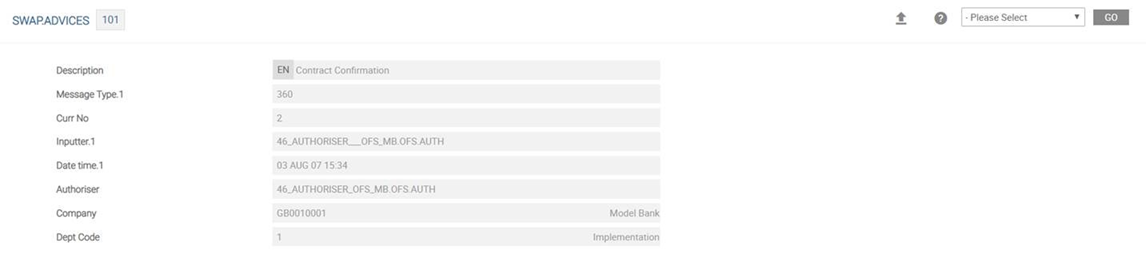
This file controls the output of delivery messages for a SWAP.ACTIVITY. The record key is SWAP.ACTIVITY-SWAP.TYPE (the latter being optional). For example, 101 or 101-CIRS.
A SWAP.ADVICES record is linked to another defined SWAP.ADVICES record and can define multiple message types, print formats and deal slips. This can help to customise the output of a swap activity.
The following details are held for each SWAP.ADVICES:
- Description of advices to produce
- Use linked
SWAP.ADVICESrecord - Message type to produce (
DE.MESSAGE) - Delivery print format
- Optional deal slips to produce
PERIODIC.INTEREST
This table plays an important role in SWAP module and is referred in the following instances:
- The key defined in Floating Interest field is a record in
MARKET.RATE.TEXTtable, which refers toPERIODIC.INTERESTtable. The usage of Floating Interest field is to capture the floating rate index and populate in Swift confirmation messages. This field is referred by theST.GROUP.FIXapplication for automatic fixing the floating leg rate periodically. - Rates are defined within
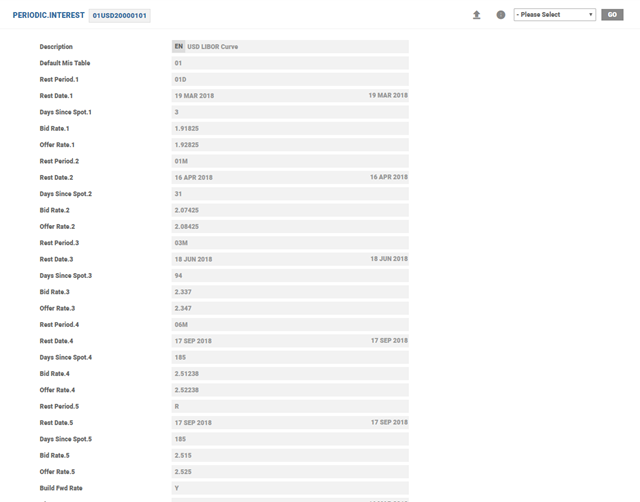
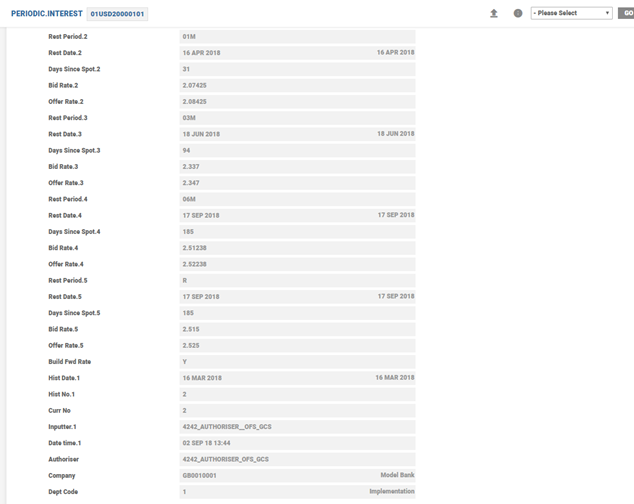
PERIODIC.INTERESTfor each type of floating rate that is required. For example, three month LIBOR and six month LIBOR are setup as two different records withinPERIODIC.INTEREST. For example, 07USDyyyymmdd can represent the three month LIBOR rate and 08USDyyyymmdd can represent the six month LIBOR rate for the same system date. - Each record needs to have one entry other than the Rest entry. If the table has more than these two entries, only the first value (by nearest date) is used; the second and any other subsequent values are ignored. The same reference key is also used in floating rate reset using
ST.GROUP.FIXapplication for multiple contracts meeting the criteria. - The key defined in Fwd Rate Key field in
SWAPapplication refers to the spot interest rate curve. This key is used in deriving the cash flow amounts on the floating leg side of the swap. These derived cash flows are used in swap revaluation process. - The key defined in Coupon Curve Rate field in
SWAP.REVAL.PARAMETERtable represents a coupon curve which is bootstrapped to build a zero coupon curve for discounting the cash flows of the swap to arrive at the net present value of the swap. The key also represents a zero coupon curve which can be used straight away to discount the cash flows. Whether the key represents a coupon or zero coupon rate curve is denoted by another field inSWAP.REVAL.PARAMETER, that is, Zero Coupon Rate.
The system allows up to 99 different types of rate sets per day for each currency.
EB.ACCRUAL.PARAM
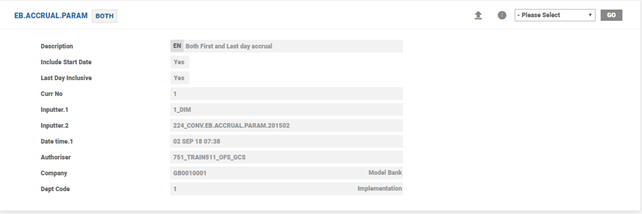
This is a core table that allows the user to define the rules relating to accrual methods, such as First day, Last day and Both. It also allows to define a principal effective date calculation routine, which is applied in the Eb Accrual Param field of SWAP application.
SWAP.REVAL.PARAMETER
All the fields related to Swap revaluation are grouped under this table, in a single system record. The system record has the following:
Revaluation related data, such as P&L category for currency revaluation, revaluation transaction codes, coupon curve rate, periodic interest rate Indices, discount formula, NPV related fields and zero coupon rate methods.
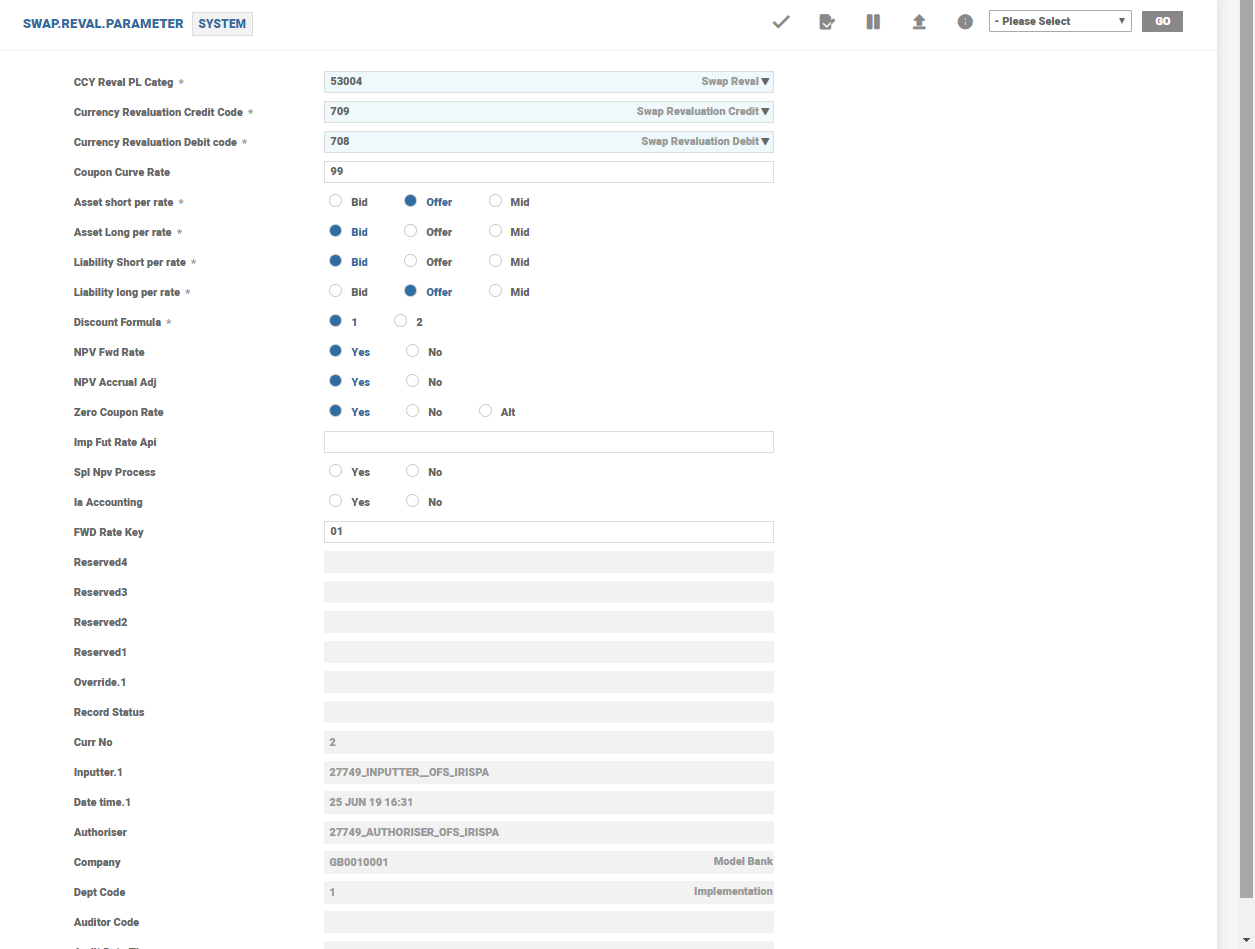
Following are the important fields in SWAP.REVAL.PARAMETER:
| Field Name | Functionality |
|---|---|
| Discount Formula | To use linear discounting instead of compounding |
| Npv Forward Rate | To use forward interest rates to determine cash flows on floating rate side of the swap |
| Npv Accrual Adj | To consider actual accrued interest or calculated interest accrual notionally for the first IP period during revaluation |
| Zero Coupon Rate | To perform or not the bootstrapping of interest rates available in PI key referenced for discounting |
| Fwd Rate Key | To use PI record key in finding the implied future cash flows on floating leg side. Value defaults in SWAP application, which the user can override |
Add Bookmark
save your best linksView Bookmarks
Visit your best links BACK
BACK


Are you sure you want to log-off?