| Bookmark Name | Actions |
|---|
Introduction
The Securities (SC) module allows trading in equities, bonds, mortgage backed securities and funds. The product supports trading, position keeping, valuation and maintaining the tax lots. Both, exchange traded and over the counter orders are supported. The Securities product may be used by banks trading on their own behalf, trading on behalf of their customers or offering their customers brokerage services.
Product Configuration
The parameters are one of the most important applications in Temenos Transact which define how the product functions for a particular module. Parameter records contain critical settings and default values that the system uses for various functionalities. Many of the settings cannot be changed once the system is live. Hence, the parameters must be set correctly before creating transactions.
This document describes some of the key parameter records that need to be set in the Securities (SC) module before transactions can be processed. While individual feature documents highlight the parameter settings for that particular feature, this document provides a high-level overview. The main parameter applications present in the SC module are listed in the following table:
| Parameter File | Transaction ID | Description |
|---|---|---|
SC.PARAMETER
|
Not Applicable | Main parameter setup for the SC module to function properly |
SC.STD.SEC.TRADE
|
SEC.TRADE
|
Execution of securities |
SC.STD.POS.TRANSF
|
SECURITY.TRANSFERPOSITION.TRANSFER
|
Transfer of Securities Transfer Portfolio Contents |
SC.STD.CLEARING
|
SC.CLEARING.SYSTEM
|
Clearing Systems |
SC.STD.BOND.LEND
|
BOND.LENT.MASTER
|
Bond Lending |
SC.TAX.PARAMETER
|
TAX
|
Coupon and Dividend Tax |
VAULT.PARAMETER
|
VAULT.EXPECT
|
Safe Custody Control |
Apart from the major SC parameters, there are other parameters that are specific to certain functionalities and these are detailed in the relevant feature document. In a multi-company environment, it is mandatory for the user to set up the parameter files for all companies.

SC.PARAMETER
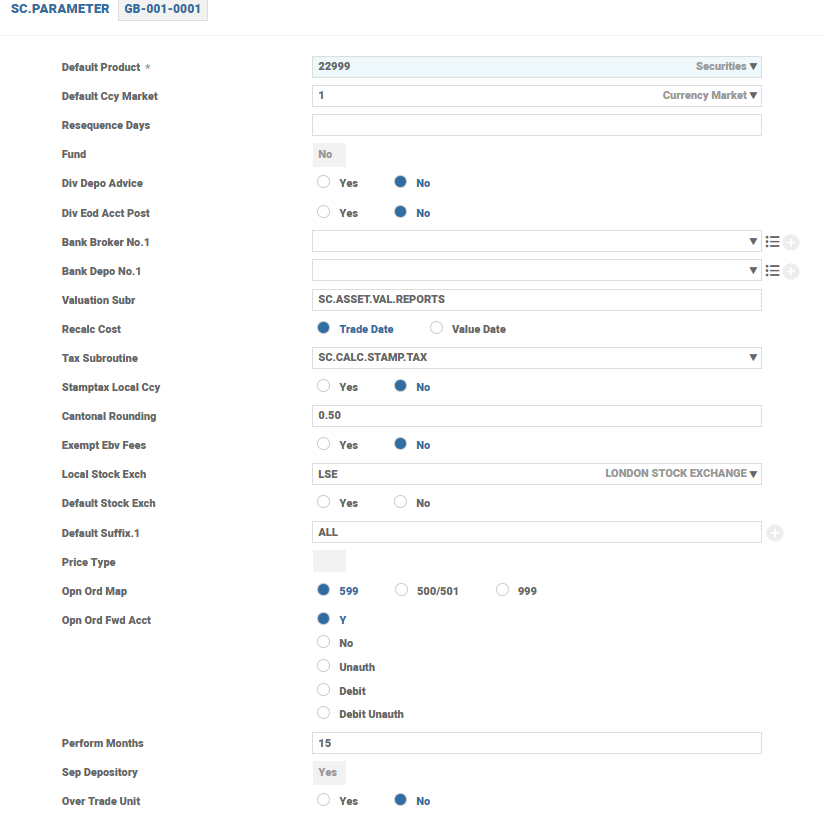
The record in SC.PARAMETER is the mandatory parameter record. This application contains the default values at company level that must be set up for the SC module to function properly. These default values apply irrespective of the application, transaction type or user. A record in SC.PARAMETER needs to be present for each company in the SC module. The user must be aware of the functionality of all the fields in this record to ensure its proper usage.
| Field | Description |
|---|---|
| Valuation Subr | Controls the default valuation routine required to produce valuation reports |
| Local Stock Exch |
Holds the ID of the stock exchange where the company usually trades. The ID of the local stock exchange is already defined in the STOCK.EXCHANGE application.
|
| Bulk Limit |
Allows the user to specify the number of transactions required before running a background bulk processing. For example, this field in SC.PARAMETER enables the user to enter hundreds of individual customer purchases or sales of securities and release the session while the transaction runs in the background.
|
| Security Format |
Enables the user to define the main ID for the record in the SECURITY.MASTER application, which holds the list of the various securities in which the organisation trades. The default format is (######-###).
Example: The default format enables the user to define a security ID as 000001-000. This format supports the Telekurs security identification numbers. If Telekurs format is not required, the user can define any format using up to 12 characters. The user can use only the # and - characters in both the Telekurs and user-defined format where # indicates a numeric equivalent and – separates the suffix part of the ID. This field cannot be modified once the record in SC.PARAMETER is authorised.
|
| Alternate Index |
Enables the user to specify an alternative means of accessing individual security records for examination or entry into the transactions and enquiries. This field also enables the user to use other system IDs, such as the EUROCLEAR Clearance ID (if any), as well as the main ID.
NOTE: Usage of this field is no longer recommended. Instead, use the ALT.SEC.PARAMETER application. |
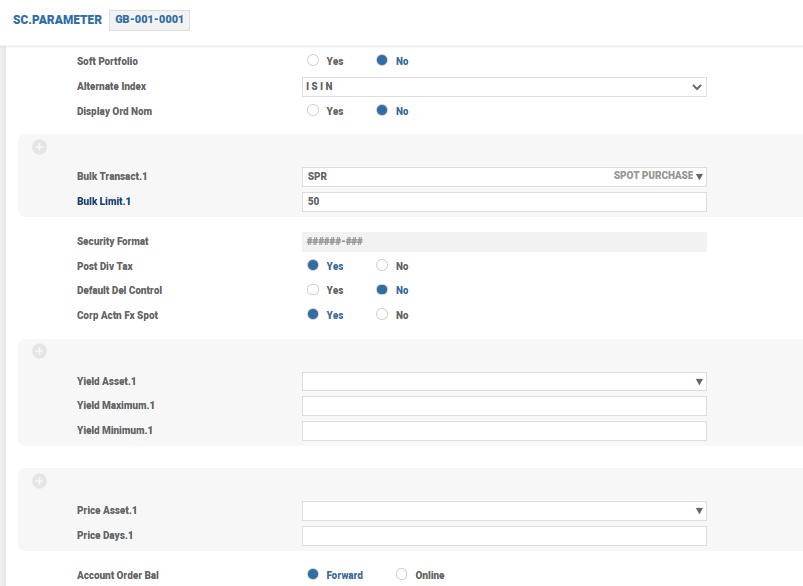
Some fields require the specification of a category or record from another application. For example, if the user wants to perform price integrity validation on certain asset types, the Price Asset field requires completion, specifying the valid asset type record.
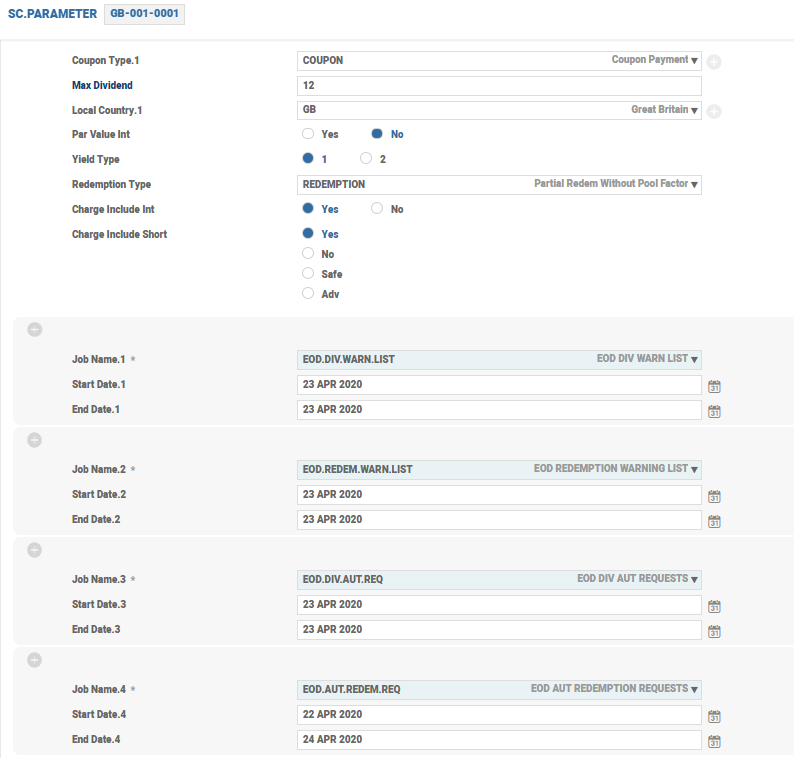
The system can be parameterised to automatically create diary records such as COUPON and REDEMPTION in the DIARY.TYPE application. The user must enter the appropriate record from DIARY.TYPE in the Coupon Type field in SC.PARAMETER to enable automatic processing of bond coupons and in the Redemption Type field in SC.PARAMETER to enable the automatic maturity of bond type securities.
If this field is updated, then the diary records are automatically created by EOD.DIV.AUT.REQ and EOD.DIV.AUT.REQ. The user can set the start and end dates and the system creates diary records where the bond’s coupon or maturity date falls within the range. The date range is automatically recycled by the system once the COB is completed on the end date.
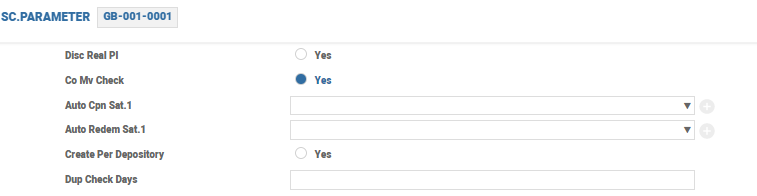
The system additionally allows to create diary records during COB for specific sub-asset type for coupon or redemption event provided the Auto Cpn Sat and Auto Redem Sat fields are set. If the number of days is specified in the Dup Check Days field, the system checks if a duplicate diary record exists based on the ex-date plus or minus the number of calendar days as defined in this field. This happens when the diary record is created for the redemption and coupon events during COB and when an incoming MT564 is received. The Create Per Depository field allows the user to specify whether a single diary record should be created for the security or separate diary records should be created based on depository for the above-mentioned events.
NOTE: If the Create Per Depository field is set to Yes, the diary record is created per depository during COB for the security, irrespective of the custodian holding the position.
| Field | Description |
|---|---|
| Safekeep Report |
Generates an alternate safekeeping journal report. The routine specified must be defined as an S type in the PGM.FILE application. The report is created in HOLD.CONTROL application.
|
| Cg Base Update | Allows the user to control the updation of the capital gains transaction base. If this field is set to Yes, the system maintains a transaction base, which displays the capital gains positions on portfolio trading in a security. |
| Sett Mat Days |
Defines the number of days after which a fully settled record in the SC.SETTLEMENT application can be moved to history
|
| Diary Remain |
Controls the retention of records in the SC.PRE.DIARY application. If not set, the records in SC.PRE.DIARY are retained for 180 working days.
|
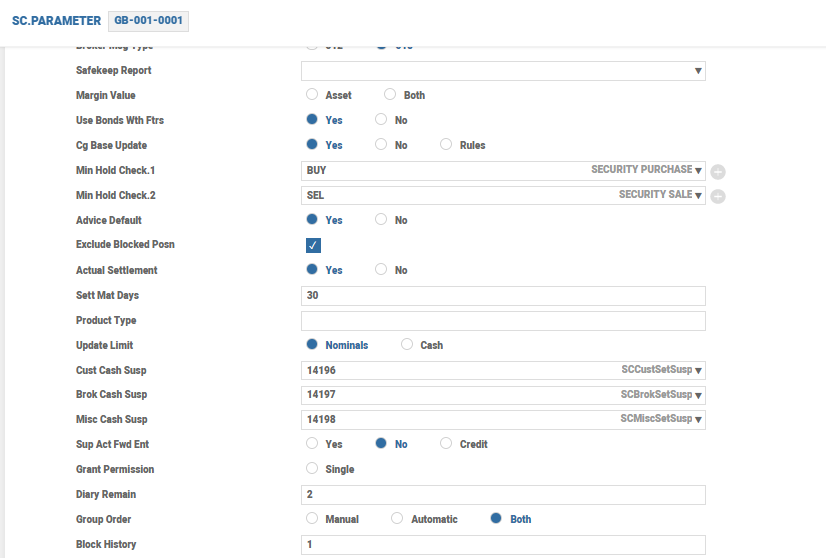
| Field | Description |
|---|---|
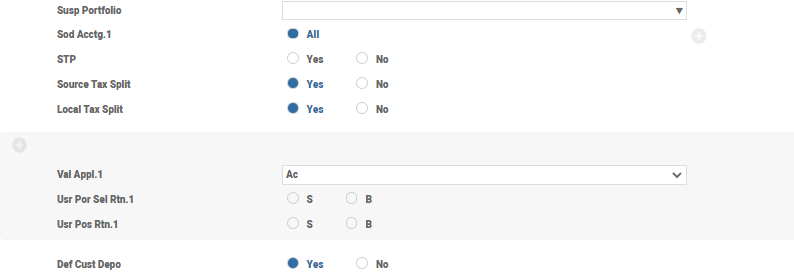
| Sod Acctg | Controls the system-generated accounting. The available values are ALL and NULL. When this field is set to ALL, the account postings generated from the transactions of all the SC applications (including corporate action events) are posted on the value date. These transactions are included in the start of day batch on the value date. The COB batch considers only those transactions that are not included in the Start of Day (SOD), for example, transactions entered on their value date. |
| Source Tax Split and Local Tax Split | Used to process corporate action events. If these fields are set to YES, separate source or local tax accounting entries is posted. The customer is posted with the gross amount for the cash entitlement and a separate entry for source or local tax amount. |
| Field | Description |
|---|---|
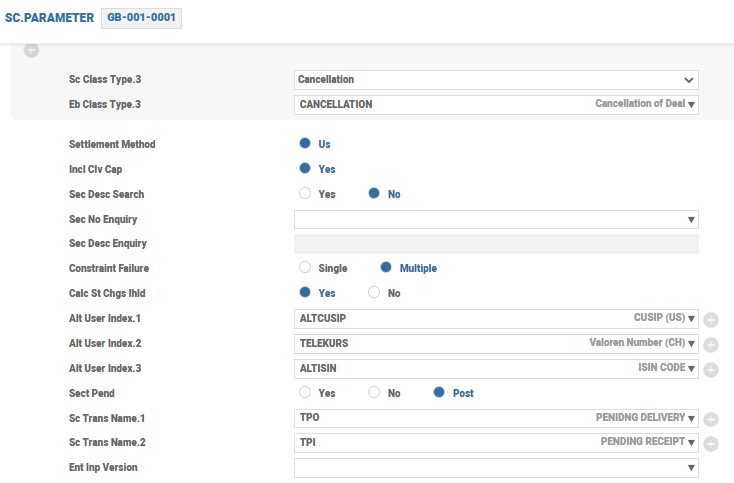
| Constraint Failure | Defines the criteria for the execution of trading restriction testing. The available values are SINGLE and MULTIPLE. If this field is left blank, then the system accepts the value as SINGLE. Read the Trading Constraints in the Securities user guide for more information on how this field and its associated files work. |
| Calc St Chgs Ihld |
Determines whether the SEC.TRADE application in HOLD status from the order processing (processed directly from order for traded orders and processed in SC.EXE.SEC.ORDERS application for transmitted orders) has all the default charges and commissions populated. The trade charges are calculated either at the field level in the transaction or while committing the trade. The charges calculated at the order or execution stage are carried forward to the trade created from order execution processing. If this field is set to Yes, the system calculates the charges in the trade created (in IHLD status) from the order execution processing even if the charges are not computed at the order entry or execution stage.
|
| Field | Description |
|---|---|
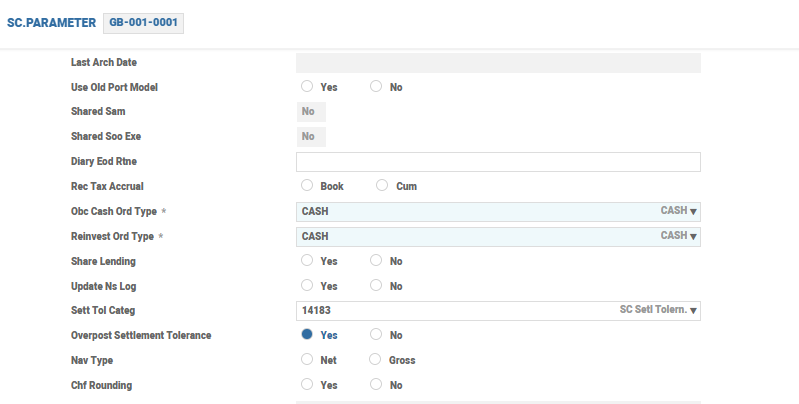
| Obc Cash Ord Type and Reinvest Ord Type |
Specifies the record in the SC.ORDER.TYPE application used in the orders generated from the ORDER.BY.CUST application and dividend reinvestment.
|
| Share Lending |
Controls whether the bank can lend share and bonds as specified by the record in SECURITY.MASTER when using the BOND.LENT.MASTER application. If this field is set to Yes, the bank is permitted to lend both shares and bond. If this field is set to No or left Null, then only the lending of bonds is permitted.
|
| Field | Description |
|---|---|
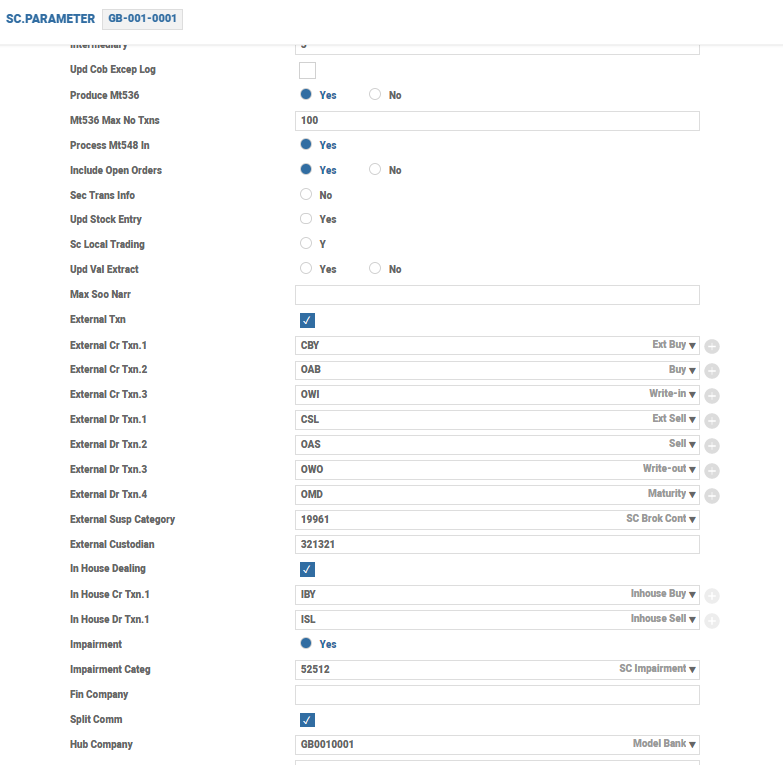
| Produce Mt536 | When set to Yes, the system supports generation of outbound MT536 messages |
| External Txn | Determines whether the system allows external transfers of securities. If set to Yes, the system prompts the user to enter the valid transaction codes that can be used for all debit and credit external transactions |
| In House Dealing | Determines whether the third-party custody orders can be routed through the in-house dealing desk |
| In House Cr Txn and In House Dr Txn | Identifies the third-party custody orders routed through the in-house dealing desk |
| Hub Company |
Specifies the centralised hub, where all security and derivative trades take place. This is more relevant to the customer setup, where trades happen in a central location. The value given here defaults to the Port Comp Id field in the SEC.ACC.MASTER application.
|
| Field | Description |
|---|---|
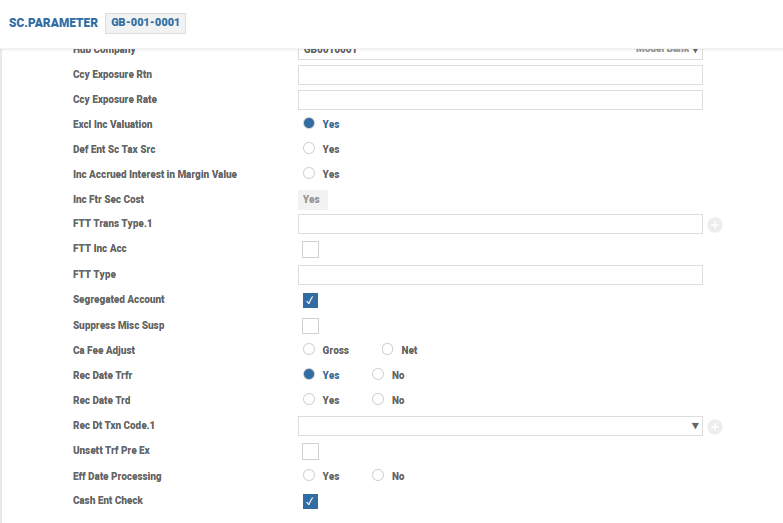
| Excl Inc Valuation | Specifies whether the income account in one portfolio can be defined as a capital account in another portfolio. This field is used if the customer portfolios require the sorting of the income and capital. If this field is set to Yes, the user can use an account, which is linked to a different portfolio as an income account. Further, the existing valuation process considers the capital and income accounts, if they belong to the same portfolio. If the income account belongs to a different portfolio and if this field is set to Yes, then the income account is excluded from the valuation. However, if the account is a capital account in another portfolio, it is included in the valuation of the other portfolio. |
| Inc Accrued Interest in Margin Value | If set to Yes, the accrued interest is included while calculating the margin value of the portfolio |
| Suppress Misc Susp |
If this check box is selected, the Profit and Loss (P&L) entry for fees, charges and commissions entry for the tax is posted on the trade date for all security transactions (the SEC.TRADE, SECURITY.TRANSFER and ENTITLEMENT applications), even if transaction is actually settled. If set to No, the P&L is posted only on authorising the settlement record.
|
| Ca Fee Adjust | Controls whether the fee applicable for corporate action events are to be restricted to the extent of dividend payment. |
| Diff Cat |
If this field is set, then any difference arising due to exchange rate rounding in the SC module is posted to this category and not to the internal account category defined in DIFFERENCE record in ACCOUNT.CLASS. This field accepts an internal account or P&L category. If internal category is set, the system posts entry to the internal account and if P&L is set, the system posts the difference to P&L.
|
SC.STD.SEC.TRADE
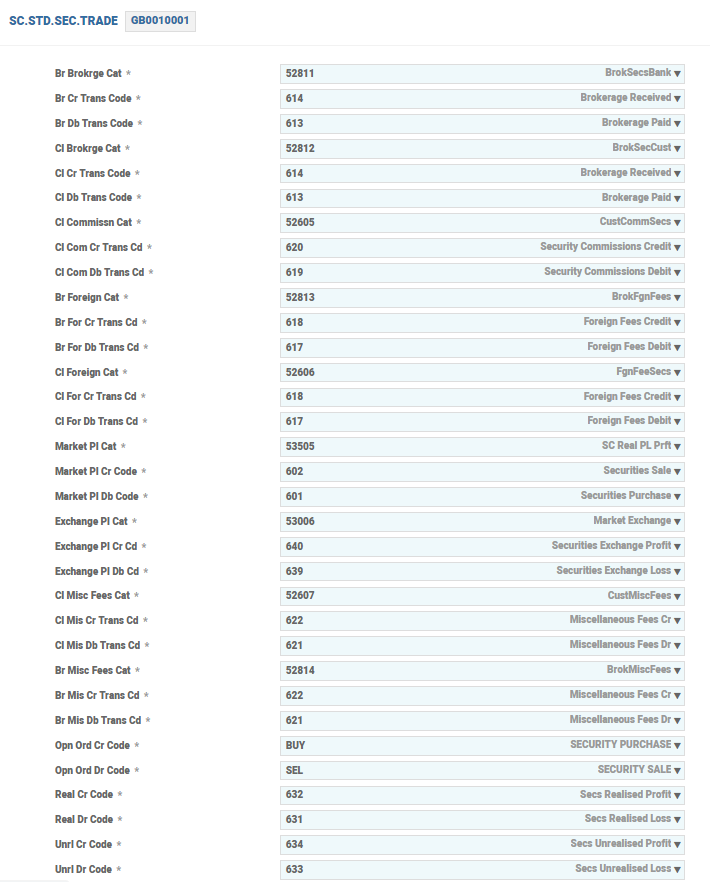
The SC.STD.SEC.TRADE application helps to process a basic SEC.TRADE transaction. This record does not require modification, if configured properly. The initial fields contain many CATEGORY and TRANSACTION codes relating to debit and credit transaction entries posted during the trade capture. The fields shown in the screenshot below deal with processing rules, which also help during trade entry. The user can have the SEC.TRADE transaction to default the security price from the record in SECURITY.MASTER in all cases or make it a manual process.
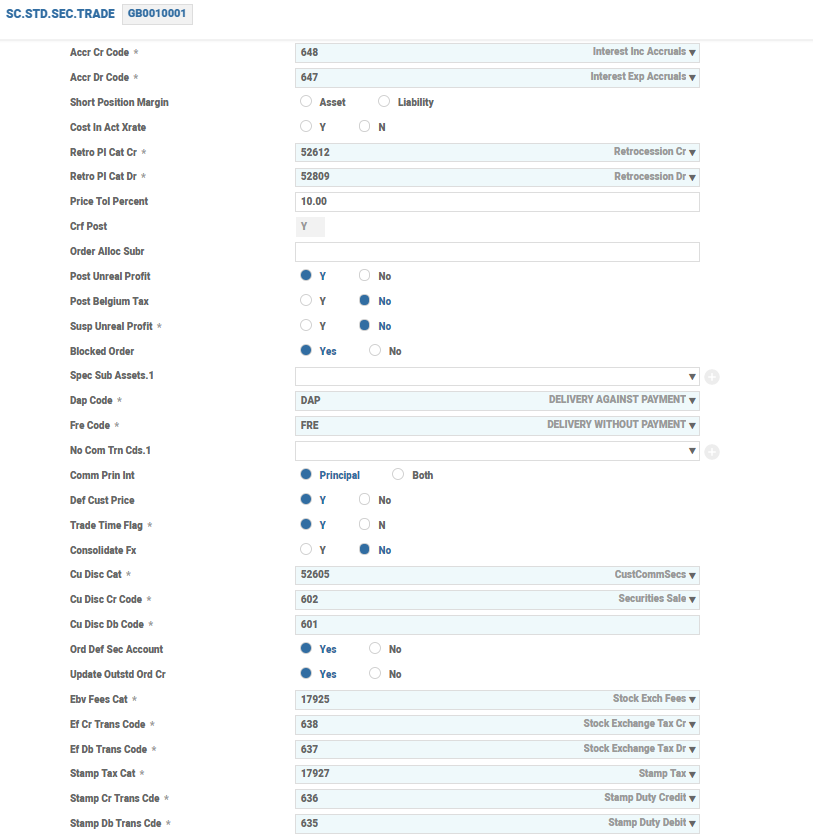
The Def Cust Price field must be set to Y for the trade price to be defaulted from the record in SECURITY.MASTER if input is not given by the user. This facility is feasible only when the user can be certain that the security records are up-to-date with the latest pricing information. If the user has modified the price or is not sure of the pricing or in cases where the organisation gets the pricing details from an automated third-party system, the trade price can be updated when processing bulk records in SEC.TRADE (a bulk trade is when a large number of customer transactions with the same price are to be entered). In such cases, the Def Cust Price field can be set to No.
The user must change the price in the relevant record in SECURITY.MASTER to which the price is to be defaulted. This can be reverted to the current price once the record in SEC.TRADE is updated. If the user utilises this facility to default a required non-current price, it is mandatory that no other trades be entered in the same security.
The user can set the Consolidate Fx field to Y or N to indicate whether or not to total the currency requirements of each customer into a single amount. The consolidated rate is obtained from the forex dealers and it is updated in the Consol Rate field in the SEC.TRADE application. If this field is set to Y, the user cannot enter specific rates for each customer in the Cu Ex Rate Acc field in the SEC.TRADE application. Read the Trade Creation feature in the Securities user guide for more information on the SEC.TRADE application. If the Trade Time field is set to Y, the current system time (in HH.MM.SS format) is defaulted into any time fields within the order processing programs of the ORDER.BY.CUST, SEC.OPEN.ORDER, SC.EXE.SEC.ORDERS and SEC.TRADE applications.
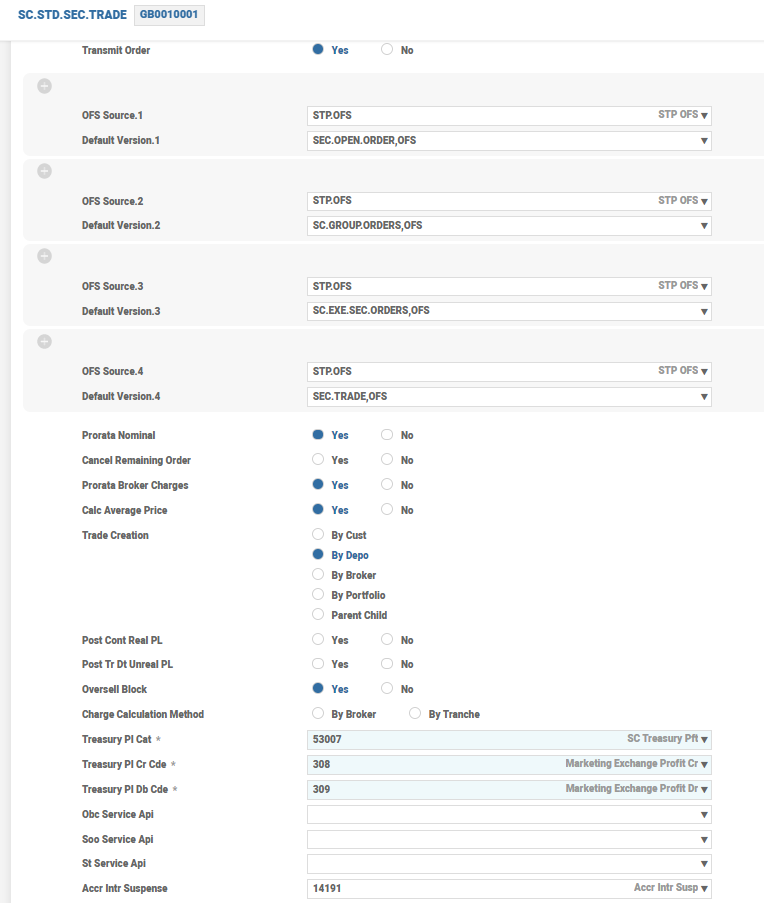
The Trade Creation field controls the SEC.TRADE creation from SC.EXE.SEC.ORDERS. For example, if the Trade Creation field is selected as By Portfolio, then records are created in SEC.TRADE for each port.
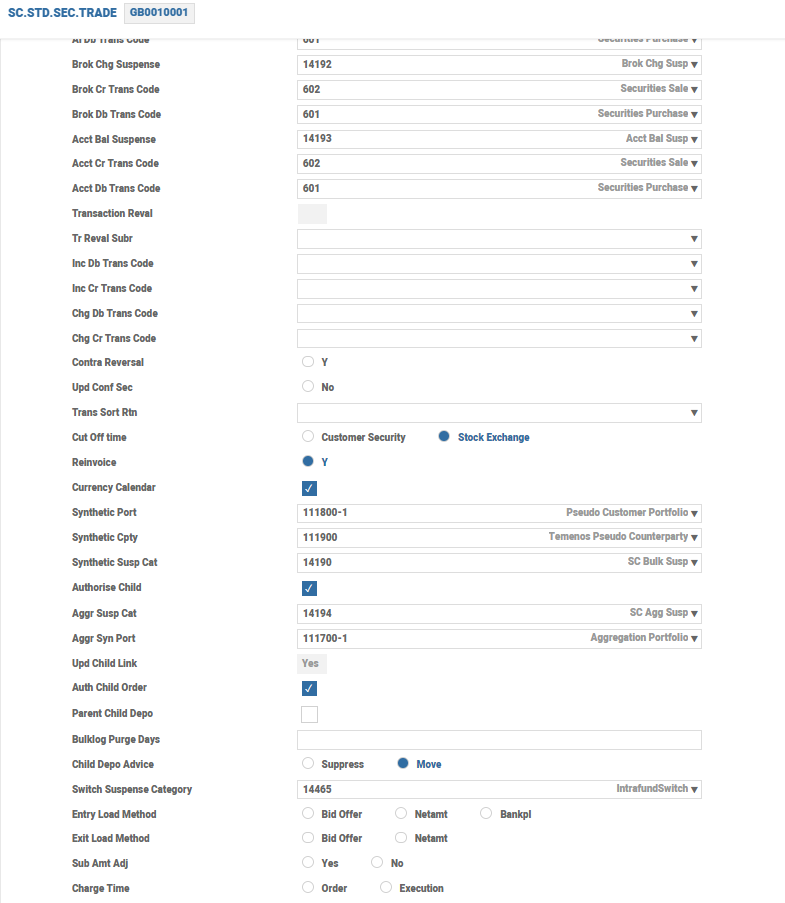
If the user selects the Currency Calendar check box, the system calculates the settlement date (value date) for security transactions based on both the holiday tables of the currency’s country and stock exchange country. A date, which is a working date for both the countries, is considered. If the user clears this check box, the settlement date for a transaction is calculated based on the values in the Calc Country field in STOCK.EXCHANGE. If there is no input, it is calculated based on the local holiday calendar. The following fields are used when parent child trades take place.
| Fields | Description |
|---|---|
| Synthetic Port | Indicates the synthetic portfolio used for parent child processing. This portfolio is updated in the customer side of parent transaction. |
| Synthetic Cpty | Indicates the synthetic counterparty used for parent child processing. The counterparty specified here is updated into broker side of child portfolio. |
| Synthetic Susp Cat | Used for parent child processing. The internal account category specified in this field is used for entry processing in parent and child trades. For parent and child trade, customer and broker side account is the internal account formed using this category. |
| Trade Creation | This field is set to Parent Child for creating parent child trades on execution |
| Authorise Child | If set to Yes, the child trades are authorised on authorisation of the parent. Child trades are also automatically authorised, if the Authorise Trade field in SC.EXE.SEC.ORDERS of the parent is set to Yes. |
| Upd Child Link | Determines whether the child link records such as SC.CHILD.ORDER.LINK and SC.CHILD.TRADE.LINK are to be updated. These backend files hold a link between the parent and child orders and trade. This is useful for reports and enquiries. |
| Parent Child Depo |
Specifies whether parent trades are to be created based on each depository. The value is defaulted to the similar field in SC.EXE.SEC.ORDERS.
|
| Bulklog Purge Days | Indicates the number of days to hold the purging of SC.BULK.EXCEPTION.LOG. The records with value date prior to the date calculated from the current date are purged. |
| Order Alloc Subr |
Accepts an API that is used for the allocation of the executed nominal among different customers in the case of bulk orders. The arguments to an API are SEC.OPEN.ORDER record and SC.EXE.SEC.ORDERS record in dimensioned format. If the API is defined in the Order Alloc Subr field, the prorating process calls the local API to allocate the nominal for customers based on the API logic.
|
SC.STD.POS.TRANSF
The SC.STD.POS.TRANSF application contains the company-level default values, which are used to process the POSITION.TRANSFER, SECURITY.TRANSFER and SC.BULK.TRANSFER transactions. It allows the user to specify the default charge category for the bulk charges and specify the status for the record in SECURITY.TRANSFER generated from the bulk transfer. The initial fields contain many CATEGORY and TRANSACTION codes relating to debit and credit transaction entries posted during the transfer out and in as shown in the screenshot below:
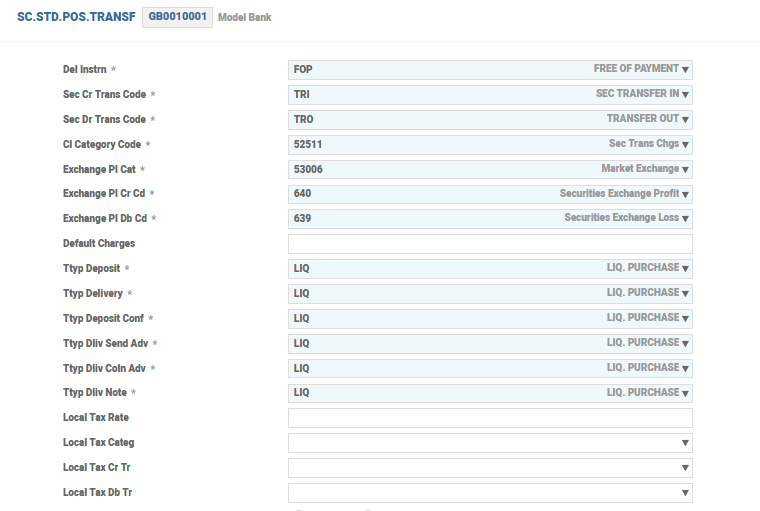
For a POSITION.TRANSFER transaction, the system defaults to a delivery instruction type as mentioned in the Del Instrn field.
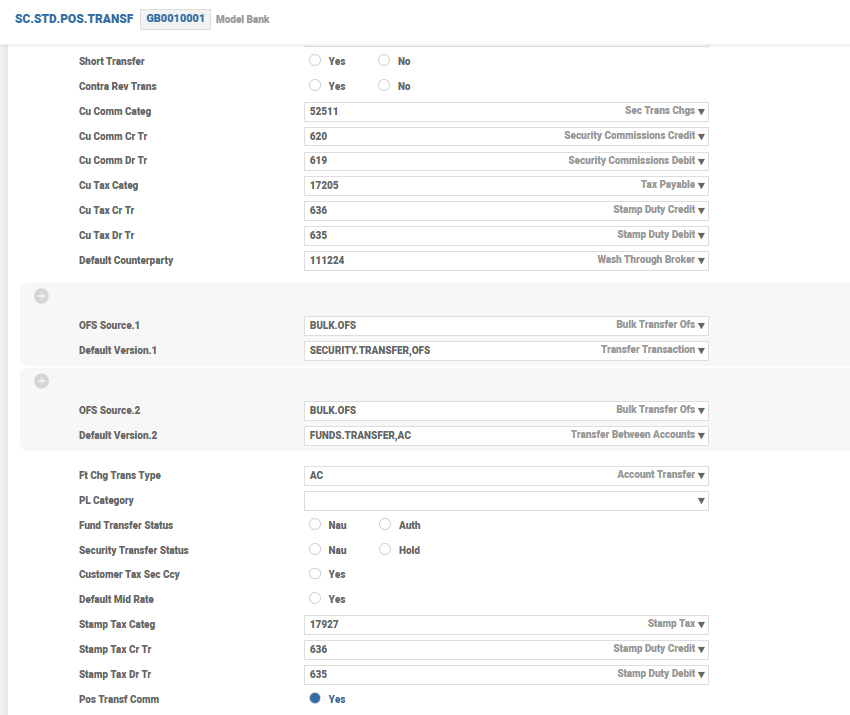
If the Short Transfer field is set to Yes, the system allows transfer of short position.The Ofs Source and Default Version fields are used to create and authorise the applications used in the SC.BULK.TRANSFER application. The Stamp Tax Categ field is used for defaulting category for stamp tax posting from security transfer, where the Stamp Tax Dr Tr field defines the debit transaction code for the stamp tax posted and the Stamp Tax Cr Tr defines the credit transaction code for the stamp tax posted.
The value in the Default Counterparty field should be a valid record in the CUSTOMER.SECURITY application with any one of the following customer types such as BROKER, COUNTERPARY or CLIENT. This is the default counterparty at the company level for transfers.
SC.TAX.PARAMETER
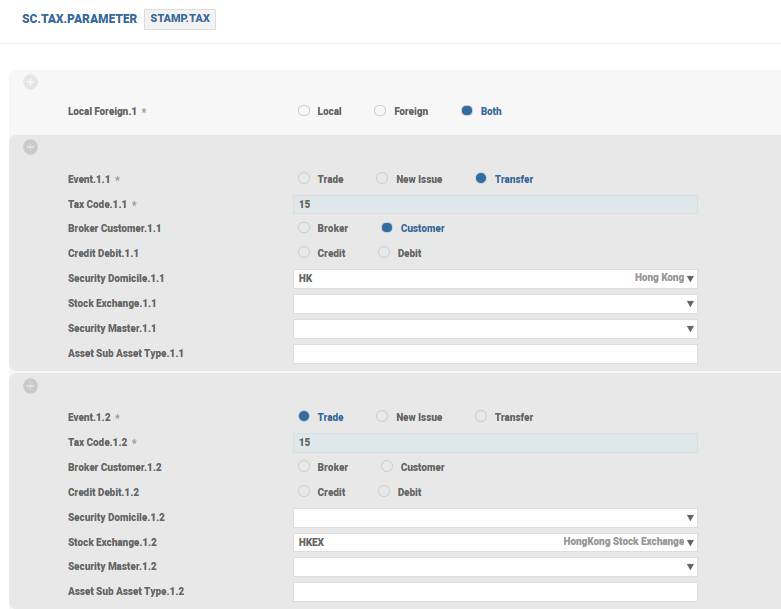
The SC.TAX.PARAMETER application is used to define stamp tax. Different tax rates can be applied based on the application, security, stock exchange, sub-asset type and so on.
The Tax Code field defines the tax code used to calculate the tax amount. This field accepts the tax code defined in either the TAX application or the TAX.TYPE.CONDITION application. The ID of the record in TAX.TYPE.CONDITON should be prefixed with *. If this field has a defined TAX.TYPE.CONDITION value, the system calculates the tax based on the tax codes defined for the respective customer group defined in the record in TAX.TYPE.CONDITION. If this field has a defined tax code, the system performs tax calculation based on the tax code record defined in the TAX application.
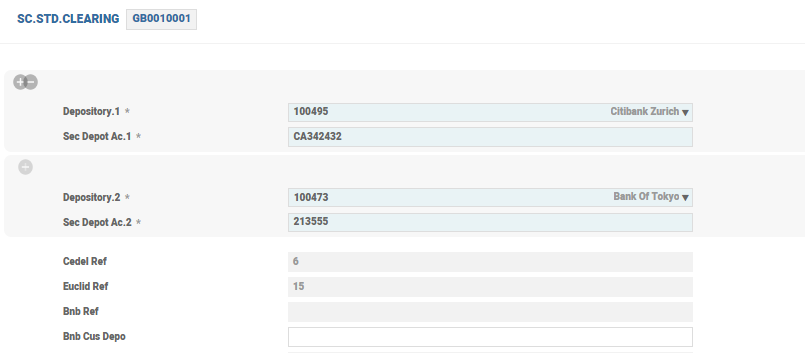
SC.STD.CLEARING
Rules of the clearing systems are set in this application. The Sec Depo Ac field must be a valid record in CUSTOMER.SECURITY.
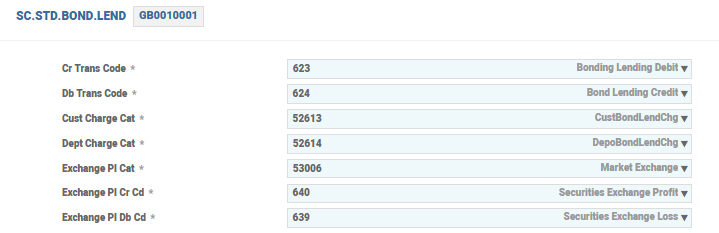
SC.STD.BOND.LEND
This table contains company-level default values, which are used when processing bond lending transactions.
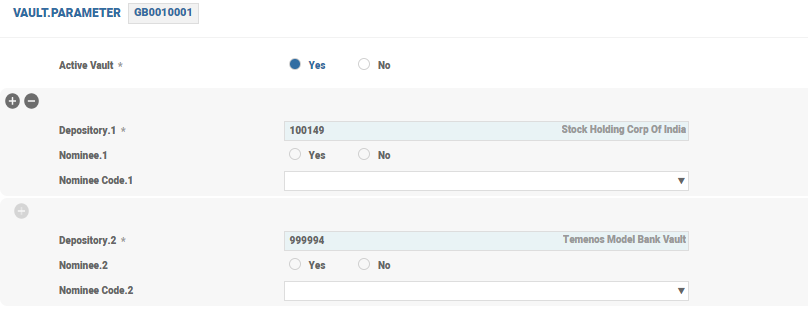
VAULT.PARAMETER
Before Temenos Transact begins to control the contents of the vault, it is mandatory to complete the configuration of the VAULT.PARAMETER application, which enables the system to identity the vault(s), depositories or areas within the vault. The VAULT.PARAMETER application is required for each company to use the vault application facilities provided by Temenos Transact. The vaults must also be set up on the records in CUSTOMER and CUSTOMER.SECURITY before they are defined in the VAULT.PARAMETER application. This application controls whether vault (safecustody functionality in Temenos Transact) is turned on or off, and which depositories are turned on or off. If the vault is active, then records in the VAULT.EXPECT application can be produced from the VAULT.CONTROL application.
Illustrating Model Parameters
The model parameters for the Securities (SC) module are explained below:
Defining Securities Parameter
The SC.PARAMETER application is the main parameter record for the SC application that defines the company level default values which must be setup for the SC module to run correctly. These default values apply irrespective of the application, transaction type or user. Each record is created against each company running the SC module. The following are the key features of this application:
- Each attribute of this parameter are specific to the company.
- Local stock exchange and default stock exchange can be setup at company level.
- The Alternative Index field enables the user to specify an alternative means of accessing individual security records for examination or entry into any of the various transactions and enquiries.
- Some fields require the specification of a category or a record from another application.
-
If the user wishes to perform price integrity validation on certain asset types, then the Price Asset field is specified with the valid
ASSET.TYPErecord. If the user wants to use the Corporate Actions (CA) system to process their bond redemptions, this field contains theDIARY.TYPEID that is used to process the redemptions. -
The Cg Base Update field in the
SC.PARAMETERapplication allows the user to control the update of the capital gains transaction base. If this field is set to Yes, the system maintains a transaction base that can be used to display the capital gains positions on portfolio trading in a security. - The Source Tax Split and Local Tax Split fields can be used in conjunction when processing the CA events. If these fields are set to Yes, separate source or local tax accounting entries are posted. The customer is posted with the gross amount for the cash entitlement and a separate source or local tax amount.
- The Hub Company field specifies the centralised HUB, where all SC and DX trades take place. This is particularly relevant in the customer setup, where trades are always done in a central location.
- The Actual Settlement field defines whether the trades or corporate is settled manually or automatically (contractual settlement).
- The Default Ccy Market field defines the currency market used for all FX Intraday transactions and valuations.
- The COB Ccy Market field defines the currency market used for all portfolio or position valuations done during COB.
- If the user wishes to perform manual grouping of orders, then the Group Order field should be specified as ‘Manual’.
Defining Standard Defaults for Security Trade
The SC.STD.SEC.TRADE application advises the system on how to process a SEC.TRADE transaction. This includes the buy or sell and other trade related transactions, and mainly the processing rules. The following are the key features of this application:
- The initial core fields contains the CATEGORY and TRANSACTION codes which relate to debit and credit transaction entries that are posted during trade capture.
- The Synthetic Port field is used for parent child processing. This portfolio updated in the customer side of parent transaction and the Synthetic Cpty field is used for parent child processing. The counterparty specified here is updated into broker side of child portfolio.
- The Authorise Child field accepts a value Yes, to denote that child trades are to be authorised on authorisation of parent. Child trades are also automatically authorised, if the Authorise Trade field in the
SC.EXE.SEC.ORDERSapplication of parent is set to Yes. - The Consolidate Fx field indicates whether the user wants the system to total the currency requirements of each customer into a single amount for which a consolidated rate can be obtained from the Forex dealers and entered into the Consol Rate field of the
SEC.TRADEtransaction. - The Currency Calendar field is defined so that the system calculates the settlement date (value date) for security transactions based on both the holiday tables of the currency’s country and the stock exchange country.
- The Transmit Order field is set as ‘Yes’ to transmit the grouped orders.
- The Broker Only Cty field holds the synthetic counterparty for Broker only transaction. This is used for the Broker Only Trade (Customer Vs Intermediate Broker).
- The Broker Only Port field holds the Bank’s synthetic portfolio for Broker only transaction. This is updated in the Customer portfolio for the underlying trade (Intermediate Customer Vs External Broker) in Broker only processing.
- The Broker Only Cat field holds the suspense category, which is used for Broker only processing.
Defining Standard Defaults for Position Transfer
The SC.STD.POS.TRANSF application contains the company level default values which are used to process the POSITION.TRANSFER and SECURITY.TRANSFER transactions. It allows the user to specify the default charge category for the bulk charges and specify the status for SECURITY.TRANSFER or FUNDS.TRANSFER record generated from the bulk transfer. The following are the key features of this application:
- For a
POSITION.TRANSFERtransaction, the system defaults to a delivery instruction type as contained within theSC.DEL.INSTRapplication. If delivery instructions are not contained within thePOSITION.TRANSFERapplication, the Delivery Instr field must contain the exact user requirement. - The Ofs Source and Ofs Version fields are used to create and authorise the applications used in
SC.BULK.TRANSFER. - Each business transaction within Temenos Transact is allocated a category code which enables the construction of reports that give an accurate view of the bank's operations.
- The Stamp Tax Categ field is used for defaulting category for stamp tax posting from security transfer, where the Stamp Tax Dr Tr field defines the debit transaction code for the stamp tax posted and the Stamp Tax Cr Tr defines the credit transaction code for the stamp tax posted.
- The value in the Default Counterparty field should be a valid
CUSTOMER.SECURITYrecord with any one of the following customer types BROKER, COUNTERPARY or CLIENT. This will be default counterparty at the company level for transfers.
Defining Security Master Parameter
The SM.PARAMETER application is used to store the SECURITY.MASTER related parameters that are shared across companies. Only one record is allowed with the ID as SYSTEM. The following are the key features of this application:
- The Price Qual Format field indicates if the cum and ex markers are to be in SWIFT format or not.
- The Isin Validation field determines whether the ISIN code entered through the
SECURITY.MASTERapplication is validated. If this field is set to Yes, the check digit must be as calculated by system. - The Alpha Key field enables the input of alphanumeric characters in the
SECURITY.MASTERID. If this is set to Yes, the system does not perform the formatting ofSECURITY.MASTERreference, based on the format specified in the Security Format field in theSC.PARAMETERapplication. - The Alt Index Check field is used to default the
SECURITY.MASTERID, when the user enters an alternate identifier like ISIN in theSEC.OPEN.ORDERorSEC.TRADErecords. Read the Alternate Security Index section in Instrument Master feature under Securities User Guide for more information. - The Sec Domicile Ssi field determines whether the security domicile must be considered for SSI search, when the Pl Sett field is not given in the
SECURITY.MASTERrecord. Read the Settlement feature under Securities user guide for more information.
Defining Local Tax Parameter for Securities
The SC.LOCAL.TAX.PARAM application is the main parameter application which holds the local tax that is applicable for SC. This can be defined for specific TXN.TAX.CODE and COMPANY or SYSTEM. The following are the key features of this application:
- This application defines the tax basis for calculating the withholding tax.
- The Tax Basis field indicates the type of transaction basis for the allocation and unallocation of nominal (for example, FIFO, LIFO and so on).
Defining Order Routing Instructions
The SC.ORDER.ROUTING application is the main parameter to define the routing of orders at company level. The routing conditions can be set-up based on any field in SECURITY.MASTER or SEC.ACC.MASTER applications. Record ID of this application can be SYSTEM or a Company ID.
The following are the key features of this application:
- The Default Company and Default Portfolio fields will be set as the default routing conditions if all other conditions fail to match.
- If the Exe Orig Comp field is set to Yes, then the routed order will be executed in the originating (Bank) company and the execution will be mirrored in the route-to (Broker-dealer) company.
Defining Personal Assets Parameter
The SC.PERSONAL.ASSET.PARAM application is the main parameter application that holds the details applicable for personal assets set up in the core banking system.
The user can define the following list of fields based on the company and are required to create the personal assets:
- Transaction Codes (Buy, Sell, Write-In, Write-out, Maturity, Liability In, and Liability Out)
- Suspense Category
- Price Source
- Industry type
- Wash Depository
- Coupon Tax Code
- Stock Exchange
Defining Personal Asset Types
The SC.PERSONAL.ASSET.TYPE application enables the user to record the attributes relevant to each Personal Asset Type. The ID of this application is a SUB.ASSET.TYPE record.
Application allows the user to enter if SC.PERSONAL.ASSET.PARAM record exists for the company.
Defining Grouping Parameter
The SC.GROUP.PARAM application is the main parameter file for both AUTOMATIC and MANUAL grouping of orders, which can be defined at company level. while grouping, If a value is defined in the Sys Fields.1 field in SC.GROUP.PARAM is entered in the parameter table, then the system checks for the same value in the field of the orders to be grouped.
The record ID of this parameter can be set as follows:
| Parameter | Description |
|---|---|
SECURITY.MASTER
|
A valid SECURITY.MASTER can be defined as the ID (100040-000) |
SUB.ASSET.TYPE
|
A valid SUB.ASSET.TYPE can be defined as ID (S-102) |
ASSET.TYPE
|
A valid ASSET.TYPE can be defined as ID (A-10) |
SYSTEM
|
This is the generic parameter record and it is used when no specific parameter is defined. |
The following are the key features of this application:
- Whenever a grouping is performed, a parameter record with
SECURITY.MASTER,SUB.ASSET.TYPE,ASSET.TYPEandSYSTEMis checked. The same sequence is followed, if a record withSECURITY.MASTERis found in the first instance then the grouping is based on the parameter record. - If no match is found then the
SYSTEMrecord is used as a parameter for grouping.
Defining Trailer Fee Parameter
Trailer fee is a commission paid by an issuer of security to the bank for providing the bank’s customer with services, such as, holding, investment advices and other handling services of those financial instruments. The SC.TR.FEE.PARAMETER is the parameter record which must be set up at company level for the banks to process the trailer fees received from the issuer.
| Parameter | Description |
|---|---|
DEFAULT.PRODUCT
|
Allows the bank to report Profit and Loss earned as trailer fees. |
ACCRUAL.METHOD
|
Accrual method can be set to,
|
TR.FEE.SUSP.CAT
|
Allows to set suspense category account which is treated as a wash account for posting capitalisation entry and apportioning of difference amount. |
REIMBURSE.ALLOWED
|
This field must be set to ‘Yes’, if the bank decides to reimburse the trailer fees to their customers. |
Illustrating Model Products
Model products are not applicable for this module.
Add Bookmark
save your best linksView Bookmarks
Visit your best links BACK
BACK


Are you sure you want to log-off?