
| Bookmark Name | Actions |
|---|
Payment Schedule
The Payment Schedule Property Class is used by all Products which have amounts billed (that is, made due) or capitalised.
Product Lines
The following Product Lines use the Payment Schedule Property Class:
- Account
- Agent
- Deposits
- Facility
- Rewards
- Lending
- Safe Deposit Box
Property Class Type
The Payment Schedule Property Class uses the following Property Class types:
- Currency Specific
- Dated
- Enable External
- Enable External Financial
- Enabled For Memo
- Forward Dating
- Inheritance
Property Type
The Payment Schedule Property Class is associated with the following Properties. Properties can be defined by users.
- FORWARD.DATED
- INHERITANCE.ONLY
 Defining Future Conditions at the Arrangement Level
The FORWARD.DATED type controls and allows the user to introduce a new definition at the arrangement level, and it is dated.
Balance Prefix and Suffix
The Payment Schedule Property Class is not associated with balance prefix and suffix.
Attributes
The following are the related attribues
Defining the Payment Schedule
- A Payment Schedule is comprised of one or more payment definitions with conditions such as:
- Type
- Method
- Pay Freq
- Properties
- Start
- End
- Amount
- Temenos Transact provides a mechanism through AA.PAYMENT.TYPE by which users can define the standard payment types that can be used by a Product.
- Type (specifies payment type) is required for every Payment Schedule definition.
- Method—On designating the Payment Type, the user can specify whether the amount is due (to or from the customer) or capitalised or paid to the customer or specify the actual amount to be maintained.
- Valid inputs are CAPITALISE, DUE, PAY and MAINTAIN.
- Pay Freq —This attribute indicates the frequency at which the payments are to be made due. The actual payment date moves forward or backward depending on the values in the Date Adjustment and Date Convention attributes.
- The user can also define a holiday period for the payment with the combination of the following fields:
- Start Date
- No of Payments
- Payment Frequency
EXAMPLE:a)M 01 31. M = Monthly. 01 = one monthly intervals. 31 = the last day of the month.
b)M 03 31 M = Monthly. 03 = three monthly intervals. 31 = the last day of the month.
c)M 01 10 M=Monthly, 01 = at monthly intervals.10 = 10th of the month.
d)31 MAR 2006 W, where W= weekly. In this case, the first schedule would fall on 31 March 2006.
e)31 Mar 2006 BSNSS, where BSNSS = every business day. In this case, the first schedule would fall on 31 March 2006.
- The frequency is specified as a Temenos Transact recurrence attribute.
- Input prohibited for a date prior to the system date.
- The user can also define a holiday period for the payment with the combination of the following fields:
- Properties—Indicates the Property to be given for the Payment Type Property Class.
- Bill Type —The user defines the Sys Bill Type field in AA.BILL.TYPE which decides the type of the bill. The Bill Type can be ACT.CHARGE, COMMISSION, DEF.CHARGE, DISBURSEMENT, EXPECTED, INFO, PAYMENT, PR.CHARGE or TRANCHE.
- Prog %—This field allows the user to specify the progressive percentage with which the system calculated payment amount has to progress on every payment.
- This is valid only for payment types whose Calc Type field is set to PROGRESSIVE. This requires additional setup as defining the MAKEDUE Activity in the On Activity field and setting RECALCULATE option as PROGRESSIVE.PAYMENT.
- Percentage —This allows the user to specify the percentage that is applied on the outstanding balances and made due.
- Only the percentage of the amount is issued in the bill and made due. The remaining amount remains on their respective balances and any further calculation is based on this balance.
- In Adv—This field allows the user to specify the number of working days prior to the due date when the bill needs to be produced. When this is not set, by default, the bill is made due on the frequency specified.
- Issue —This field allows the user to indicate whether the system should run ISSUEBILL and MAKEDUE separately or together. If the attribute is set to NO, then both are combined and there is no ISSUEBILL Activity, but only Make Due Action.
Validations:
- It is left blank by default, which means ISSUEBILL Activity always runs.
- If it is set to NO, then In Adv should be set to 0.
- Defer By — This field allows the user to define the deferment period from the original payment. Bill is generated for same value, however deferred for specified number of days before due, pay or capitalise. Bill status is maintained as DEFER for the deferred period.
- Num — When a frequency has been specified, the user can specify either an end date (in End attribute) or number of payments (in Num attribute) to indicate the system when the payments should terminate.
- Amount —There can be two amounts for each payment definition: Calculated Amount and Actual Amount.
- o The user can enter the actual amount to override the calculated amount or manual payments. When ad hoc payments are defined, the user has to define the actual amount for each payment date.
- o This is part of a multi-value set of attributes with Start, End and Num.
Minimum Payment Type
A Minimum Payment Amount is primarily required in the US financial market for Lines of Credit to define a minimum repayment amount. When such a line of credit is backed by a mortgage, then it is called as Home Equity Lines of Credit (HELOC).
- AA supports to capture a Minimum Payment Amount based on Bill Type. This gives the flexibility for the users to group Properties by bill type and assign a minimum payment amount for them.
- If the calculated payment amount for the given bill type is less than the minimum payment amount, then the bill would be raised of the minimum payment amount. The difference is billed as principal (ACCOUNT Property).
- This is allowed only for scheduled payments not for Activity based charges or break rule charges.
- Minimum payment amount calculation is considered during Payment Schedule projections and simulations.
- There are two attributes required for indicating a minimum amount for an arrangement.
- The bill type for which the minimum amount has to be applied with the Type attribute.
- The minimum bill amount with the Amount attribute.
- On the scheduled payment date, when a bill is raised for the bill type mentioned in Type, the system evaluates the calculated payment amount against the minimum amount specified.
- If the calculated amount is greater than or equal to the minimum amount, then calculated amount is billed
- If the calculated amount is less than the minimum amount, then the minimum amount is billed. The differential amount is billed as ACCOUNT (Property).
Minimum Payment Amount for Fixed Equal Payment
The Property attribute is part of the Minimum Payment set of attributes to capture the Minimum Invoice Component (MIC). This is mutually exclusive with Amount attribute. Bill Type wise MIC can be defined using the Group Bill type and Group Min Property set of attributes for Fixed Equal Repayment (FEP) type of contracts to define the MIC.
Payment Holiday
- Payment Holiday or Postponement is a feature offered by banks, by which, a customer, may opt to take an instalment break to skip repayments.
- This feature is available through the Flexible Payment Limit Periodic Attribute.
Flexible Payment Limit
- Flexible Payment Limit can be defined as a percentage at product level and as an amount at arrangement level.
- The available flexible payment limit is checked every time a payment holiday or flexible payment is requested.
- Excess payments replenish the flexible payments which are to be restricted.
Flexible Payment Limit and Excess Payment
The HOLIDAY.LIMIT and HOLIDAY.LIMIT.REVOLVING Periodic Attribute Classes are used to define flexible payment limit.
Restricting Types of Flexible Payment
- It is possible for the user to set restriction type for Flexible Payment at product level and arrangement level.
- The user can define Holiday Restrict Type and Holiday Restrict Item at Payment Schedule condition attached to the Product, and same value cascaded at account level.
- If none of the value defined at product level, the user can set restriction type at arrangement level.
- Holiday Restrict Type—contains different types of restriction with the following options:
- Property Class—Indicates that all the Properties belonging to the given Property Class are eligible for holiday restriction.
- Property—Indicates that the holiday restriction is of Property Type and only the given Properties are eligible for holiday restriction.
- Bill Type—Bill Type, Payment Type of Bill Type and Properties of Bill Type in the Payment Schedule definition are eligible for holiday restriction only if the Bill Type given in attribute matches the counterpart in the Payment Schedule definition.
- Payment Type—Payment Type and properties of Payment Type in the Payment Schedule definition are eligible for holiday restriction only if the Payment Type given in this attribute matches the counterpart in Payment Schedule definition.
NOTE: During Update Payment Holiday Activity, the Bill Type and Payment Type in the Activity is cross-validated against these attributes before proceeding with updating holiday information.
- The Holiday Restrict Item attribute indicates the actual restricted entity for holiday. It holds the valid record from
- AA.PROPERTY
- AA.PROPERTY.CLASS
- AA.BILL.TYPE
- AA.PAYMENT.TYPE based on the value selected in the Holiday Restrict Type attribute.
- There can be two amounts for each payment definition:
- Calculated Amount
- Actual Amount
- Calc Amount is determined by Temenos Transact based upon the Payment Type and Properties involved, but it is also possible for the user to enter a value in Amount attribute to override the calculated amount.
Recalculate Frequency
For Products that have constant payments, the user may want to fix the payment amount for a period regardless of any changes to the arrangement (for example, principal increase, interest rate change, and so on). In such cases, the user can specify a payment using Recalc Frequency attribute so that the constant amount can be recalculated periodically to take into consideration any of these changes.
Recalculation based on Activities
- The user must specify the recalculation if that should be performed on certain Activities (changes of payment components) that occur on the arrangement. These Activities are input into On Activity attribute.
- The following Activity Classes may require a recalculation:
- Change – Charge
- Change – Interest
- Change – Payment Schedule
- Change Term – Term Amount
- Increase – Term Amount
- Decrease – Term Amount
- For each component specified on the Payment Schedule, the resulting Action must be specified in Recalculate attribute. The recalculation types are:
- Payment – the payment amount is changed.
- Term – the Arrangement term is altered.
- Residual – the residual amount is changed.
- Nothing – the payments, term, and residual are unchanged. In this case, a recalculation frequency has to be specified.
- PROGRESSIVE PAYMENT- The payment amount is incremented and decremented from the CALC.AMOUNT based on the percentage mentioned in the Prog Pay Perc field.
Recalculating Term for Forward Dated Payment Conditions
- When a prepayment transaction is performed that has forward dated conditions, the system allows recalculation of a term.
- When the term is recalculated with forward conditions, the system uses the term that is recalculated based on the last forward dated condition.
- When more than one condition exists, the last maturity date that is, the recalculated maturity date as on the applicable last forwarded date is considered for any subsequent processing.
- When the repayment amount is huge, the term can end before moving into a forward condition. In such cases the forward condition is not applicable and the maturity date is recalculated based on the current condition.
Read Working with Scheduling Payments to know more on how the payment schedule with forward dated conditions for recalculation of term works.
Bills Combined
Combine Bills attribute – When two payment types have the same payment date and are produced on the same date, it can be combined. When two payment types have the same payment date but different payment method say DUE or CAPITALISE, then the bills are not combined.
Include All Payments
Include All Payments attribute allows the user to specify if the Principal Payments (additional principal payments) need to be considered when deriving the constant payment amounts.
- If set to Yes along with CONSTANT (annuity) and other payment types which has user defined amounts for principal payments, then the system arrives at a CONSTANT amount such that it includes all these ad hoc payments and then arrives at a Calc Amount.
- If it is left blank, the Calc Amount does not consider these ad hoc user defined amounts in its calculation.
Include Future Disbursements
The Include Future Disb attribute is used to indicate if future disbursements scheduled must be considered for calculating the constant instalment amount. This is applicable for CONSTANT or LINEAR payment type. The Include All Payments and Include Future Disb attributes are mutually exclusive.
This attribute allows the user to specify if the future scheduled disbursements need to be considered for deriving at the projected payment amount.
- No - Recalculates the payment amount based on the disbursed amount and this is the default option
- Yes - Recalculates one payment amount from the start date until the maturity date of the contract by considering the total commitment of the loan on the arrangement date.
- Progressive - Recalculates the payment amount by considering the disbursed and the future disbursement on the arrangement date. The projection changes in the payment schedule is progressive
Repay from Credit Balance
Repay from Credit Balance attribute is used to specify the Activity to be triggered for adjusting the credit balance.
Amortisation and Residual Amounts
It is possible to define a RESIDUAL.AMOUNT at the maturity date of a term Product that can be paid on the last payment date of the arrangement. This can be specified by entering a value in Amortisation Term attribute with which Temenos Transact can calculate payments and any residual or by entering a RESIDUAL.AMOUNT directly.
Floating Rate Change Processing
- When a new record is created in BASIC.INTEREST (BI) table for a future date, the Change Interest Activity triggers the Apply Rate Activity for business date.
- This creates a forward dated Interest condition, which is effective from the future effective date of the BI record that is, date on which the rate has to take effect.
- This is applicable only if the Property Type of the Interest Property is Forward Dated.
- This Activity also creates a forward date condition for Payment Schedule in order to calculate and store the new payment amount for the revised rate. This is based on the user configuration in Payment Schedule with respect to recalculation of payment amount or term.
- This again depends on the Property Type of the Payment Schedule Property being Forward Dated.
EXAMPLE:
- Consider Principal Interest Property in Mortgage contract is following an index rate maintained in BASIC.INTEREST table.
- Today’s Date : 1-Jan-2017
- Rate change Effective Date : 1-Mar-2017
- On 1-Jan-2017, the bank receives intimation about the change of rate (change from 2% to 3%) due to take effect on 1-Mar-2017. Now, the bank enters the new rate in the system that is, on 1-Jan-17, the bank creates a new record in BASIC.INTEREST table for the index rate with effective date as 1-Mar-17.
- During COB processing on 1-Jan-17, the system trigger LENDING-APPLY.RATE-PRINCIPALINT Activity with effective date as today and with a forward dated condition effective from 1-Mar-2017. This Activity results in 2 interest conditions being created.
- 2% effective from 1-Jan-17
- 3% effective from 1-Mar-17
- Apart from creation of forward dated interest condition, the system also creates forward dated conditions for Payment Schedule for the same effective dates.
Messaging Handoff
Activity Messaging Property Class caters to the requirement of notifying the customer X number of days in advance to actual change. The following handoff information required for populating the notice to be sent to the user is provided by the system:
- Old Rate as of pre-notification date
- New Rate as of forward date
- Effective date of Rate change
- Old Payment Amount
- New Payment Amount
- Effective date of New Payment Amount
Debit Interest Offsetting Credit Interest for Tax
- In the Payment Schedule Property, the user can define the required accounting and consolidated entries.
- The Consolidate Class and Consolidate Property attributes can be used to define Interest Property Classes and Properties that can be used in the process. Consolidation only happens for bills that have matching payment dates, payment methods (Pay, Due or Capitalise) as well as matching defer dates.
- When specified, all bill properties of this Property Class are consolidated into the Property which has the largest overall contribution.
- Consolidation only happens for bills having matching payment dates, payment methods (PAY or DUE or CAPITALISE) as well as matching defer dates.
- Must be a valid Property Class. Currently only INTEREST Property Class is supported.
EXAMPLE:
- Bill A has CRINTEREST 100.
- Bill B has DRINTEREST 50.
- CRINTEREST is the consolidation target since it is the largest contributor.
- After consolidation:
- Bill A has CRINTEREST 50.
- Bill B has DRINTEREST 0.
- Optional multi-value field.
Consolidate Property
It is used in connection with CONSOLIDATE.CLASS to limit the properties selected for consolidation to the ones specified here.
- At least the following two properties must be specified.
- It must belong to the Property Class specified in CONSOLIDATE.CLASS.
- It must have a schedule defined.
- If a property selected for consolidation has tax attached, then tax netting for this property must also be enabled.
- Optional sub-value field.
Defining the Billing Rules
For each payment that is due from a customer, Temenos Transact creates a bill record and optionally a bill notice. The bill contains the details of the amounts due, the due date, and so on. This bill record is also the basis of the AA Overdue processing.
- The Bill Type is soft coded so that aging rules may be defined based on AA.PAYMENT.TYPE by choosing a soft Bill Type in Payment Schedule.
- Bill Type is kept as DISBURSEMENT for scheduled disbursements.
- By default, Temenos Transact creates the bill on the due date; however, for Products that require a Bill notice to be sent in advance of the due date, the user may enter the number of days prior in Bill Produced. This results in the due amounts being projected and recorded on the bill.
- Additionally, if the bill is produced prior to the due date, the user can specify when the bill is considered final (that is, the bill does not alter based on changes to the arrangement).
- Temenos Transact can also combine bills by selecting Yes in Bills Combined, which have the same due date and are produced on the same date. This provides, for example, the ability to combine a monthly annuity loan repayment with a monthly charge to provide the user with a single bill amount.
Finalisation of Bills
Any change in the scheduled payment amount between the issue bill date and payment date is effective only from the next payment date. However, the issued bill can be modified using flexible repayment definition.
The Finalise Bills attribute defines the period until which an issued bill can be modified. It can be defined only when Bill Produced is defined. This has to be less than the Bill Produced.
Scenario: Assume the following conditions on a loan.
| Attribute | Value |
|---|---|
| Bill Produced | 5D |
| Finalise Bills | 2D |
The system issues the bills, five working days (5D) before the payment date and finalises the bills two working days(2D) before. The bill amount can be modified until finalisation.
Scheduled Charges
It is possible to define that all charges be paid on a scheduled basis, – that is, on a monthly or quarterly basis. This is scheduled in the Payment .Schedule Property, but the user must define which charges applyies to which Activities.
During Charge Capitalisation, if account has insufficient funds to capitalise the charge, the pending amount is invoiced to the customer. The system retries capitalising the invoiced charge automatically at regular intervals using Transaction Cycler facility in Settlement Condition.
NOTE: The user can find the scheduled bill details in the Schedule tab of Arrangement Overview screen.
Schedule Definition for Savings Plan Products
For Savings Plan Products, definition of Account Property is mandatory in the Payment Schedule, and the bill type has to be expected meaning the amount is expected from the customer on the dates defined in the Payment Schedule. Interest schedules are not mandatory and for both interest and principal, PAY bill gets created on maturity denoting that the amounts are to be paid to the customer.
The notional payment is defined in the Payment Schedule, these notional due payments Bill Type is flagged as EXPECTED.
The below screenshot displays Notional payments, Interest and Bonus schedules.

Principal and Interest Bills on Maturity
On maturity, the outstanding principal which was being paid by the customer on a defined frequency is part of a PAY type bill to be paid back to the customer. PAY bill for interest is also created on maturity.
AA Payment Type
Payment Types are stored in AA.PAYMENT.TYPE, which can be accessed through the AA Product Builder. The Payment Types can be created by the users. In Payment Type, AA supports one of the five calculation types:
- Constant: This results in constant repayments, that is, Principal plus Interest repayment are constant. This is used for Annuity arrangements. This requires both an Account and Interest Property to be specified in the Payment Schedule. Charge Property is optionally added.
- Linear: Here, Principal repayment remains fixed over lifetime of the arrangement. Optional properties such as Interest, Charge and Tax may be included. The actual amounts calculated by these properties are added to the fixed principal amount repayment.
- Actual: When Type is Manual, then only allowed calculation type is Actual, in which case the user has to specify an amount in the arrangement for the Payment Type arrangement an Amount. When the type is calculated, Actual is normally used for repayment of calculated Property Classes (for example, Interest, Charge, and Tax) and the amount is determined on each payment schedule date. It can be also used in conjunction with Account Property Class, such as, Principal, when a percentage need to be specified in the Payment Schedule.
- Accelerated: It is similar to Annuity payments, but payment frequency is Bi-weekly or Weekly.
- Other: This is a user routine attached to the Calculation Routine attribute.
Only for Calc Type as Actual in AA.PAYMENT.TYPE, the mandatory Property Class is not specified for which the Property in Payment Schedule can be specified as any Interest, Charge or Tax Property used in the Product.
Overriding Capitalisation Amount
For CAPITALISE payment method, it is possible to cap to the extent of available balance and invoice the rest, thereby restricting the account from being overdrawn. This is configured by setting Alt Payment Method to Cap and Inv.
It is possible to attach a user API to check additional conditions during capitalisation process. This is defined in the Alt Payment Routine attribute and is currently allowed only when Alt Payment Method is set to Cap and Inv.
Accelerated Payment
A calculation type Accelerated can be chosen to calculate the accelerated payment amounts based on the frequency defined in the Payment Schedule Condition.
NOTE: Account and Interest Property Classes are mandatory for the ACCELERATED CALC .TYPE.
When Accelerated Payment Type is used in the Payment Schedule, the validation process restricts the input of payment frequencies other than Bi-Weekly and Weekly. An error message appears if others (monthly or semi-monthly) are chosen.
The chart below illustrates how the customer is benefited by choosing an accelerated payment frequency.
Loan Amount: 100,000 USD and Interest Rate: 10.5241%
|
Payment Type |
Payment
Amount |
Amortization Years |
Interest
Cost |
|---|---|---|---|
| Monthly | 1,000.00 | 20 years | 139,999.82 |
| Accelerated Bi-Weekly | 500.00 | 16 years and 1 day | 108,935.06 |
| Accelerated Weekly | 250.00 | 16 years and 8 days | 108,721.84 |
Payment Type for Fixed Equal Payments
The payment type for Fixed Equal Payments is FIXED.EQUAL. It is used in a loan arrangement to indicate a Fixed Equal Repayment (FEP) schedule.
This payment type has the calculation type as Manual. The mandatory Property Classes are Account (Principal) and Interest.
Key differences between Annuity and Fixed Equal Payment Type are shown in the following table.
|
Annuity |
Fixed Equal Repayment |
|---|---|
|
Loan Amount, Interest Rate and Term are mandatory. Payment amount is calculated by the system. |
Loan Amount, Interest Rate and Payment amount are mandatory. Term is optional, if not defined, this is calculated by the system. |
|
System calculated amount can be overridden by the user amount. |
User defined amount is mandatory. |
|
Payment Schedule projection is generally based on the system calculated amount with exception to user defined amount. |
Payment Schedule projection is generally based on the user defined amount with exception to case where system calculated amount is enforced. |
|
The Term field cannot be blank, that is, for any reason, if the term cannot be calculated, the system raises an error message. |
The Term field can be blank if term cannot be calculated signifying it as a call loan. |
Percentage Based Calculation
Based on the user- defined percentage, the system calculates the repayment amount on sum of outstanding principal and remaining interest amount.
Repayment Amount = Percentage Defined * (Total Profit + Principal)
For example, loan amount is 200,000 and remaining interest amount to be scheduled is 5,608.8. If the user has given the percentage as 10%, then the system calculates the repayment amount based on the following formula:,
Repayment Amount = 10% * (200,000 + 5608.8) = 20560
For scheduled Disbursements, the following payment types are available:
- AA.PAYMENT.TYPE>DISBURSEMENT.AMT
- AA.PAYMENT.TYPE>DISBURSEMENT.%
Alternate Payment Method
The Alt Payment Method attribute has two options:
- Cap and Inv
During capitalisation,
- If the account balance is more than the capitalisation bill amount, the bill is capitalised.
- If the account balance is less than the capitalisation bill amount, the system capitalises the amount upto the balance in account and invoices the remaining amount as a due bill.
- Due and Cap
In a lending product with annuity payment type, when the actual amount is given in the payment schedule, that amount is made due. Any accrual for that period which is not made due is capitalised to the principal of the loan.
- If the actual amount is less than the accruals for that period, then the actual amount is raised as due bill and the remaining amount is raised as a separate bill that is capitalised to the principal.
- If the actual amount is more than the accruals for the period, then the remaining amount is billed towards to the principal.
- If the actual amount is specified as zero, then the accruals for the period are fully capitalised. This option is available for both conventional and Islamic banking contracts.
AA Bill Details
The AA.BILL.DETAILS table stores the details of bills that are generated on the scheduled date. This table can be used in generating payment advices and chaser notice to the customer.
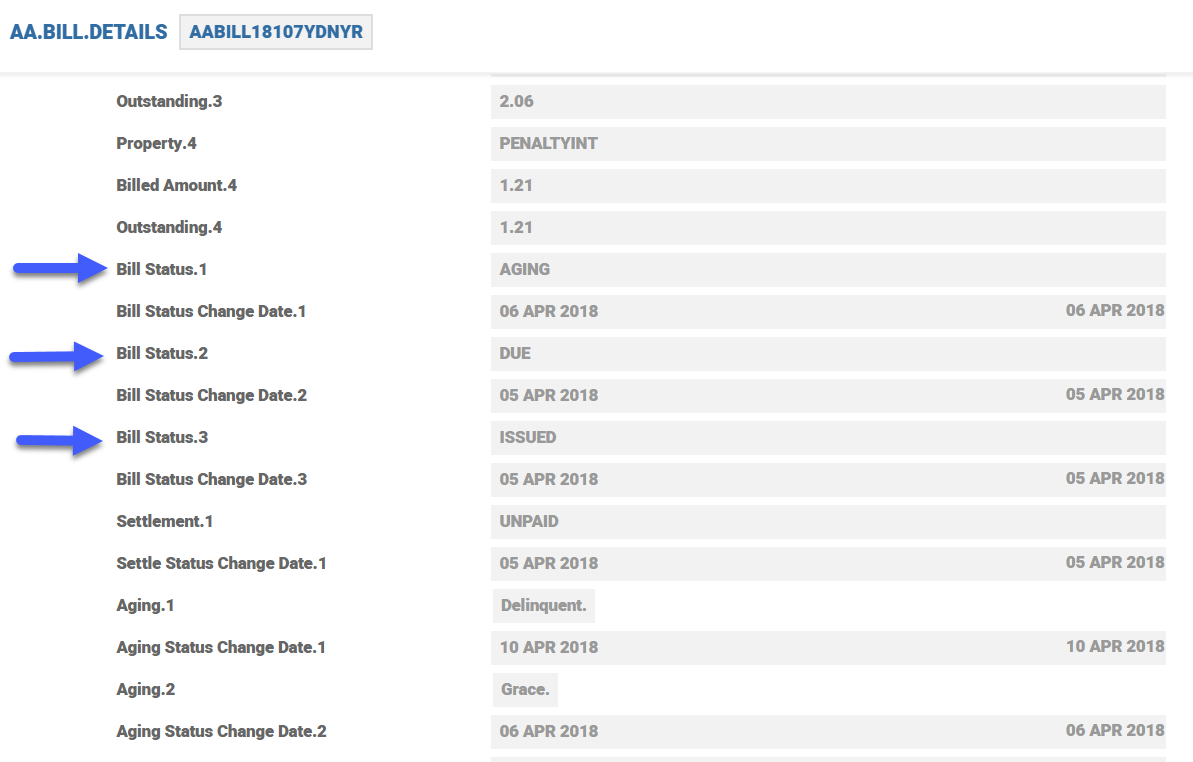
The AA.BILL.DETAILS table has three sets of attributes related to bill settlement.
- Bill .Status – Bills are issued, made due or paid or deferred, then capitalised or settled. Bill status also takes the Ageing status but it is not applicable for Accounts.
- Settlement – The new bills issued are in a status UNPAID status till they move to REPAID status (SETTLED in the case of capitalise option).
- Ageing – Bills The age of bills are based on the Overdue Property Class setup. It is not applicable for accounts that. Accounts have overdraft facility. Ageing for OD is part of the Limit Property Class.
This table also contains the Original Amount, Outstanding Amount and Adjusted Amount for every Property in the Bill and also in Total.
Relative Dates
The Payment .Schedule Property is used in the following Product Lines Lending, Deposits and Accounts. For all the Product Lines, it can be used to either repay/pay interest and charges, capitalise and rollover deposits. These events happen on a frequency as defined in the Payment Freq attribute. In each case, a bill is produced for the customer to either receive or pay the interest as required.
The following relative events can be defined:
- START - First deposit, first disbursement.
- MATURITY - Maturity of Arrangement.
- RENEWAL - Renewal date for Arrangement
- Statement - Statement date of Statement Cycle 1
System calculates the relative date during New Arrangement, Update Statement, Change Payment Schedule Activities and cycles forward the next schedule date.
The actual statement date is used for scheduling and no adjustments based on Date Convention is done in this case.
Defining the Start and End Dates.
The Start and End attributes are used to define the Payment Schedule in such a way that all the schedules can fall within this period.
Input into the Start and End attributes has to be done in any of the below manner.
- R_XXXX + 2D - (Relative event XXX and offset by 2 Calendar days forward)
- R_XXXX - 5Y - (Relative event XXX and offset by 5 Years backward)
- D_20001130 - ( Exact date specified as 30th Nov 2000)
Following relative events can be defined:
- START - First deposit, first disbursement.
- MATURITY - Maturity of arrangement.
- RENEWAL - Renewal date for arrangement.
Defining the Start Date and End Date
The Start and End fields are used to define the Payment Schedule in such a way that all the schedules can fall within this period.
The user can input the Start and End fields in any of the following ways:
- R_XXXX + 2D - (Relative event XXX and offset by 2 Calendar days forward)
- R_XXXX - 5Y - (Relative event XXX and offset by 5 Years backward)
- D_20001130 - ( Exact date specified as 30th Nov 2000)
The following relative events can be defined:
- START - First deposit, first disbursement
- MATURITY - Maturity of Arrangement
- RENEWAL - Renewal date for Arrangement
Example for a relative date definition in the Payment Schedule:
The user can specify a date in the Start .Date or End .Date field as shown in the below screenshot.
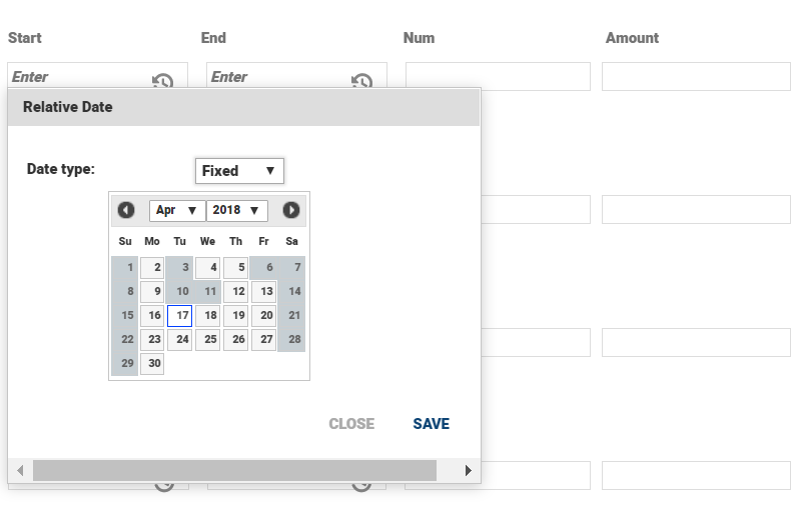
Upon selecting the above date 17th Apr 2018, the system populates the date as D_20180417.

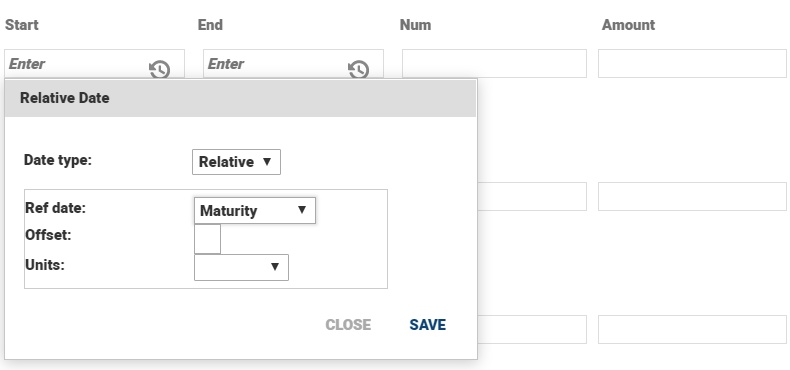
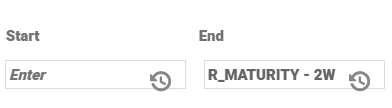
The user can define a relative date in the Start Date or End Date field based on events as shown in the below screenshots. In the below example, The illustration shows how to define an End Date as 2 weeks before Maturity, event selected as Maturity and the offset period defined -2.
Defining the event for relative date.
Defining offset period for relative date.
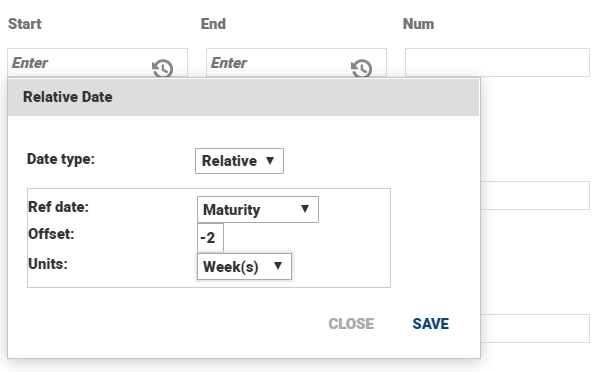
Upon selecting the dates, the value appears as R_MATURITY – 2W as shown in the below screenshot.
Flexible Payment Limit
The flexible payment limit definition and processing areis now satisfied through AA’s Periodic Rule functionality. Two Periodic Attribute Classes (PACs), which can be used by the Payment Schedule Property Class are created. The Product level requirement to specify a maximum limit is managed by a Negotiation Rule on the Periodic Attribute.
Although requirement is for a revolving limit has been created for both Revolving and Non-Revolving PACs to satisfy a broader range of requirements. Using the Periodic Attribute functionality of AA also allows banks to create period- based versions of these rules (for example,1000 USD Flexible Payment Amount Limit per year).
Both these PACs validate any Holiday schedule exception that is requested by thea customer to ensure that they remain within the limit amount established on the arrangement for the period specified. In addition, the Revolving PAC uses any extra payments to principal to restore any utilized amount of the limit.
New Periodic Attribute Classes
Both the HOLIDAY.LIMIT and HOLIDAY.LIMIT.REVOLVNG PACs have the following characteristics in common:
| Attribute | Value | Description |
|---|---|---|
| Property Class | PAYMENT.SCHEDULE | This PAC can only be used in the Payment Schedule Property Class |
| Comparison Type | MAXIMUM | Amount entered is the maximum allowed |
| Data Type | AMT | The rule is expressed as an amount |
Periodic Attribute
The bank can then create a Periodic Attribute from the appropriate PACs. The Periodic Attribute includes the period for which the rules applies; in this case, the life of the arrangement. The following is an example:
| Attribute | Value | Description |
|---|---|---|
| ID | FLEXIBLE.PAYMENT.LIMIT[KS1] | |
| PAC | HOLIDAY.LIMIT.REVOLVING | |
| Period Type | LIFE | The RULE period is for the life of the Arrangement. |
| Comparison Type | MAXIMUM | |
| Rule Start | ARRANGEMENT | The rules begin upon establishment of the Arrangement. |
Multi-value and Sub-value Support for Negotiation Rules
- Each negotiation rule is defined using a multi-value set of attributes which begin with Nr Attribute. Nr Attribute does not clearly define the attribute for which the negotiation rule applies.
- This enhancement provides a mechanism helps to specify which Nr .Attribute the negotiation rule applies to. This is accomplished by adding an additional Nr .Attribute .Rule attribute in which a user specifies a rule defining a value or values within a multi-value and/or sub- value set to pinpoint the specific attribute.
- The same mechanism is used for Progressive Disclosure to define these rules. Attribute Rules can be specified based upon the value of a single attribute or the values from multiple attributes. The user can then specify comparison operators (that is,. ==, !=. <, <=, >, >=), AND or OR, as well as brackets or parentheses for grouping.
- It should be noted that in the Negotiation Rule set of attributes, users can set up multiple rules per attribute; negotiable, non-negotiable, mandatory, resetting, non-resetting, fix value, and override on change of default. The new Attribute Rule applies for all of these options.
- The following are some examples of rules which could apply for negotiation:
- Key: Attribute Name, Comparison Operator, Literal Value, Boolean Operator, Brackets
EXAMPLE:
Maximum Flexible Payment Limit of 100,000:
| Attribute | PR.VALUE |
| Attribute Rule | PR.ATTRIBUTE == ‘FLEXIBLE.PAYMENT.LIMIT’ Must have a space delimiter between expression and Attribute name and values |
| Options | NEGOTIABLE |
| Type | MAXIMUM |
| Value | 100,000 |
EXAMPLE:
Customer Margin Range of 0.025 to 0.100 if Periodic or Floating Rate:
| Attribute | MARGIN.RATE |
| Attribute Rule | (PERIODIC.INDEX != ‘’ OR FLOATING.INDEX != ‘’) AND MARGIN.TYPE == ‘CUSTOMER’ Must have a space delimiter between expression and Attribute name and values. |
| Options | NEGOTIABLE |
| Type | RANGE |
| Value | 0.025 0.100 |
Dynamic Amounts in Negotiation Rules
To provide flexibility in negotiation rules at Product level, the negotiation rule value must be dynamic, varying according to arrangement conditions, (that is, arrangement specific) and is defined as a percentage of the amount of the loan. To define the value, the user needs to specify both a percentage and what that percentage is calculated on. This allows for the percentage to be calculated on a balance by enhancing an existing Nr Value attribute and adding a new Nr Value .Sourceattribute.
| Attribute | Description | Example | |
|---|---|---|---|
| XX- | Type |
Existing Attribute |
MAXIMUM |
| XX- | Value | Existing Attribute For Nr Types which allow an amount to be entered, the user is now able to enter either an amount or a percentage. | 10% |
| XX- | Value Source | For an Nr Value which is defined as a percentage, this attribute is mandatory. Currently supports balances through the following format: BALANCE.TYPE>Name | BALANCE.TYPE> TOTCOMMITMENT |
During evaluation at the arrangement level, the above negotiation rule compares the amount entered in by the user in Pr Value to 10% of the TOTCOMMITMENT balance.
Processing of the Periodic Rule
Rule Trigger
All periodic rules specified on the Payment Schedule get evaluated each time the details of the schedule changes. Changes to the schedule can be a result of thea user Activity (for example, change schedule or define holiday), a transaction (for example, principal reduction), or a scheduled Activity (for example, interest rate change).
Rule Evaluation
During evaluation of a Periodic Rule based on HOLIDAY.LIMIT, the system compares the total of all payment amount reductions during the specified period against the limit entered on the arrangement to ensure the established limit is not breached.
For a rule based upon HOLIDAY.LIMIT.REVOLVING, the system offsets the total of the payment amount reductions by any early principal repayments and compares the amount against the limit entered on the arrangement.
Revaluation of the Rules on Schedule Change
Each holiday requested by the user is defined according to how much the user pays not by how much the bill is reduced. If for example, a scheduled payment is for 1500 USD and the user elects to pay 500 USD , the system stores 500 USD as the new amount for that scheduled payment. At this point ofin time, the requested holiday reduces the limit by 1000 USD.
If the scheduled payment amount change prior to the holiday, the rule is re-evaluated. If for example, there is a significant rate change and the standard repayment amount increases to 1600 USD, the rule is re-evaluated and since the user requested to pay 500 USD the limit is reduced an additional 100 USD (that is, 1100 USD as opposed to 1000 USD).
This also means that it is possible to break the limit during standard system processing and not only during a user Activity. As a result, the system recommends that the Periodic Rule is set up to generate an override rather an error so that during system processing any changes are automatically approved but during a user initiated Activity, an approval is required to exceed the limit.
Available Limit
An enquiry mechanism is provided which allows the rule to be evaluated so that can display to the user the amount of the Holiday Limit still available for use.
Month-End Repayment Schedules
To know how the repayment schedule works when it falls on a holiday read Date Convention and Adjustment in the Account Property Class.
Payments that are scheduled for the during last few days of month will have a change in schedule date for the month of February.
Consider a schedule is every month on 30th. For February, it moves to 28,Feb (to 29, Feb if the year is a leap year. In this scenario it is a non-leap year). The next schedule falls on 28, Mar automatically considering the monthly frequency. This is incorrect when the schedule agreed with customer is the 30th of the month.
Base Day Key in Payment Schedule decides if the next schedule after February is:
- Option Previous: Based on the previous schedule date the next schedule will fall on 28 March.
- Option Base: Based on the given base date in payment schedule that is every month 30th schedule, the next schedule will fall on 30th March.
NOTE: When the Base Day Key field is left blank or Null, the default option (Previous) is used by the system.
This feature can be enabled when:
- Date Convention is selected as Forward, Forward Same Month or Backward, with Date Adjustment as Period.
- Does not get enabled when Date Convention is Calendar.
- Does not get enabled when Date Adjustment is Value.
- This feature is applicable only for recurrence pattern monthly in the frequency.
- During a new arrangement creation, the start date of schedule can be a specific or relative date. If that points to a month end schedule and Base Day Key is set to Base then the schedule date will be continued after February.
- Does not apply for weekly, daily, yearly, defined frequency, advanced.
- Does not apply to “Day “specified in Monthly frequencies. For example this feature does not apply for “e0Y e1M e0W o30D e0F”
- The option for Base Day Key field can be input only for NEW and TAKEOVER activities.
- The Base Day Key is reset in the following scenarios:
- Start Date is provided/removed during an amendment activity
- Payment frequency is changed and is no longer monthly
- For CHANGE SCHEDULE activity, the system continues with the existing arrangement behaviour.
If the Base Day Key field is changed at arrangement level, then the system throws an error.
- For Renewal activities like CHANGE.PRODUCT the system calculates the repayment cycle date as per the old product payment schedule even though the Resetting attribute is configured as Yes and the new product payment schedule is changed.
- For ROLL OVER activity, the system continues the payment schedule as per the old product.
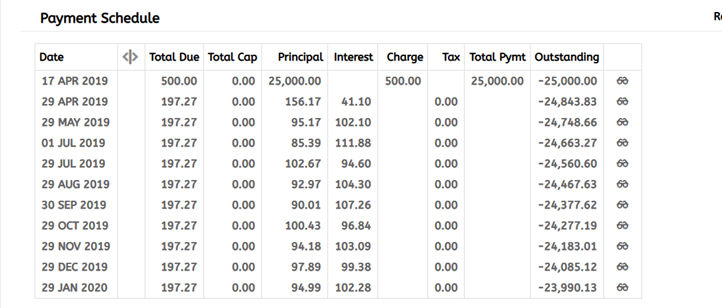
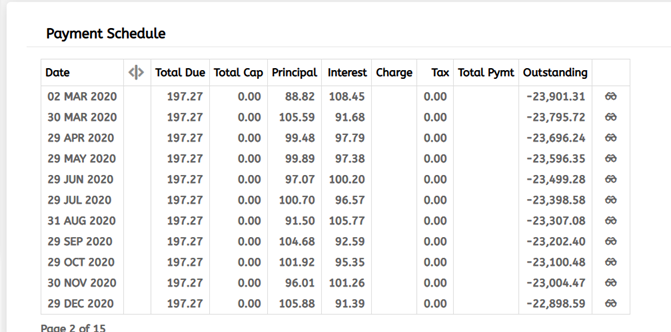
Below is an example where the Base Day Key is set to Base and the Date Convention is Forward. 28 Feb, 29 Feb, 01 Mar, 28 Mar, 29 Mar are holidays. So the schedule dates are 29 Jan, 2 Mar, 30 Mar and 29 April and thereon.
Wrapper Routine for a Core API to Expose Payment Schedules
The AA.SCHEDULE.PROJECTOR core routine can be configured to return the payment schedule amounts ignoring Actual Amt specified in the payment schedule. The external API, which calls the core routine should pass a special flag to the schedule projector routine as part of the arguments to return the payment schedule amounts ignoring Actual Amt specified in the payment schedule. The ARRANGEMENT.ID is an incoming argument for AA.SCHEDULE.PROJECTOR. The third position (delimited by field marker) should be assigned with the flag “IGNORE.ACTUAL.AMT”.
EXAMPLE: ARRANGEMENT.ID<3> =” IGNORE.ACTUAL.AMT”
Periodic Attribute Classes
The Payment Schedule Property Class provides the following Periodic Attribute Classes from which users may define Periodic Attributes.
- HOLIDAY.LIMIT
- HOLIDAY.LIMIT.REVOLVING
Actions
The Payment Schedule Property supports the following actions:
| Action Name | Description |
|---|---|
| ADJUST.CAP | When system tries to adjust the ACCOUNT portion of the bill to match minimum payment amount & the adjustment amount is more than what is outstanding in CURACCOUNT, then system would restrict the adjustment to what is available CURACCOUNT. |
| ADJUST.DUE | To adjust the make due bills for the Account product line. |
| ADVANCE.RESET | Advance Reset action for Payment schedule. |
| ADVANCE.SCHEDULE | Bills for a payment, can be generated by specified number of days in advance by indicating number of advance days in Bill Produced field–E.g. if interest is to be made due to customer on the 10th of every month and bill is to be issued on the 9th (previous working day), this field should be set as 1. |
| ALLOCATE.ADVANCE | Advance Bill Settlement Action. |
| CALCULATE | Calculate payment schedules and residueal based upon term amount, interest, charges, and amortisation period. |
| CANCEL.BILLS | Update actionfor for payment schedule to cancel the bills. |
| CANCEL.DEPOSIT | Cancel Deposit action for the Payment schedule. |
| CANCEL.EXP.BILLS | To cancel the expected bills from the Payment schedule. |
| CAPITALISE | The CAPITALISE Action can be initiated by the system. This results in calculation of the accrued interest amount to the requested effective date and the generation of accounting entries. |
| CHANGE | The CHANGE Activity is initiated manually by the user in order to change any of the Payment Schedule attributes. As a result, a recalculation of the Payment Schedule may be performed. |
| CHECK.PROJECTION | Check for online AA capitalise projection. |
| CHECK.SETTLE | Check settle action for payment schedule. |
| CONSOLIDATE | When bills are set to combine, system would raise a consolidated bill for all payment type lines that has a scheduled bill getting due on the same date. BT.MINIMUM.AMOUNT would be considered only when ACCOUNT property is part of the combined bill. If ACCOUNT property is not available, then calculated property amounts are billed at actuals. When ACCOUNT property is available, system would check if the sum of calculated amount per property (including ACCOUNT) is greater or . equal to the minimum amount. If there is a short fall, the difference amount would be increased in ACCOUNT property to match the minimum amount specified. |
| DATA.CAPTURE | Data Capture for the Payment Schedule. |
| DEFER.CANCEL | Make billed amounts as cancelled according to the payment schedule. |
| DEFER.CAPITALISE | Defer capitilisation process for the payment schedule. |
| DEFER.MAKEDUE | Make billed amounts due according to the payment schedule. |
| DEPOSIT | Deposit action for Payment schedule. |
| DISCOUNT.MAKE.DUE | Make Advance Interest Bill and DUE. |
| ISSUE.BILL | Payment Schedules generate Bills when a scheduled amount is not capitalised and made due. Bills for a payment, can be generated on the due date or by specified number of days in advance by indicating number of advance days in Bill Produced field–E.g. if interest is to be made due to customer on the 10th of every month and bill is to be issued on the 9th (previous working day), this field should be set as 1. |
| ISSUE.CANCEL.BILL | Issue bill for cancelled amounts. |
| ISSUE.COMBINE.BILL | When more than one payment falls due on the same date, user can opt for combining the bills. Bills that are issued on the same date and will also become due on the same date are typically combined into a single bill. When bills are set to combine, system would raise a consolidated bill for all payment type lines that has a scheduled bill getting due on the same date. |
| MAKE.DUE | The MAKE DUE Action applies the amount of interest due to be repaid to the DUE interest Property. The amount to be made due is determined from the associated bill that is being made due. |
| PROJECT.CAPITALISE | Online AA process to project for the capitalisation of the bills. |
| RECALCULATE | On Activity field to state a list of activities during which payment schedule is to be recalculated. When those activities are performed, system would automatically recalculate the payment schedule. For example, UPDATE – CHARGE. Recalculate field indicates which payment parameter to change when changes occur to payment schedule or when any specific activity is triggered on the arrangement. The recalculation types are: Payment – the payment amount will be changed. Term – the term of the arrangement will be altered. Residual – the residual amount will be changed. Nothing – the payments, term, and residual will be unchanged. In this case a recalculation frequency should be specified. If "Nothing" is selected, a recalculation frequency should be specified. Progressive Payment – Increase /Decrease in CALC.AMOUNT based on the Progressive Pay Percentage. |
| REDEEM | Redeem action for the payment schedule. |
| RETROSPECT | Schedule ADJUST.CAP and ADJUST.DUE. |
| SETTLE.ADVANCE | Advance bill settlement action for Facility. |
| SETTLE.BILLS | Action routine to settle all the PAY bills of a deposit dormant account. |
| SUSPEND | Suspend scheduling of outstanding Bills for processing. Suspend will not generate any further bills. |
| SUSPEND.OVERDUE | Bills outstanding after due date is the basis for overdue processing. Suspend Overdue will not generate any further bills for the unpaid amount. |
| UPDATE | The UPDATE Action is initiated manually and allows the user to change any of the Interest attributes. This Action is initiated as part of the NEW-ARRANGEMENT and UPDATE- INTEREST Activities. |
| UPDATE.SCHEDULES | When the bill is capitalised the bill is treated as settled. The Settle Status field is updated as UNPAID initially and when the bill is settled it is REPAID. |
Accounting Events
The Payment Schedule Property Class does not perform any actions that generate accounting events.
Limits Interaction
The Payment Schedule Property Class does not perform any actions that impact on the limits system.
Add Bookmark
save your best linksView Bookmarks
Visit your best links BACK
BACK


Are you sure you want to log-off?