







| Bookmark Name | Actions |
|---|
IMPORTANT: As a prerequisite, the system should be configured as per the instructions in the PSD2 installation guide(s).
The client’s must only publish APIs which they would support. Any APIs in the delivered Temenos provided Swagger that the bank does not support should be removed from the Swagger before publishing.
The client’s must only publish APIs which they would support. Any APIs in the delivered Temenos provided Swagger that the bank does not support should be removed from the Swagger before publishing.
Introduction to PSD2
The second Payment Services Direct (PSD2) enables Third Party Providers (TPPs) to gain access to customer’s accounts and initiate payments. It is effective from September 2019.
Application programming interfaces (APIs) facilitate the information exchange and initiation processes.
A number of security layers and authentication processes are required to accept and process requests from TPPs. TPPs must be regulated with the National Competent Authority (NCA) in their home country and may additionally be ‘passported’ to other countries in which they wish to offer their services. A TPP can be registered as one or more of the following:
- Account Information Service Providers (AISP) – account aggregators
- Payment Initiation Service Provider (PISP) – merchants or third parties that can initiate payments on a customer’s account
- Card-based Payment Instrument Issuer (CBPII) or Payment Instrument Issuer Service Provider (PIISP)
TPPs must be regulated as per their role to make specific requests. Processing a request from a TPP depends on the following factors:
- Whether consent is provided by the customer – if required for the call.
- The need for authentication or Strong Customer Authentication (SCA) from the customer – ensures that the customer is making requests against their account(s).
- Checking the customer’s permissions – ensures that the customer has sufficient access to the accounts to which the TPP requests access.
In Temenos Transact, the PSD2 modules are classified into Payment Initiation (PX) and Account Information (PZ) modules.
Read the Account Information Processing (PZ) and Payment Initiation Processing (PX) user guides for more information on each function. The functionality described in this user guide is the Temenos Transact mechanisms delivered as part of the overall PSD2 offering. A number of other non-Temenos Transact user guides should be read to understand the end-to-end flows.
To know more on the notation, refer the glossary.
Solution Overview
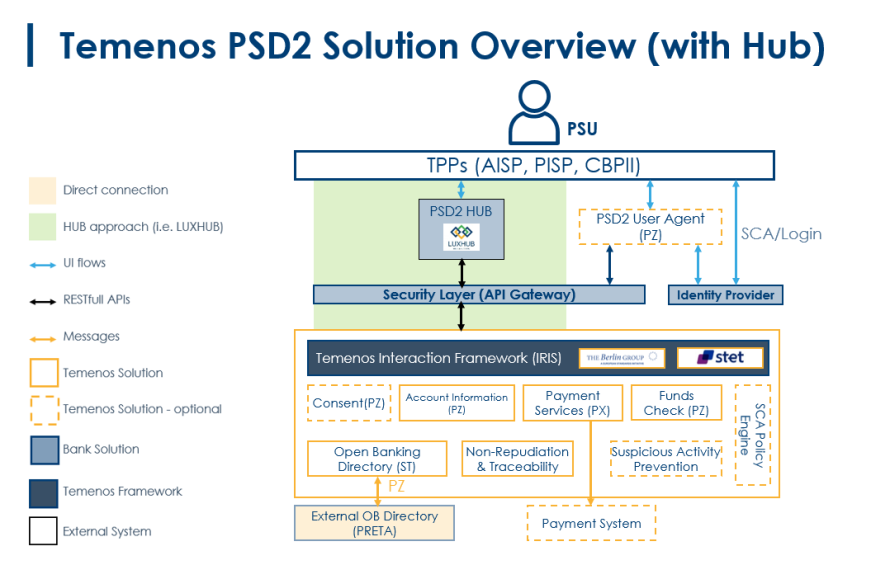
NOTE: Depending on the services offered by the bank and the bank’s existing architecture and systems, the modules required for the bank’s overall solution are impacted.
 Aspects of PSD2 in Scope of Temenos Transact Module(s)
- Open Banking Directory to hold a list of regulated TPPs (ST module)
- TPP Validation and Consent Validation (ST module)
- Consent Framework for AIS calls (PZ module)
- Provider APIs – Temenos Transact enquiries and versions
- Consent Validation (PZ module)
- Account Information APIs (PZ module)
- Payment Initiation or Processing APIs (PX module)
- Initiating Authorisations workflow (PX Payments and PZ Consent)
- Depending on the payment system of the bank
- Payment Order
- Standing Order (STO)
- Funds Transfer (FT)
- Depending on the payment system of the bank
Dependencies
- SEPA module (for Payments)
- IBAN (for Payments)
- AA Framework (for Consent)
- Interaction Framework (IRIS) (for Published APIs)
Aspects of PSD2 not in Scope of Temenos Transact Module(s)
In Scope of Temenos Products
- User Agent – Channels Delivery. Read the User Agent user guide for more information.
- Published APIs – IRIS and Interaction Framework Delivery. Read the IRIS user guide for more information.
- Policy Engine or Fraud Monitoring – Financial Crime Management Product Delivery. Read the FCM user guide for more information.
- Non-repudiation and traceability – Security Product Delivery. Read the Security user guide for more information.
Not in Scope of Temenos Products
- API Gateway or Security Layer – Not provided by Temenos, but is mandatory in the bank’s architecture.
- Identity or Authentication Provider – Not provided by Temenos, but is mandatory in the bank’s architecture.
- PSD2 Hub like LUXHUB – Not provided by Temenos, but can be optionally interfaced with our current offering.
NOTE: Temenos currently supports the Berlin Group workflows using REDIRECT mechanisms for Consent and Payments.
Generic Applications and Processes
As Temenos provides two modules (PZ and PX), there is some processing generic between the two workflows. It includes the following:
Open Banking Directory
The Open Banking Directory holds a list of regulated TPPs who can make PSD2-related requests. It can be manually populated using a core interface with PRETA (depends on the bank’s own subscription to PRETA) or can be configured to be handled externally (for example, when a Hub provides this capability).
Depending on whether the Open Banking Directory is handled externally or within Temenos Transact, this can be configured in the PZ.PARAMETER and PX.PARAMETER applications.
Internal
If the Open Banking Directory is held and maintained within Temenos Transact, the system can perform validations against a TPP that is making a PSD2-related request using the contents of the directory. Only TPPs that are regulated to make the request would be accepted.
External
If the Open Banking Directory is configured externally to Temenos Transact, the Open Banking Directory within Temenos is not populated. The initial TPP validation is handled in an external system and the request does not meet Temenos Transact if the TPP was not regulated.
A separate validation process occurs within Temenos Transact to check if the TPP that made the request is not manually blocked by the bank in Temenos Transact (using the Block Tpp field in PZ.PARAMETER or PX.PARAMETER before accepting the request).
Read the TPP Validation section for more information on the validation processes.
ST.OPEN.BANKING.DIR.API,ST.OPEN.BANKING.DIR.PARAMETER and ST.OPEN.BANKING.DIR.REFRESH
These applications assist in the population of the Open Banking Directory from an external directory, such as PRETA.
Not applicable for LUXHUB clients or clients who have not subscribed to the PRETA directory services.
Read the installation guide for more information on these applications.
PZ.OPEN.BANKING.DIR
This application holds the list of regulated TPPs who are allowed to make PSD2-related requests.
It holds a set of information about the TPP as per PRETA’s directory content. It includes its name, global unique identifier and also their regulated roles and countries in which they are allowed to operate.
This application can be manually or automatically populated through an interface with directories (such as PRETA). Temenos Transact supports an automated interface with PRETA, which means the PRETA directory can be uploaded automatically through an interface.
NOTE: The automated interface of the directory is subject to banks having their own subscription to PRETA.
Both of these approaches can be taken when the Obd Provider field in PZ.PARAMETER or PX.PARAMETER is set as a valid ST.OPEN.BANKING.DIR.PARAMETER Record ID value.
If the value of the Obd Provider field in the parameter table(s) is set as EXTERNAL, this application should not be populated as the TPP Validation is handled before reaching Temenos Transact.
The screenshot below shows an example of the application, a quick summary of each field and its intended use:
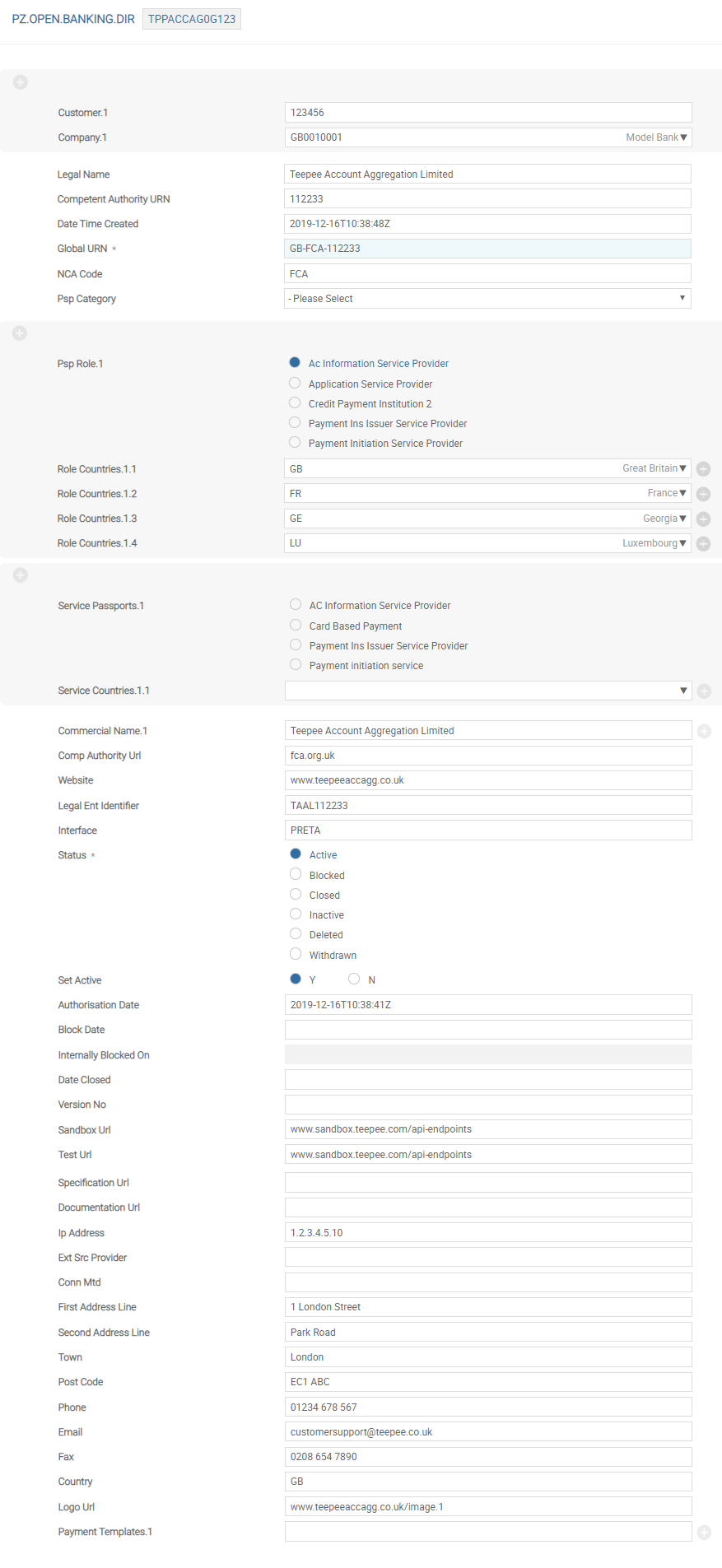
| Field | Description |
|---|---|
| Customer |
If the TPP company is also a customer within Temenos Transact, this field can be populated with a valid Temenos Transact customer number.
This field is optional and is manually entered by a user. The value in this field is not populated through an interface and is used for informational purposes only. |
| Company | Transact company of the customer in the previous field. This field requires manual input. |
| Legal Name | Registered name of the TPP, as per the NCA. |
| Competent Authority URN | Unique Reference Number (URN) of the TPP at the NCA. |
| Date Time Created | Date and time that the TPP was uploaded to the Directory. This is a no-change and mandatory field. |
| Global URN |
Global URN of the TPP. This should be a unique reference.
It includes a country code, NCA identifier and then a unique numeric value.
For example, GB-FCA-100008. |
| NCA Code | ID of the record in the NCA table, which contains the NCA data for this record. |
| Psp Category | Valid TPP category |
| Psp Role |
Multi-value field and is used to define the role for which the TPP is registered. It is used in the TPP Validation process to check if the TPP is allowed to make a particular request. The allowed options for this field are:
|
| Role Countries |
This field is the second part of a multi-value set and is linked to the Psp Role field. It holds the country in which the TPP is regulated to operate its services for the specific role mentioned in Psp Role. For example, if a TPP is regulated as an ‘Account Information Service Provider’ in both Great Britain and France, the Psp Role would be Account Information Service Provider and the Role Countries value would be GB and FR. This value is used during the TPP Validation. A comparison is made against the Local Country of the COMPANY receiving the request.
|
| Deleted |
Allowed values are:
|
| Service Passports | Currently not in use. |
| Service Countries | Currently not in use. |
| Commercial Name |
Multi-valued list of commercial names for the entity. For example, Google Payments, Google Pay. If there is a single commercial name, only one name is recorded here. |
| Comp Authority Url | URL to the NCA source of this data. |
| Website | Website of the TPP as specified in the NCA Register. |
| Legal Ent Identifier | Free text field. The Legal Entity Identifier of the entity as specified in the NCA Register. It accepts alphanumeric characters. |
| Interface | Free text field. Enter the name of interface. For example, PRETA. |
| Status |
Holds the NCA or PRETA status of the TPP.
Allowed options are:
|
| Set Active |
This field is not populated from the external directory and must be manually input and maintained by an authorised bank user.
It holds the bank’s (ASPSP’s) own status of the TPP and whether they want to actively accept requests from this TPP.
In validation processes, it is used in conjunction with the Status field.
Allowed values are:
|
| Authorisation Date | Date on which the entity is authorised by the NCA. |
| Block Date | Date on which the entity is blocked by NCA. It is mandatory when Status is BLOCKED. |
| Internally Blocked On |
No input field. If Set Active field is changed from any other value to N, the current server date and time are captured in this field. Reset to NULL if Set Active is changed from N to any other value. |
| Date Closed | Holds the date the entity is withdrawn from the NCA Register. |
| Version No |
Holds the version number of the TPP record from the external directory. This version increments each time a new version is published and refers to the version number in the NCA directory. This may be part of a regular download (daily) or based on a real-time update when the source data changes. |
| Sandbox Url | Optional field |
| Test Url | Optional field |
| Specification Url | Optional field |
| Documentation Url | Optional field |
| Ip Address | Holds the registered IP address of the TPP. |
| Ext Src Provider | Free text field |
| Conn Mtd | Holds the connection method. It is an optional field. |
| First Address Line | Holds the first line of the TPP’s registered address. |
| Second Address Line | Holds the second line of the TPP’s registered address. |
| Town | Holds the town of the TPP’s registered address. |
| Post Code | Holds the postcode of the TPP’s registered address. |
| Phone | Holds the registered telephone number of the TPP. |
| Holds the registered email address of the TPP. | |
| Fax | Holds the registered fax number of the TPP. |
| Country | Holds the country of the TPP’s registered address. |
| Logo Url | Includes the URL link to the TPP’s registered logo. |
| Payment Templates | Types of payments allowed for an entity. |
| Time Zone | Time zone in which the TPP operates. |
| Alternate Id | Holds any alternative identifiers of the TPP, if required. |
Configuration
As a prerequisite, the system should be configured as per the installation guide.
-
Overview of the Open Banking Directory
The Open Banking Directory holds a list of the regulated TPPs who can make PSD2 related requests. The Open Banking Directory can be manually populated, populated using a core interface with PRETA*, or can be handled externally (like in LUXHUBs case).
Depending on whether the Open Banking Directory is handled externally or within Temenos Transact, it can be configured in the Obd Provider field in
PZ.PARAMETERorPX.PARAMETERtables.- Internal Validation – If the Open Banking Directory is held within Temenos Transact, the system can perform validations against any TPP that makes a PSD2 related request. Only TPPs who are regulated to make the request are accepted. The validation checks the contents of the Open Banking Directory records to identify if the TPP is regulated or not.
- External Validation – If the Open Banking Directory is handled externally to Temenos Transact, the Open Banking Directory within Temenos is not populated. Before accepting the request, the validation process checks if the TPP making the request is not manually blocked in the system.
Read the TPP Validation section for more information on the validation processes.
The configuration of this is detailed below in the document.
-
Automated Population of the Directory through PRETA Interface
The system provides a mechanism to interface with an external Open Banking Directory called PRETA. The bank must have their own subscription to PRETA to use this functionality.
This document outlines the step-by-step process of using this interface to populate the system’s internal Open Banking Directory application (
PZ.OPEN.BANKING.DIR) used during TPP Validation process.The intention of holding an Open Banking Directory within Transact is for clients where the TPP Validation does not happen externally (that is, like a PSD2 Hub such as LUXHUB). By internally populating the directory, banks hold an updated list of all regulated TPPs (and their allowed roles and services). This internal directory can then be validated against, when any API call is made.
The Open Banking Directory can be populated automatically through PRETA, or manually.
This document outlines the automatic process to:
- Perform the initial upload of the PRETA Directory into Temenos Transact.
- Run ongoing updates to ensure the most up to date information is recorded and used for validation (get all changes in the directory).
- Get a specific TPP’s information.
- Get a specific versions of a TPP’s information.
- Accept a ‘push’ request from PRETA.
Temenos currently only supports an automated interface with PRETA (where the bank has a subscription).
Any other external Open Banking Directory needs a customised solution to be interfaced with Temenos Transact.
-
Configuration Tables
The configuration and processing of the Open Banking Directory upload is handled within a number of parameter tables.
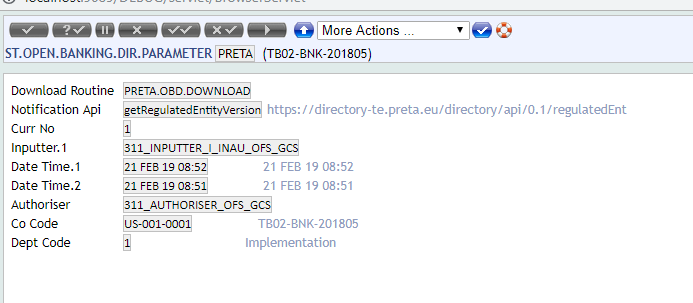
ST.OPEN.BANKING.DIR.PARAMETERThis application defines the connection between Temenos Transact and the external directory (PRETA). It is used within a ‘push’ process from PRETA for changes to the directory after the initial download.
This record must be created first and used during later processing. The application is consists of the following fields:
@ID − The ID of the record should be PRETA for the PRETA download.
Field Description Download Routine Set as PRETA.OBD.DOWNLOAD. This routine is delivered from Temenos. Notification Api This is updated once the subsequent ST.OPEN.BANKING.DIR.APItable is created for getRegulatedEntityVersion.Updates to PZ and PX Parameters
Once a value is created in this application, the ID of the record should be populated in the Obd Provider field in
PZ.PARAMETERorPX.PARAMETERapplications (depending on the modules installed).This helps with TPP validation in a later process to identify the
PZ.OPEN.BANKING.DIRrecords to validate against.PZ.PARAMETERPX.PARAMETER
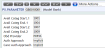
ST.OPEN.BANKING.DIR.APIThis application must be used by bank administrators only. This application is one of the main parameter applications for the PRETA download and helps in the initial and continuous download of TPP information from PRETA.
This application holds the definition and expected values for API routines specified by PRETA which is used to retrieve the TPP data. The names and expected processing of these routines are as follows:
PRETA Specified API Intended use getAllRegulatedEntityChanges Used for the initial download of PRETA data. It obtains the entire list of regulated TPPs and the respective details.
Also used for the initial download of TPP data and on an ongoing basis.getRegulatedEntity Used by an ASPSP to request the recent details of a specified TPP. getRegulatedEntityVersion Used by an ASPSP to request the details of a specific version of TPP. A record must be created in the
ST.OPEN.BANKING.DIR.APIapplication for each of the above APIs. Read Expected Configuration for each API record for more information.The application consists of the following fields:
 NOTE: In the above screenshot the API key is hidden for security purposes. This should be populated using the API key provided to the bank by PRETA.
@ID − This includes one of the following:
- getAllRegulatedEntityChanges
- getRegulatedEntity
- getRegulatedEntityVersion
It is not recommended to create any other record ID at this time.
Field Description Url URL provided to the ASPSP by PRETA. Note: The URLs in the below configuration screenshots are test URLs. Parameter Multi value field and allows the following EB.OBJECTs: - API-Key
- recordDate
- maximumResults
- globalUrn
- recordVersion
Type Explains where the parameter is used within the routine.
Allowed values are:- Header
- Path
- Query
Mandatory Defines if the value in the following field is mandatory.
Allowed values are:- Yes
- No
Value Default value of the field. Its value is dependant on the Parameter field. EB.OBJECT Description Applicable to API? getAllRegulated
EntityChangesgetRegulated
EntitygetRegulated
EntityVersionAPI-Key Provided by PRETA and is the license key to access their data.
It must only be available within this application and not available to all bank staff.Yes Yes Yes recordDate Starting date when TPP data must be returned. Yes No No maximumResults Maximum number of results that should be returned by PRETA at a time. It can be used for performance purposes, if required. Yes No No globalUrn Used to specify the Global URN reference of a TPP data for which data is required. No Yes Yes recordVersion Used to specify the record version of a TPP No No Yes These values can be overridden in the
PZ.OPEN.BANKING.DIR.REFRESHapplication.Expected Configuration for each API record
getAllRegulatedEntityChanges
The record should be configured as given below.
NOTE: The API key is hidden for security purposes. This should be populated using the API key provided to the bank by PRETA.getRegulatedEntity
The record should be configured as given below.
 NOTE: The API key is hidden for security purposes. This should be populated using the API key provided to the bank by PRETA.getRegulatedEntityVersion
The record should be configured as given below.

Once this record is created, this value must be populated in the Notification Api field in
ST.OPEN.BANKING.DIR.PARAMETER.NOTE: The API key is hidden for security purposes. This should be populated using the API key provided to the bank by PRETA.ST.OPEN.BANKING.DIR.REFRESHThe
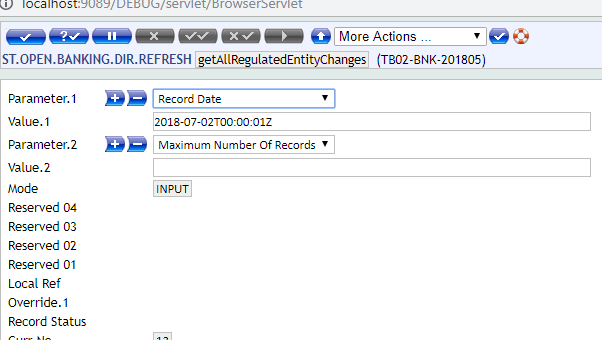
ST.OPEN.BANKING.DIR.REFRESHapplication creates a trigger to retrieve the content of the PRETA Directory. This process allows the bank to have the most up to date information from PRETA, which includes the list of regulated TPPs, their roles and passports.Read Automated PRETA Download section for more information on the workflow for each PRETA download process. However, these records must be configured as a prerequisite to the process. The following APIs are outlined by PRETA:
- getAllRegulatedEntityChanges
- getRegulatedEntity
- getRegulatedEntityVersion
A corresponding record for each API must also be created in this application and verified to trigger the relevant process.
When the user inputs the record @ID, the values from the corresponding
ST.OPEN.BANKING.DIR.APIrecord default in the Value field. A user can modify these values, if required.Based on the authorisation of the record, a trigger is created. This trigger is then picked up in the ST.OBD.DOWNLOAD service.
The application is made up of the following fields:
@ID − It must match one of the ST.OPEN.BANKING.DIR.API records.
Field Description Parameter Defaults from the corresponding ST.OPEN.BANKING.DIR.APIrecord and is a no change field.NOTE: In the above screenshot the API key is hidden for security purposes. This should be populated using the API key provided to the bank by PRETA.Value Defaults from the corresponding ST.OPEN.BANKING.DIR.APIrecord and is amendable by a user, if required.Mode Defines the status of the record’s processing. Allowed values are: - INPUT – When the record is amended (in the process of creating a trigger).
- PROCESSED – When the record is processed (the trigger is processed).
 ST.OPEN.BANKING.DIR.URL (Concat)
On approval of the
ST.OPEN.BANKNIG.DIR.REFRESHrecord, a URL is created and the system automatically creates a record in a concat fileST.OPEN.BANKING.DIR.URL. This URL is used within the IRIS layer to request or retrieve the data from PRETA.The concat file contains the following information:
@ID − This is a valid @ID from
ST.OPEN.BANKNIG.DIR.REFRESH.Field Description Url Holds the URL used to access PRETA. Header Unique key used to connect to the PRETA directory. This value differs for each interface. ST.OBD.DOWNLOAD (BATCH)
The below screenshot shows a trigger, which is created based on a
ST.OPEN.BANKNIG.DIR.REFRESHrecord being authorised.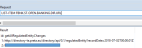 NOTE: In the above screenshot the API key is hidden for security purposes. This should be populated using the API key provided to the bank by PRETA.
A batch process is used as a service to pick up the trigger and populate the directory accordingly. The batch process is called ST.OBD.DOWNLOAD.
 ST.OBD.DOWNLOAD (SERVICE)
The following service picks up triggers created by the
ST.OPEN.BANKING.DIR.REFRESHapplication.It is suggested to set to this service to ‘AUTO’ to automatically process the triggers when created.
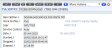
PZ.OPEN.BANKING.DIRThis application holds the list of the regulated TPPs who are allowed to make PSD2 related requests. It holds information about the TPP, which includes its name, global unique identifier and also their regulated roles and countries where they are allowed to operate.
This application can be handled in the following ways:
- Automatically updated by PRETA
- Manually updated by the bank
- Externally managed (TPP validation not handled in Temenos Transact)
NOTE: Both of the above approaches can be taken when the Obd Provider field in thePZ.PARAMETERorPX.PARAMETERis set as a validST.OPEN.BANKING.DIR.PARAMETERrecord ID value.Automatically updated by PRETA
This application is populated with the list of TPPs as per the PRETA directory once the configurations are set and the service is run. It holds the relevant information about a TPP as per PRETA’s directory. Read Automated PRETA Download for information on the automated interface.
Manually updated by the bank
This application can be manually populated by the bank. Each TPP record and content should be manually input by an authorised bank user. Read Manual Population of Open Banking Directory for more information on this configuration.
Externally managed (TPP Validation not handled in Temenos Transact)
If the value of the Obd Provider field in the parameter table(s) is external, this application should not be populated. This is in the example of LUXHUB, where the TPP validation is handled within LUXHUB and therefore is not required to be validated in Temenos Transact. Read TPP Validation is managed externally for more information on this configuration.
A screenshot of the application is shown below.

-
Mapping between PRETA and Temenos Open Banking Directory
Mapping between the PRETA Directory and Temenos Transact
PZ.OPEN.BANKING.DIRapplication is provided below.PRETA Response PZ.OPEN.BANKING.DIRFieldaddressLine1 FIRST.ADDRESS.LINE addressLine2 SECOND.ADDRESS.LINE commercialNames COMMERCIAL.NAME competentAuthorityCode NCA.CODE competentAuthorityCountry competentAuthoritySourceUrl COMP.AUTHORITY.URL competentAuthorityStartedDate AUTHORISATION.DATE competentAuthorityStatus STATUS competentAuthorityUrn NCA.URN Country COUNTRY dateStopped BLOCK.DATE Deleted NA directoryStatus STATUS Email EMAIL Fax FAX globalUrn GLOBAL.URN legalEntityIdentifier LEGAL.ENT.IDENTIFIER Name LEGAL.NAME recordVersion VERSION.NO recordDate DATE.TIME.CREATED Phone PHONE postalTown TOWN.COUNTRY Postcode POST.CODE pspCategory PSP.CATEGORY pspRolePassports NA * role PSP.ROLE * countries ROLE.COUNTRIES pspServicePassports NA *Service * countries Website WEBSITE withdrawalDate DATE.CLOSED latestRecordDate -
Automated PRETA Download
The expected five stages of the PRETA download are as follows:
- Initial Download of Data
- Subsequent Update of All TPP Data
- Update one TPP’s Data
- Retrieve one TPP’s Data for a specified version
- Receive a ‘Push’ Update from PRETA
This document outlines a step by step of each process.
-
Prerequisites
As a prerequisite, the following applications are configured as explained above.
ST.OPEN.BANKING.DIR.PARAMETERST.OPEN.BANKING.DIR.APIST.OPEN.BANKING.DIR.REFRESHST.OPEN.BANKING.DIR.URL(Concat)ST.OBD.DOWNLOAD(BATCH)ST.OBD.DOWNLOAD(SERVICE)
-
Initial Download of Data
- Open
ST.OPEN.BANKING.DIR.REFRESHapplication. - Input record of getAllRegulatedEntityChanges.
- Change the relevant values, if required and commit, validate and authorise the record.
- A URL is created and stored in the
ST.OPEN.BANKING.DIR.URLconcat file. - A trigger is created.
- The ST.OBD.DOWNLOAD service picks up the trigger and processes the request. The below is a sample COMO log:
- FETCH control list is the number of records fetched from the ST.OPEN.BANKING.DIR.URL table.
- SPLIT control list is the number of TPP records fetched using the PRETA URL specified. The sample log shows a full download so the number of records is 157.
PZ.OPEN.BANKING.DIRapplication changes from blank to being populated with all PRETA TPP information. A record is created for each TPP. A sample is provided below.

Enter the initial Mode as INPUT.
NOTE: If any other user tries to input the same record when the service is not completed, an error is shown.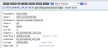
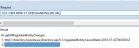 NOTE: The API key is hidden for security purposes. This should be populated using the API key provided to the bank by PRETA.
In the highlighted lines, the number of records fetched for processing in each step is shown.
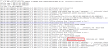
The Mode on the REFRESH record is updated to Processed.

- Open
-
Subsequent Update of All TPP Data
- Open
ST.OPEN.BANKING.DIR.REFRESHapplication. - Input record of getAllRegulatedEntityChanges.
- Commit, validate and authorise the record.
- A URL is created and stored in the
ST.OPEN.BANKING.DIR.URLconcat file. - A trigger is created.
- The service picks up the trigger and processes the request.
PZ.OPEN.BANKING.DIRapplication is overwritten with the latest values from PRETA.
- Open
-
Updating one TPP’s Data
- Open
ST.OPEN.BANKING.DIR.REFRESHapplication. - Input record of getRegulatedEntity.
- Commit, validate and authorise the record.
- A URL is created and stored in the
ST.OPEN.BANKING.DIR.URLconcat file. - A trigger is created.
- The ST.OBD.DOWNLOAD service picks up the trigger and processes the request. The below is a sample COMO log.
- FETCH control list is the number of records fetched from the
ST.OPEN.BANKING.DIR.URLtable. - SPLIT control list is the number of TPP records fetched using the PRETA URL specified. The sample log shows single record download so its 1.
- The details of the specified TPP is updated in the
PZ.OPEN.BANKING.DIRwith the latest values.

 NOTE: The API key is hidden for security purposes. This should be populated using the API key provided to the bank by PRETA.
In the highlighted lines, the number of records fetched for processing in each step is shown.
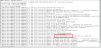
The Mode on the REFRESH record is updated to Processed.
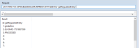
- Open
-
Retrieve one TPP’s Data for a specified version
- Open
ST.OPEN.BANKING.DIR.REFRESHapplication. - Input record of getRegulatedEntityVersion.
- Commit, validate and authorise the record.
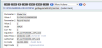
- A URL is created and stored in the
ST.OPEN.BANKING.DIR.URLconcat file. - A trigger is created.
- The ST.OBD.DOWNLOAD service picks up the trigger and processes the request. The below is a sample COMO log:
- FETCH control list is the number of records fetched from the
ST.OPEN.BANKING.DIR.URLtable. - SPLIT control list is the number of TPP records fetched using the PRETA URL specified. The sample log shows single record download so its 1.
- The details of the specified TPP is updated in
PZ.OPEN.BANKING.DIR.
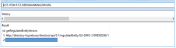 NOTE: The API key is hidden for security purposes. This should be populated using the API key provided to the bank by PRETA.
In the highlighted lines, the number of records fetched for processing in each step is shown.
The Mode on the REFRESH record is updated to Processed.
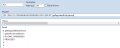
- Open
-
Receiving a Push Update from PRETA
PRETA can send an update to the Temenos Transact instance. This is managed by the
ST.OBD.NOTIFICATIONapplication.PRETA can send a ‘push’ message with changes for specific TPPs. This message is consumed by the IRIS Layer and uploaded into the
PZ.OPEN.BANKING.DIRapplication.The push message is a broadcast from PRETA. Transact receives the details using the following API.
POST ST.OBD.NOTIFICATION,PZ.API.PRETA.
NOTIFICATION.1.0.0/v1.0.0/reference/PSD2/OpenBankingDirectories Once the notification is received, Transact automatically invokes PRETA’s API to refresh the local cache.
Steps:
- ST.OBD.NOTIFICATION,PZ.API.PRETA.NOTIFICATION.1.0.0 version, the @ID of the
ST.OPEN.BANKING.DIR.PARAMETERapplication should be used in the Aut New Content field of the INTERFACE.NAME as shown below. - 3A POSTMAN request for the POST/v1.0.0/reference/PSD2/OpenBankingDirectories API must be sent.
- Once a response is generated, take the value in the ID field and view it in the
ST.OBD.NOTIFICATIONapplication. - The OFS queue is updated with the values that are posted in the
ST.OPEN.BANKING.REFRESHapplication. - When the OFS.MESSAGE.SERVICE is run, the
ST.OPEN.BANKING.DIR.REFRESHrecord gets updated with value in ST.OBD.NOTIFICATION. - Once the application is updated, the Trigger file is updated
- On running ST.OBD.DOWLOAD service, the TPP is downloaded from PRETA and updated in
PZ.OPEN.BANKING.DIR.


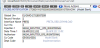
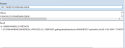
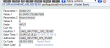
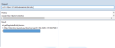 NOTE: The API key is hidden for security purposes. This should be populated using the API key provided to the bank by PRETA.
 - ST.OBD.NOTIFICATION,PZ.API.PRETA.NOTIFICATION.1.0.0 version, the @ID of the
-
Manual Population of Open Banking Directory
Some banks may not want an automated update from a given directory and want to manage the on boarding of TPPs manually.
The following steps need to be performed for allowing the bank to manually populate the Open Banking Directory.
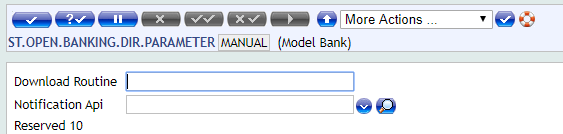
Create a record within
ST.OPEN.BANKING.DIR.PARAMETERapplication. The @ID of the record is the discretion of the bank.In the example below, it is named as MANUAL.
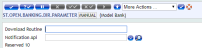
Then, within the parameter records, the value of the above record (ID) must be input within the Obd Provider field.
PZ.PARAMETER(where PZ is installed):PX.PARAMETER(where PX is installed):


For each TPP which is manually uploaded into
PZ.OPEN.BANKING.DIRapplication, the Interface field for each record must match the value of the record input into the Obd Provider field in the application. -
TPP Validation is managed externally
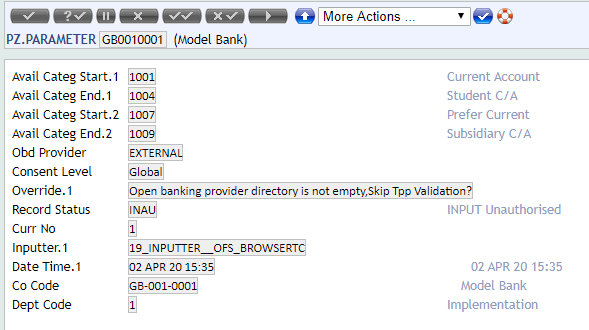
When TPP Validation is handled externally (for example, a PSD2 Hub) before reaching Transact, the parameter applications must be defined with the Obd Provider field as EXTERNAL.
PZ.PARAMETER(where PZ is installed)PX.PARAMETER(where PX is installed)

 NOTE: In both parameter applications, a (null) value in the Obd Provider field also defines that TPP validation is handled externally.
API Mapping
Outside of Temenos Transact, IRIS holds an API Mapping that maps the incoming endpoint or request to a TPP role and consent type. This information is used during the TPP and consent validation processes.
This API linking is maintained as API definitions by IRIS for APIs for which consent availability must be checked.
| Incoming Endpoint | API Standard | TPP Role | Consent Type(s) Required |
|---|---|---|---|
| GET/v1/accounts | Berlin Group | AIS | Available Accounts |
| GET/v1/accounts/{account-id} | Berlin Group | AIS | Accounts |
| GET/v1/accounts/{account-id}/balances | Berlin Group | AIS | Balances |
| GET/v1/accounts/{account-id}/transactions | Berlin Group | AIS | Transactions |
| GET/v1/accounts/{account-id}/transactions/{resourceId} | Berlin Group | AIS | Transactions |
| POST/v1/consents | Berlin Group | AIS | n/a |
| GET/v1/consents/{consentId} | Berlin Group | AIS | n/a |
| DELETE/v1/consents/{consentId} | Berlin Group | AIS | n/a |
| GET/v1/consents/{consentId}/status | Berlin Group | AIS | n/a |
| POST/v1/consents/{consentId}/authorisations | Berlin Group | AIS | n/a |
| GET/v1/consents/{consentId}/authorisations | Berlin Group | AIS | n/a |
| GET/v1/consents/{consentId}/authorisations/{authorisationId} | Berlin Group | AIS | n/a |
| PUT/v1/consents/{consentId}/authorisations/{authorisationId} | Berlin Group | AIS | n/a |
| POST/v1/funds-confirmations | Berlin Group | CBPII | n/a |
| PUT/v1/{payment-service}/{payment-product}/{paymentId}/authorisations/{authorisationId} | Berlin Group | PIS | n/a |
| PUT/v1/{payment-service}/{payment-product}/{paymentId}/cancellation-authorisations/{cancellationId} | Berlin Group | PIS | n/a |
| POST/v1/{payment-service}/{payment-product}/{paymentId}/authorisations | Berlin Group | PIS | Not required |
| POST/v1/{payment-service}/{payment-product} | Berlin Group | PIS | Not required |
| GET/v1/{payment-service}/{payment-product}/{paymentId} | Berlin Group | PIS | Not required |
| DELETE/v1/{payment-service}/{payment-product}/{paymentId} | Berlin Group | PIS | Not required |
| GET/v1/{payment-service}/{payment-product}/{paymentId}/status | Berlin Group | PIS | Not required |
| GET/v1/{payment-service}/{payment-product}/{paymentId}/authorisations | Berlin Group | PIS | Not required |
| GET/v1/{payment-service}/{payment-product}/{paymentId}/authorisations/{authorisationId} | Berlin Group | PIS | Not required |
| POST/v1/{payment-service}/{payment-product}/{paymentId}/cancellation-authorisations | Berlin Group | PIS | Not required |
| GET/v1/{payment-service}/{payment-product}/{paymentId}/cancellation-authorisations | Berlin Group | PIS | Not required |
| GET/v1/{payment-service}/{payment-product}/{paymentId}/cancellation-authorisations/{cancellationId} | Berlin Group | PIS | Not required |
For example, if a GET/{accounts}/{accountID}/balances request is made, the system identifies that the request is an AISP-related request and the customer must have ‘balances’ consent in place on the given account to return the account balances response.
NOTE: Under Berlin Group, consent is not required for payments.
TPP Validation
Depending on the bank’s architecture, TPP validation may happen within Temenos Transact or an external system.
- If the TPP Validation is handled within Transact, please refer to the INTERNAL flow.
- If the TPP Validation is handled through an external system (like LUXHUB), please refer to the EXTERNAL flow.
It is mandatory that TPPs are regulated to make PSD2- related requests.
NOTE: A first check must be made by the bank’s own API gateway to perform an eIDAS check. This check must be successful before the request reaches Temenos Transact.
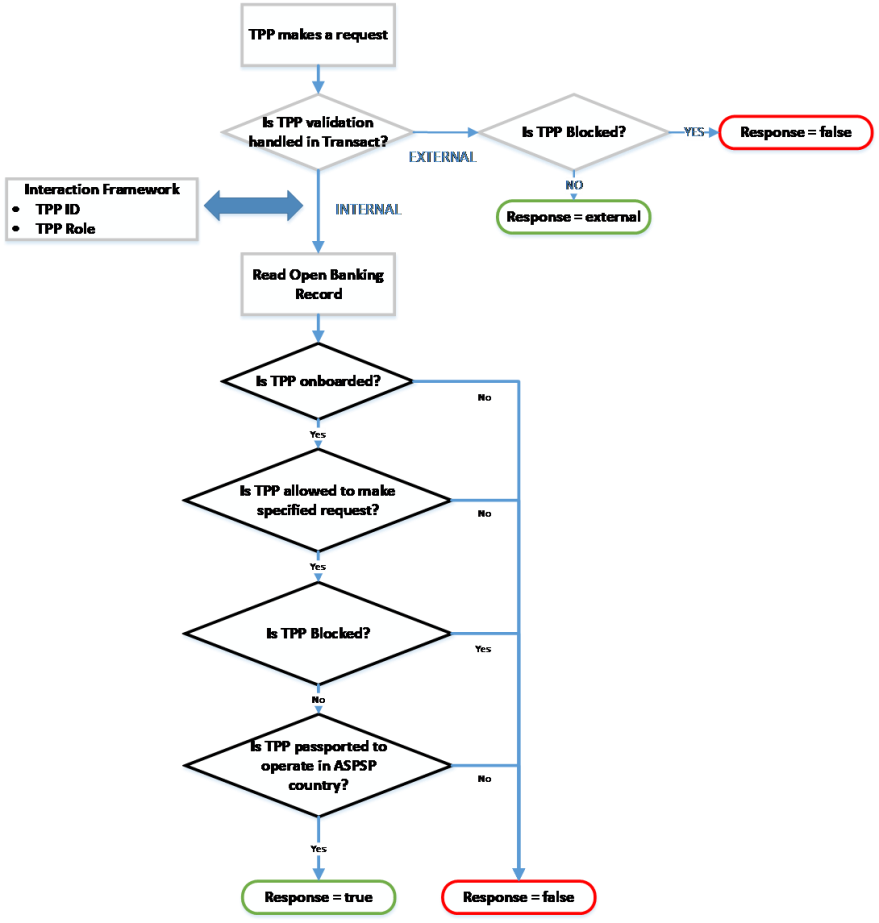
A second check then identifies if the TPP is regulated as per the role of the request. A validation process (to assist with this) is handled in the background and included here for informational purposes.
The routine that handles the validation is called ‘getTppValidateRequest’ and is automatically triggered when receiving a PSD2 request.
The underlying Temenos Transact enquiries for this include:
- PZ.API.VALIDATE.REQUEST.1.0.0
- PX.API.VALIDATE.REQUEST.1.0.0
A diagrammatic representation of the background validation is shown below:
Internal Flow
When the Obd Provider field in PZ.PARAMETER or PX.PARAMETER is set as a valid ST.OPEN.BANKING.DIR.PARAMETER record ID, the TPP validation is handled in Temenos Transact.
The validation process includes the following steps:
Is the TPP regulated in the directory application?
The system validates if the TPP making the incoming request is included within the Open Banking Directory. This is performed by validating whether the Global URN of the TPP matches a value held in the Global URN field in PZ.OPEN.BANKING.DIR.
- If the Global URN does not exist, it implies that the TPP is not regulated. The validation process ends and an error is returned. The request is not accepted or processed.
- If the Global URN exists, it implies that the TPP is regulated. The following checks happen.
Is the TPP regulated as per the role of the request it is making?
If the Global URN exists, the following checks happen.
Based on the type of request that the TPP is making, validate if the TPP is regulated as per the role of the request. Only TPPs regulated as specific roles can make specific requests.
The IRIS layer identifies the type of request the TPP is making. Read the API Mapping section for more information on API definition.
For example, a TPP regulated only as an ‘AISP’ can make account information calls. For example, GET/accounts.
However, a TPP regulated only as a ‘PISP’ cannot make account information calls. Therefore, if a TPP regulated only as a PISP makes a ‘GET/accounts’ call, this is rejected.
The logic for identifying the type of call based on the incoming API is handled within an API definition at the IRIS or Interaction Framework layer.
The type of call and the TPPs regulated roles are compared, which are held in the PSP Role field in the PZ.OPEN.BANKING.DIR record.
- If the TPP is not regulated as the role of the request, the validation returns an error. The request is not accepted.
- If the TPP is regulated as the role of the request, the validation continues to the next check.
Is the TPP blocked or restricted in any way?
If the TPP is regulated as per the role of the request, the following checks happen.
The system checks against the Status and Set Active fields within the PZ.OPEN.BANKING.DIR record.
- The Status field holds the NCA status of the TPP.
- The Set Active field holds the bank’s own status of the TPP.
Only if both fields are set positively, the validation is successful at this stage. The logic for this is as given below:
- If the Status field is set to any status other than ‘Active’, the validation provides an error at this stage. The request is not accepted or processed.
- If the Status field is set as Active, a secondary check is made against the Set Active field.
- If the Set Active field is set as No, the validation provides an error. The request is not accepted or processed.
- If the Set Active field is set as Y or null, the validation is successful.
NOTE: If this field is null, the Status field value takes precedence.
Is the TPP regulated to operate in the country of the ASPSP?
When the preceding validation was successful, a final check is made against the TPP to identify if the TPP is passported to operate in the country of the ASPSP. The system performs a validation against the Local Country of the COMPANY where the request is received and compares this against the list of ROLE.COUNTRIES (of the TPP role of the request).
- If the Local Country does not match one of the values in the Role Countries field, the validation provides an error as the TPP is not regulated to operate within the country of the ASPSP.
- If the Local Country does match one of the values in the Role Countriesfield, the validation is successful as the TPP is regulated to operate within the country of the ASPSP.
If all validations are successfully passed, the TPP Validation response is true.
At this stage, the request can be partially accepted and the Consent Validation process is triggered.
External Flow
When the Obd Provider field in PZ.PARAMETER or PX.PARAMETER is set as EXTERNAL, the Open Banking Directory is handled externally by an external system or hub.
With this configuration, the system does not expect any values in PZ.OPEN.BANKING.DIR. Therefore, no validation is performed against this table. Instead, the system expects that the TPP Validation is performed before reaching Temenos Transact and that the TPP is regulated to make the request.
One validation is performed in Temenos Transact to check if the TPP is manually blocked by the bank. This is configured in the Block Tpp field in the PZ.PARAMETER and/or PX.PARAMETER applications.
The expected value in this field, if entered, is the Global URN of the TPP.
- If the Global URN of the TPP is included within this multi-value field, it highlights the TPP is blocked by the bank. The validation returns an error. The request is not accepted or processed.
- If the Global URN of the TPP is not included in this multi-value field, the TPP is not considered to be blocked and the TPP validation is successful. The technical response to this call would be ‘external’ to identify that the TPP validation is successful; however, it is checked mainly by an external system.
At this stage, the request can be partially accepted and the Consent Validation process is triggered.
Consent Validation
If the TPP Validation is successful and it is identified that the TPP is allowed to make a particular request, the system performs a second check to identify if consent is required for the call.
The routine that handles the validation is called ‘getTppValidateRequest’ and is automatically triggered when receiving a PSD2 request.
The underlying Temenos Transact enquiries are:
- PZ.API.VALIDATE.REQUEST.1.0.0
- PX.API.VALIDATE.REQUEST.1.0.0
If consent is required for the call; Is consent available and is it valid.
This validation forms part of the getTppValidateRequest routine. The below workflow outlines the steps that occur within this process:
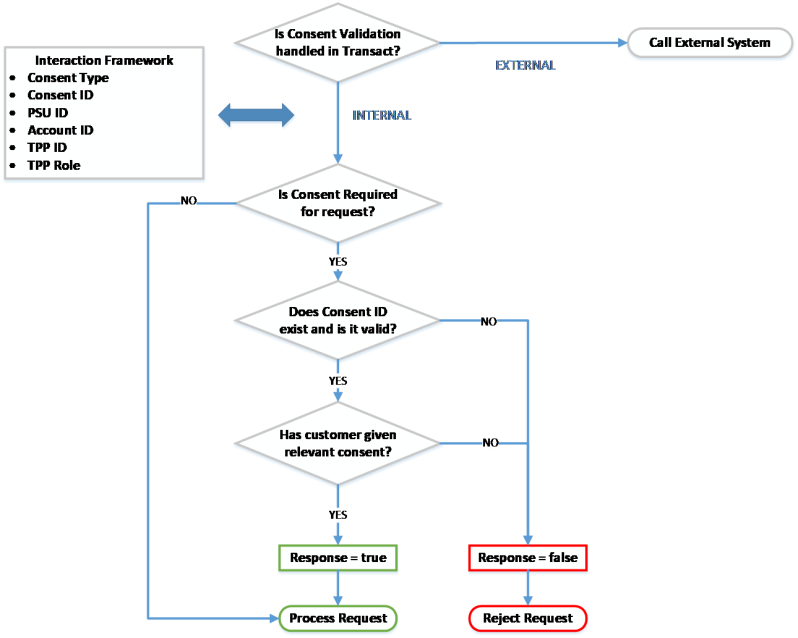
A check is made to identify if Consent Validation is handled within Temenos Transact.
This is defined in the Consent Mgmt field in PZ.PARAMETER.
NOTE: Currently, it is not applicable to
PX.PARAMETER as consent for payments is not required under the Berlin Group standard.Consent handled in bank’s External system
If the Consent Mgmt field in PZ.PARAMETER is set as EXTERNAL, the consent management process is handled by an external system and is not within Temenos Transact.
Consent handled internally in Temenos Transact
If the Consent Mgmt field in PZ.PARAMETER is set as INTERNAL, the consent management process is handled within Temenos Transact. The system performs a number of checks:
Is consent required for the request?
A check is made at the IRIS layer to identify the type of request that is being made. The IRIS layer holds an API Mapping, which identifies the following:
- Type of request that is being made
- If consent is required for the type of request
- If consent type is required for the request
For Berlin Group payment requests, consent is not required. Instead, a separate approval and authentication process is followed.
For Account Information requests, consent is required before accepting the request and sharing any account information to the TPP.
Does Consent ID exist (if given) and is it valid?
The Consent ID must be passed in the incoming request from the TPP.
The Consent ID in the request is compared with the consent arrangement for that customer and TPP combination.
The Consent ID is not considered to be valid when:
- The Consent ID cannot be found.
- The Consent ID is in history.
- The Consent ID does not link to the TPP/customer/account combination.
- The Consent ID has expired.
The Consent ID is considered to be valid when:
- The Consent ID exists.
- It has not expired (the expiry date has not passed).
- It links to the TPP/customer/account combination.
Has the customer given Consent on the account to process the request?
If the Consent ID is valid, a final check is made to check if the customer has given consent to the relevant consent type on the account.
The request is processed only if the customer has granted the consent type required for the request on the account.
The respective API is accepted and processed in the system after the above validations are successfully met. A response is provided to the incoming TPP request.
Add Bookmark
save your best linksView Bookmarks
Visit your best links BACK
BACK


Are you sure you want to log-off?