| Bookmark Name | Actions |
|---|
Creating the temp.release record
This section shows you how to create temp.release record in TAFC and TAFJ environment.
For TAFC
- Open the jShell prompt and run the jdiag command to view the environmental variables.
- Check whether the environment variable JEDIFILENAME_SYSTEM is set.
- Open the .property file and add the JEDIFILENAME_SYSTEM environment variable, if not set.
- Export JEDIFILENAME_SYSTEM=$TAFC_HOME/src/SYSTEM.
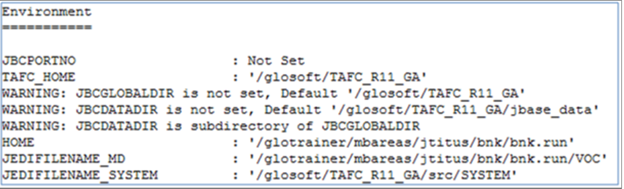
- At the jShell prompt, type the below command.
CREATE.FILE DATA SYSTEM TYPE=UD
- At the jShell prompt, type the below command.
JED SYSTEM TEMP.RELEASE

For TAFJ
- Open the tafj.properties file from the TAFJ_HOME/conf directory.
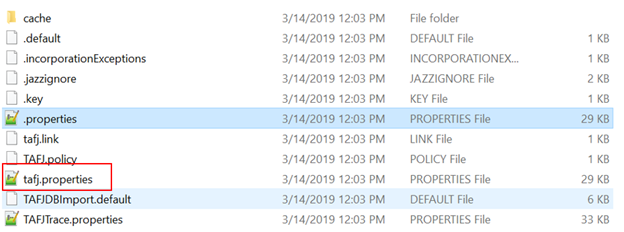
- Add the below property:
JEDIFILENAME_SYSTEM = SYSTEM
- In the tafj.properties file, look for the SYSTEM directory. If the directory is not available, then create the same in JQL-SQL editor of eclipse by using the below command.
CREATE-FILE SYSTEM TYPE=UD
- Create a temp.release record inside the SYSTEM file using the JQL-SQL editor as shown below.
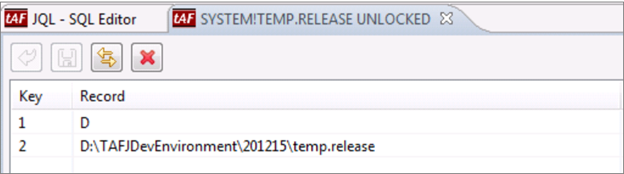
The temp.release record should have two entries. Line 1 - D (directory) and Line 2 - path of the temp.release directory.
Add Bookmark
save your best linksView Bookmark
Visit your best links BACK
BACK


Are you sure you want to log-off?