| Bookmark Name | Actions |
|---|
Creating the system definition file
Using System Update Toolbox, you can create an XML file to upload it to Temenos Transact Updates site.
Procedure
- From the System Update Toolbox, go to Extract System Information > Create System Definition File.
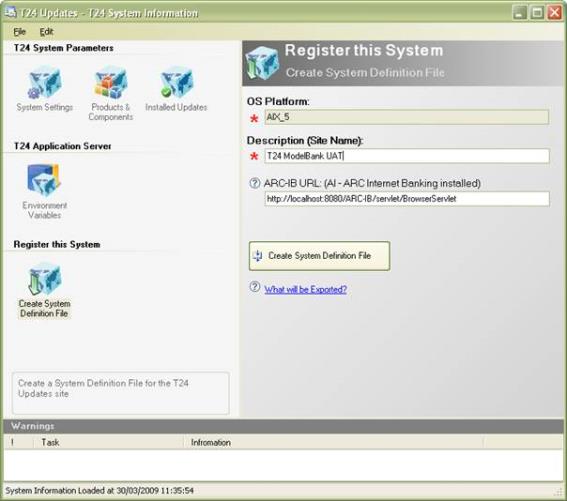
- Enter the below details.
- OS Platform: Name of the operating system platform
- Description (Site Name): Name of the system used to identify it on the Temenos Transact Updates site
- ARC-IB URL: URL of ARC Internet Banking NOTE:
You should enter the URL only if you use the product.
- Click the Create System Definition File button.
- Save the system definition file as an XML file.
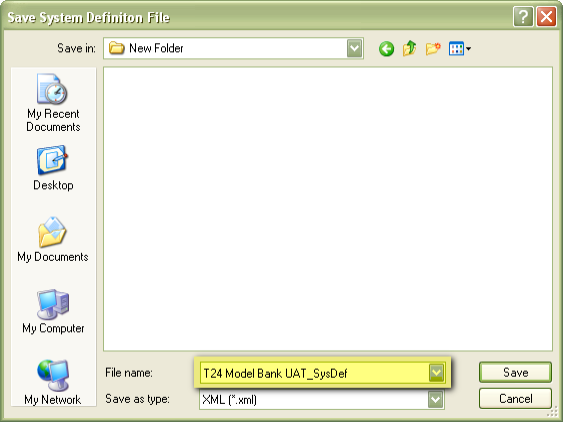
This file is used to add or update a system on the Temenos Transact Updates site.
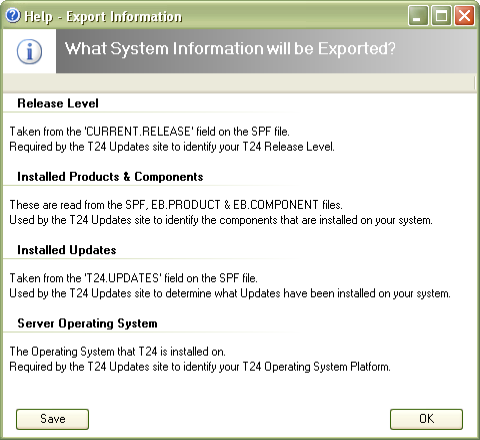
NOTE:For any help while creating the file, click the What will be exported link.
Add Bookmark
save your best linksView Bookmark
Visit your best links BACK
BACK


Are you sure you want to log-off?