| Bookmark Name | Actions |
|---|
Architecture
This section explains the architecture of the Infinity Onboarding application.
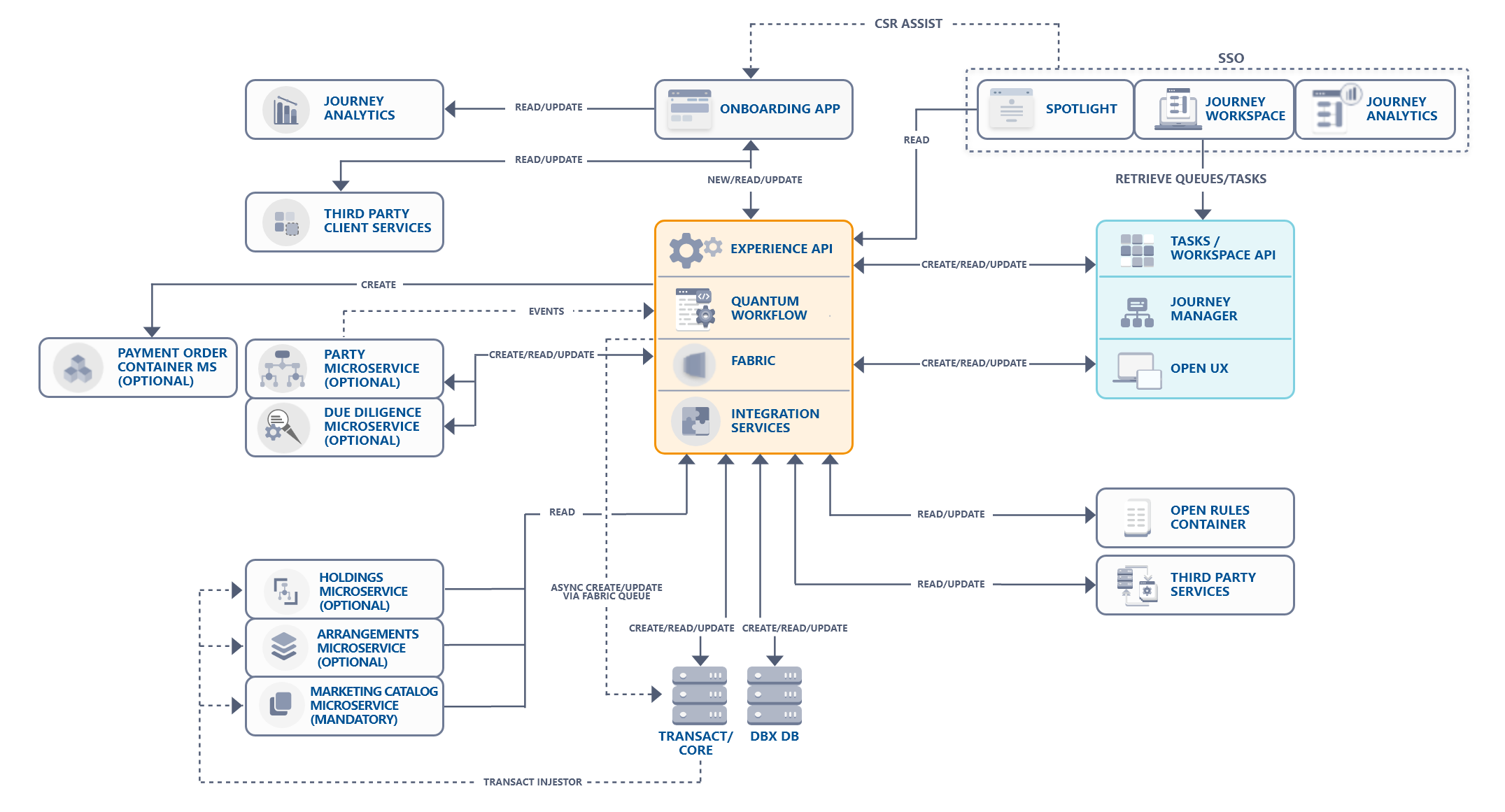
Architectural Components
The Infinity Onboarding application contains the following components.
| Component | Description |
|---|---|
| Onboarding app | The Onboarding app enables you to open an account across multiple channels. It is built by using MVC 2.0 architecture of Quantum Visualizer. |
| Experience APIs | In the overall architecture of Infinity, the Experience APIs are the most top-level APIs. These are the APIs exposed from Quantum Fabric to the outside world. In the Temenos world, the Experience APIs are consumed by Quantum Visualizer and used in any self-service customer application. Experience APIs are the gateways to access the resources of Infinity and retrieve data in a structured way. Experience APIs determine the experience that third-party developers will get when they interact with our systems. |
| Integration Services | Experience APIs are implemented as service-driven objects. Hence, the experience API will have a mapped integration service that executes business logic. After executing the business logic, the integration service invokes the integration template services to connect to endpoints such as Journey Manager, Transact, Core system, and Microservices. |
| Journey Manager |
Journey Manager is a system of engagement built to manage customer onboarding and customer journeys. For more information about the Journey Manager, click here. |
| Party Microservice | Party is a microservice that holds a party's information (customer's information). You can create/update/get the party information by using the Enterprise APIs of the Party microservice. For more information about Party MS, click here. |
| Marketing Catalog Microservice |
Marketing Catalog is a microservice that provides an independent cloud-enabled solution to manage marketing information of a bank’s products in the Core.
In the Onboarding app, the Enterprise APIs of the Marketing Catalog are used to create actual products that are selected by the customer in the Onboarding app. For more information about Marketing Catalog microservice, click here. |
| Arrangements Microservice |
The Arrangements microservice allows to hold the contract or account information in a microservice data store (core model). The account information is updated through ingestion techniques and serviced through APIs so that multiple systems may use this information.
In the Onboarding app, the Arrangements microservice is used in the Funding flow. The Arrangements microservice stores the details of the accounts of an existing user. For more information about Arrangements microservice, click here. |
| Holdings Microservice |
Holdings is a read-only microservice for providing balances and transactions. It allows the client applications to view account details along with associated transactions.
In the Onboarding app, the Holdings microservice is used in the Funding flow. The Holdings microservice stores the account balance and transactions of the existing users’ accounts. For more information about Holdings microservice, click here. |
| Spotlight |
Spotlight is a web-based solution to set up and maintain customer and employee-related information and to configure the behavior of digital banking applications associated with this information. For more information about Spotlight, click here. |
| Journey Workspace |
Journey Workspaces is a highly configurable and feature-rich business portal for banking staff, designed to support the resolution and customer service activities related to account origination and onboarding directly in the account opening process. For more information about Journey Workspace, click here. |
| DBX DB |
DBX DB is a MySQL based database that stores the user’s digital profile (Party Id) and related information. For more information about DBX DB, click here. |
| Transact |
Transact is the Temenos Core system. It contains the user’s account information that is created by the Onboarding app. The user is mapped as a Party. Transact contains the following modules:
The IRIS APIs are used to interact with the core system. If you use a different core system other than Transact, you must have the mentioned modules, corresponding web services for the same, and an API structure that is similar to the Transact IRIS APIs. |
| Journey Analytics |
Journey Analytics is a purpose-built analytics module that captures behavioral and completion analytics for applications hosted on the Journey Platform. For more information, about Journey Analytics, click here. |
| Open Rules |
Open Rules is a decision engine component and hosts the decisions based on the business rules. In the Onboarding app, the Open Rules component is used to make decisions at the applicant and the application level. For more information about Application Decision Process, click here. |
| Quantum Workflow | A workflow is a visual representation of a business process. Quantum Fabric provides the ability to build processes visually with low code drag and drop functionality. A workflow consists of execution blocks that can be configured as required to accomplish your business use-case. For more information on Quantum workflow in Infinity Onboarding, click here. |
| Third-Party Services |
Infinity Onboarding uses third party services such as SMS, E-mail, Google search, and IDology components. For more information about the third-party services used by Infinity Onboarding, click here. |
| Payment Order Container Microservice | Payment Order Container Microservice is an integral part of the Temenos Payment Solution, which is part of the Temenos Transact core banking suite. This handles order capture and management functionality, and supplements the payments processing engine, Temenos Payments Hub. |
| Due Diligence Microservice | Due Diligence is the investigation or exercise of care that a reasonable business or person takes before entering into any agreement or contract with another party. For more information on the Due Diligence micorservice, click here. |
Business Outcomes
Currently, Infinity Onboarding supports two business scenarios as follows.
- Onboarding app interacting with the Enterprise APIs of Party
- Onboarding app interacting with the Core system
In the first scenario, the Experience APIs integrate with the Enterprise APIs of Party whereas, in the second scenario, the experience APIs integrate directly with the core system.
The main difference between both the scenarios is that the Infinity Onboarding app interacts with the Experience APIs of the Party Enterprise APIs in the first scenario and it is the responsibility of the Party Enterprise APIs to synchronize data with the core system. Whereas, in the second scenario, the Infinity Onboarding app interacts directly with the Core system.
Irrespective of these two scenarios, the following aspects remain the same throughout the onboarding journey:
- The Journey Manager will act as an in-flight application storage unit.
- The DBX DB will contain the digital profile.
- The product details are always retrieved from the Core (Arrangements Module in the case of Transact) through the Enterprise APIs of Marketing Catalog.
Application Integration Flow
Let us understand how the Infinity Onboarding app interacts with different elements.
Start New Application
When you start a new application in the Onboarding app, an application is created in the Journey Manager. When you enter your information in the Onboarding app and submit it, this information is transferred to the Journey Manager through the Experience APIs. In this way, when you continue to submit your details in the subsequent sections, the Journey Manager is updated by the Experience APIs. The updated information is stored in the Journey Manager in the form of XML data.
When you submit the details in the Personal Information section, an entry for the prospect is created in the Party Enterprise APIs, Transact, and the DBX DB. Similarly, when you submit the details of the required products in the Product Selection section, the product IDs are stored in the Journey Manager and DBX DB. In this way, the Journey Manager and the DBX DB are updated.
After providing all the details, the third party API of identity verification named IDology, verifies your identity and after submitting the application, the metadata is invoked in the Decision Engine. The Decision Engine then provides the following three possibilities for the application status with the help of Open Rules.
- Auto Approved
- Auto Denied
- Under Review
This status of your application is updated in the Journey Manager. Meanwhile, the review process is done through creation of a task in Journey Workspace and the Quantum workflow is initiated.
Quantum Workflow
A workflow is a visual representation of a business process. Quantum Fabric provides Workflows, by using which, you can build processes visually with low code drag and drop functionality. A workflow consists of execution blocks that can be configured to accomplish your business use-case. Execution blocks offer a wide range of functionality, such as the ability to design complex business logic, service invocation, and triggering emails. These functionalities are achieved by using various nodes such as Start, user task, and service task.
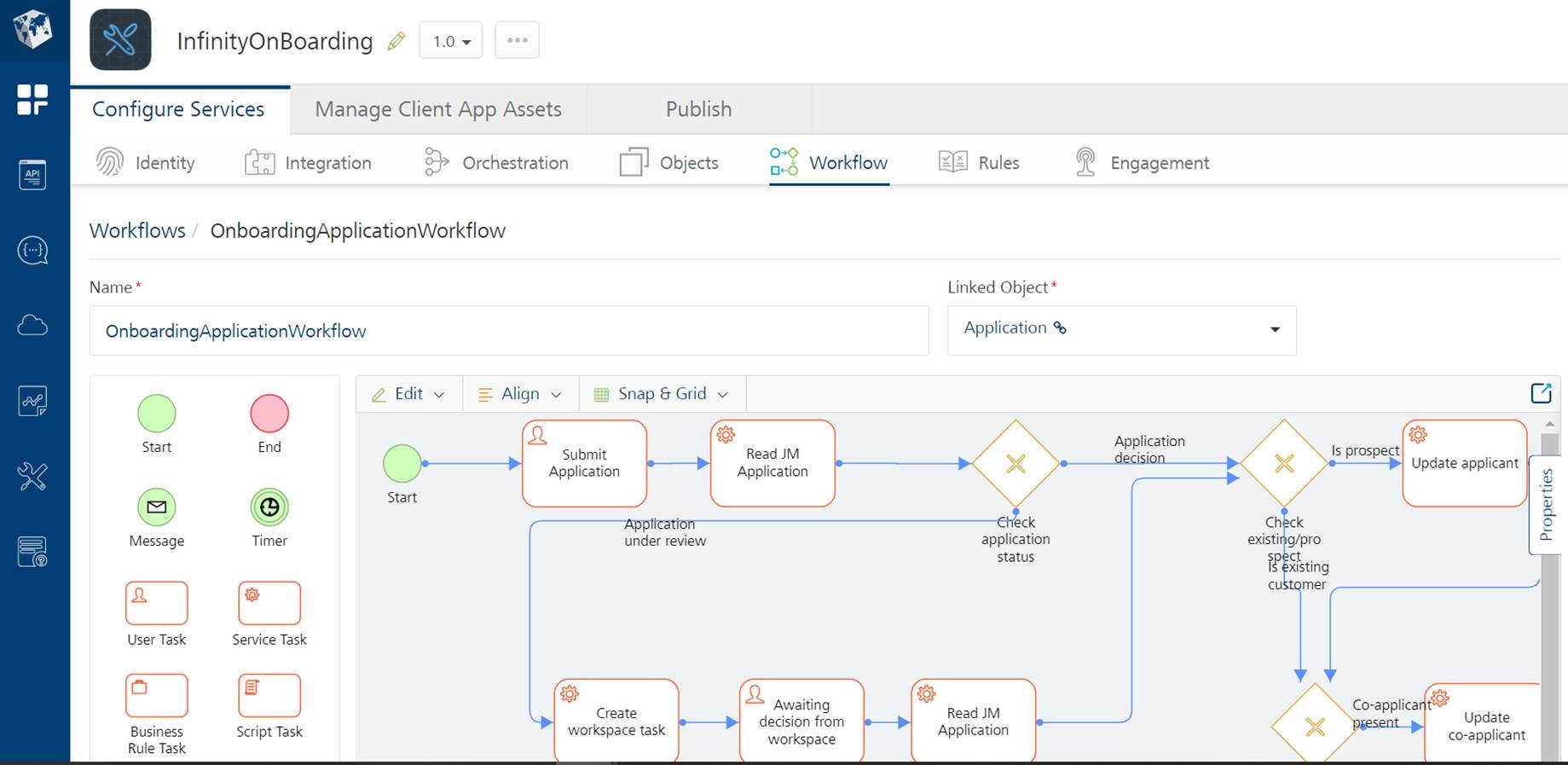
To get a quick overview of Quantum workflow, refer to Workflow - An Overview. Furthermore, to know more about the nodes and also about creating, managing, and testing a workflow, refer to Quantum Workflow.
The Workflow designed for the Onboarding app can be categorized into the following sections:
- Application Flow
- Funding Flow
NOTE: By design, the Quantum Workflow does not control the navigation flow of the application. Therefore, the navigation flow of the app cannot be modified via Quantum Workflow configurations.
Application Flow
The Application Flow illustrates the backend flow of operation after an applicant submits an application, until the status of an application is decided and is notified to the applicant.
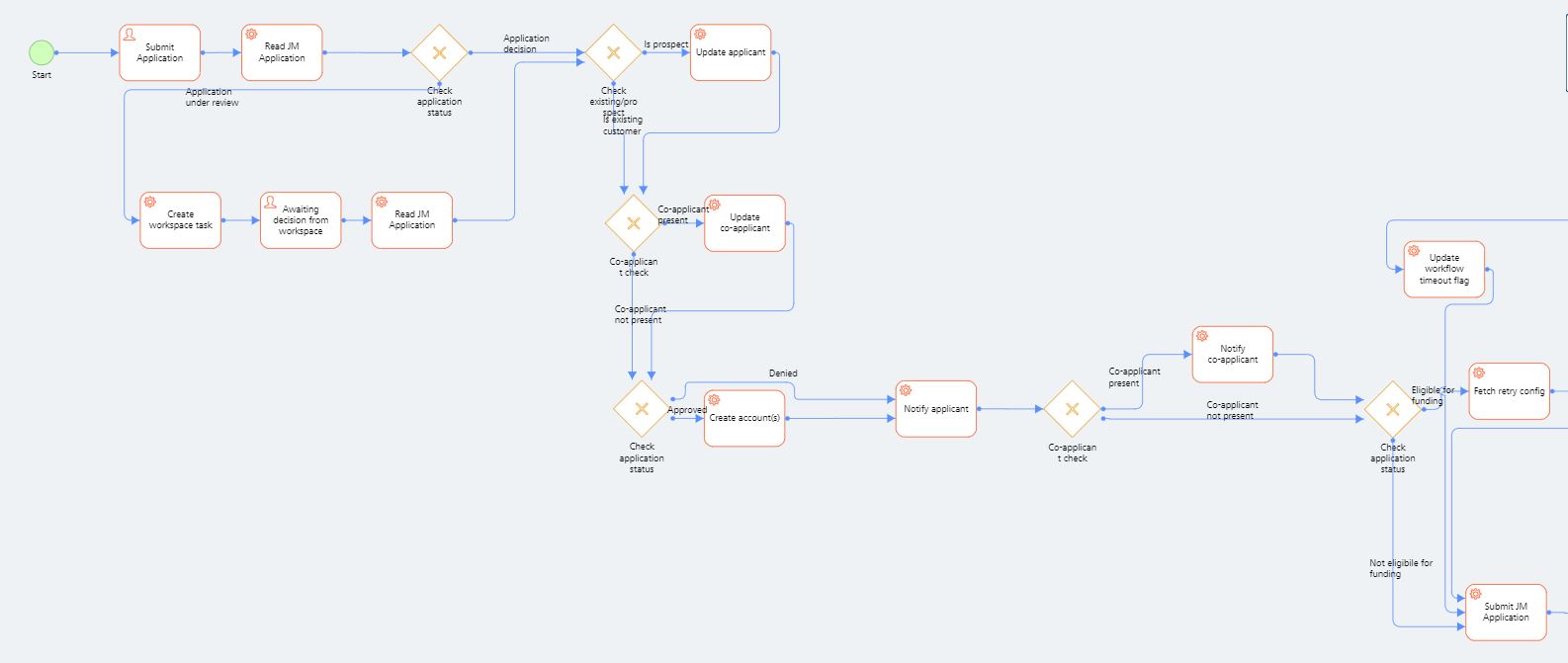
The step-by-step Application flow is as follows:
- After an application is submitted by an applicant, the status of the application is read from the Journey Manager. The workflow is now initiated with the Tracking code and the application status.
- If the application status is Under Review, a task will be created in Journey Workspace. Furthermore, a bank employee will review the application and when a decision is made in Journey Workspace, it will update the workflow with the status of the application, so that the workflow can be resumed.
- After a decision is made from Workspace or an Auto decision is made upon submission, the following steps are undertaken:
- Applicant details are updated in the Party MS, the Core system (for example, Temenos Transact), or both. The details are also updated in the DBX DB depending on the business outcome and the appropriate status (approved or denied). The applicant details are updated only if the applicant is a prospect.
- If a Co-applicant is present, the Co-applicant’s details are updated in the Party MS, the Core system (for example, Temenos Transact), or both. The details are also updated in the DBX DB depending on the business outcome and the appropriate status (approved or denied).
- Now, if the application is approved, accounts are created for all the products that are selected.
- Applicant and Co-applicant (if present) are notified of the application decision by email.
- If the application has been denied or under review, then the application is not eligible for Funding and the application in Journey Manager will be closed permanently.
NOTE: Only Auto-approved applications are eligible for Funding.
Funding Flow
The Funding flow primarily illustrates the backend flow of operation for verifying the eligibility of an application for funding. If the applicant is eligible, the appropriate payment instructions are executed. This flow begins after an application status is decided.
The eligibility of an application for funding is decided by the funding status of an application. The status of an application can be any of the following:
- Opted: Implies that an application is eligible for funding
- Optedout: Implies that an application is not eligible for funding
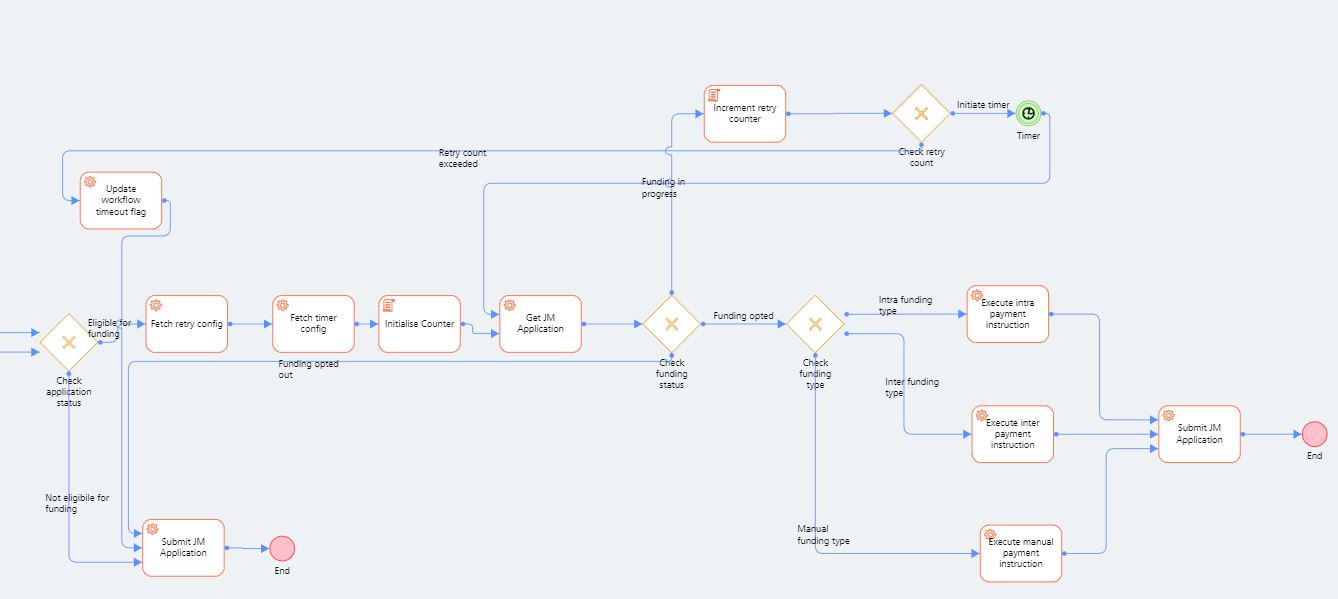
The step-by-step Application flow is as follows:
- After the application workflow is completed for auto approved applications, the funding status is verified continuously at regular intervals. The funding status is checked for a pre-defined number of times until funding status is either Opted or OptedOut.
- If the funding status does not change to Opted or OptedOut even after the configured retrials, it is considered to be OptedOut.
- Based on the funding status, the following steps are undertaken:
- OptedOut: The application is permanently closed in JM.
- Opted: Based on the funding type chosen, the required payment instruction is executed and then the application is permanently closed in JM.
NOTE: Currently, Quantum workflow executes Intra-bank payments only.
View the Execution Status
You can view the execution status of the workflow from the App Services section of the Quantum Fabric Console. In the App Services section, navigate to Workflow Services and select the required workflow.
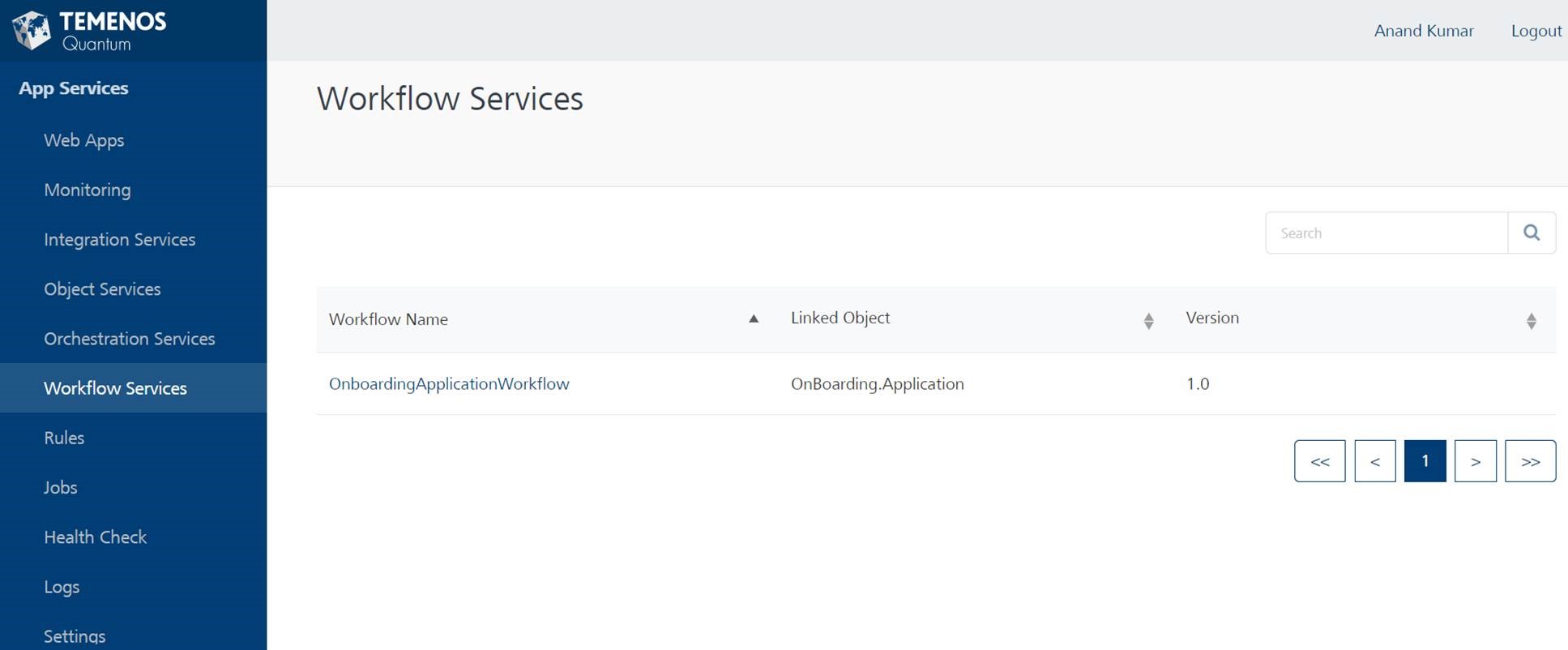
The app displays all the instances of the Workflow that were triggered and the run-time status of every instance that was triggered from here. The status of a task can be Completed, Paused, Running, Failed, or terminated.
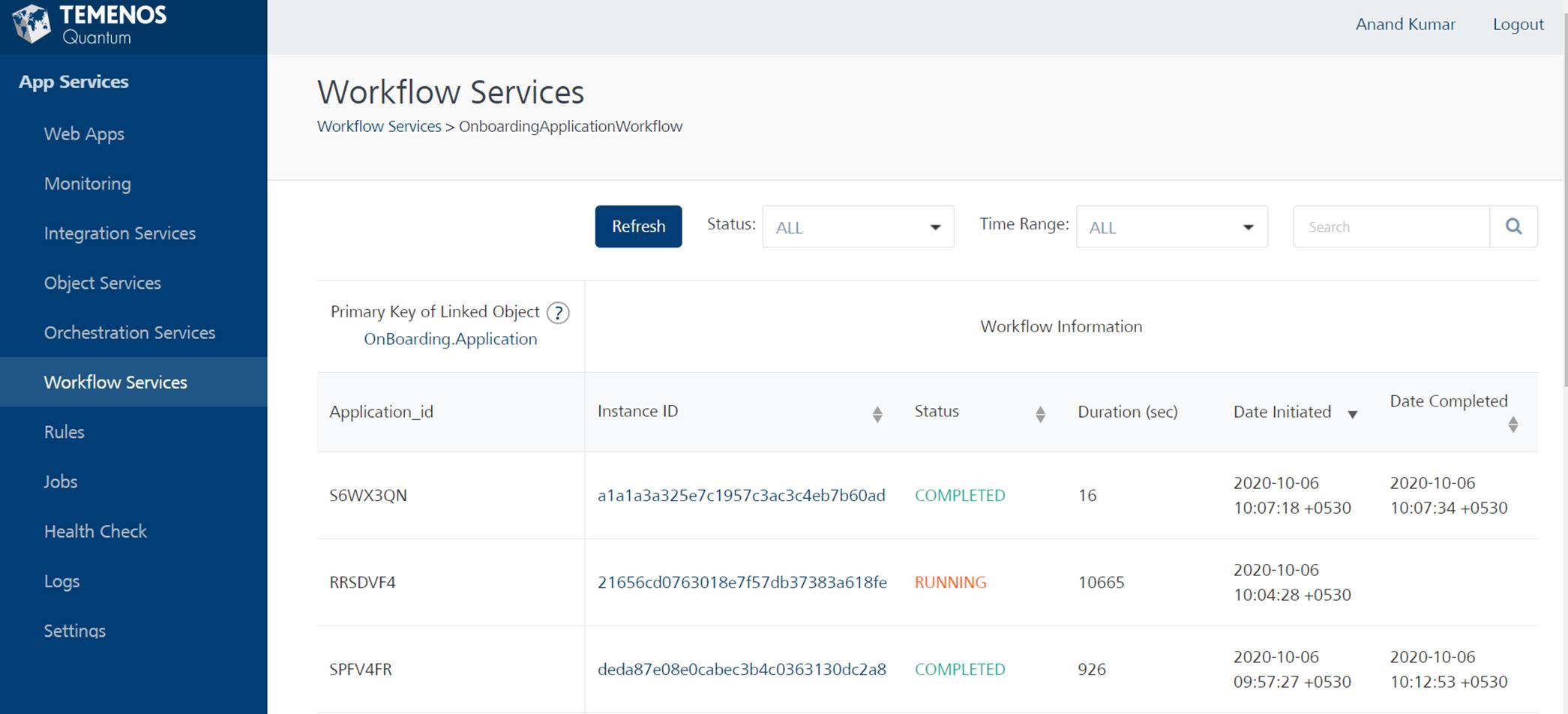
Furthermore, you can click on the required instance to view the status of execution of the nodes/tasks in that instance of the Workflow. Quantum workflow also provides an option to manually retry the tasks that have been failed. For more information on viewing the status of various actions, refer to Workflow Services.
NOTE: The Quantum workflow for Onboarding has some limitations with some types of services such as JSON services. It is recommended to use Java services to avoid these issues. For example, the Re-try option to manually retry a failed task is not available for JSON services.
APIs
The following APIs are shipped as a part of the Quantum workflow.
| API | Description |
|---|---|
| updateApplicationStatus | This API updates the decision of the application from Journey workspace. |
During the process of creating an application, the Journey Manager updates the Journey Analytics and Audit Logs with the user journey details.
Audit Logs contain the user's activity in the Onboarding app. It is recorded in Quantum Fabric and saved in the DBX DB for audit purposes. The data is available in the form of logs in the Spotlight app. For more information about Audit Logs, click here.
Resume Application
You can resume the process of creating your application by using either the Custom URL that is sent to your registered email ID or the Resume Application option on the landing page of the Onboarding app.
In either of the cases, the app first confirms your identity. To complete the verification, you must provide your Application ID of the application that you want to resume and answer a challenge question. Here, the challenge question could either be your Date of Birth or Email ID that you provided while creating the application. The key to the challenge question is configured in the Quantum Fabric layer, Journey Manager, and the Spotlight app.
The Application ID and the value for the challenge question are then transferred to the Journey Manager and the application data that you provided previously is retrieved.
After the verification is completed, you are navigated to the last-visited section of your application.
If you are an existing user, the Party ID is verified by comparing the party ID in the application data and the party ID for the current user in the DBX DB. If the verification is successful, you are navigated to the last-visited section of your application. Otherwise, an error is thrown, and you will not be able to proceed with the process of updating the application.
NOTE: The Application ID and the value for the challenge question are stored in the DBX DB.
The further process of submitting and reviewing the application is the same as that of the Start New Application.
Add Bookmark
save your best linksView Bookmarks
Visit your best links BACK
BACK


Are you sure you want to log-off?