
| Bookmark Name | Actions |
|---|
Deploying Party Microservice on Docker
This section explains how to deploy the Party microservice on the Docker. To do so, you must perform the following tasks:
Deployment Artefacts
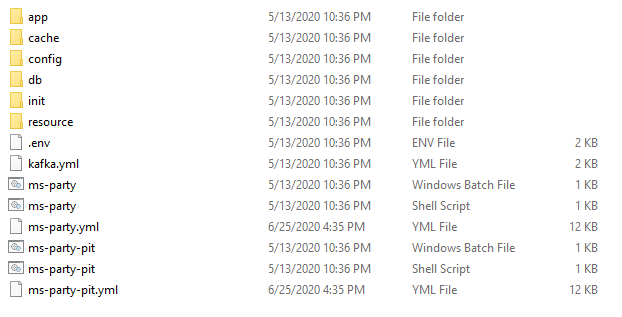
The folder structure of the Party microservice package is available as a single release bundle. For example, ms-party-package-docker-<release_number>.zip.
Deploying Party Microservice on Docker
Prerequisites
Ensure to meet the following prerequisites before deploying Party microservice on Docker.
- Install the Docker engine on your deployment environment. For more information about the installation, click here.
- Turn on the Linux containers in Docker.
To deploy of Party Microservice on Docker, follow these steps.
- Extract the
ms-party-package-docker-<release_number>.zipfile.
The extracted package contains the configuration files of Docker and the respective bat and sh files.

- Enable JWT Authentication in ms-party.yml and ms-party-pit.yml.
- From the Command Prompt, go to the directory where the .bat and .sh files are available. Run the following command that creates an image and a docker container for the image.
Script Description ms-party.bat / ms-party.sh The script is used to deploy the necessary components for a microservice. It includes the deployment of the streaming services to run the microservice independently. ms-party-pit.bat / ms-party-pit.sh The script is used to deploy the necessary components for microservice. Data Event Streaming (DES) is presumed to be deployed and running already. The streaming services are not deployed. Use the following commands for the respective platforms.
- For Windows: ms-party-pit.bat up --build -d
- For Linux : ms-party-pit.sh up --build -d
- After the successful deployment, the database, collections, and reference data(master data) are loaded into the Mongo database for the Party microservice.
- After the Party microservice is up and running on Docker, run the following URL to receive the response.
The structure of the URL of APIs is as follows.
Base Path: http://<IP_ADDRESS>:<PORT>/<context-root>/api/<version>/
For example, http://localhost:8000/ms-party-api/api/v1.0.0
The resource path of the endpoint is available in the swagger document of the respective APIs.
A sample endpoint of the party could be http://localhost:8000/ms-party-api/api/v1.0.0/party/parties.
Alternatively, the microservice status is obtained through the Health Check API.
Undeployment
To stop and delete the existing container, run the following command from the location where the party docker started.
- For Windows: ms-party.bat/ms-party-pit.bat down
- For Linux: ms-party.sh/ms-party-pit.sh down
Add Bookmark
save your best linksView Bookmarks
Visit your best links BACK
BACK


Are you sure you want to log-off?