| Bookmark Name | Actions |
|---|
Arrangement Data Ingestion
The ingestion technique facilitates the ingestion of data into the Arrangement microservice.
Ingestion mechanism is used when the back office is Temenos Transact. The component required for the Ingestion mechanism are Temenos Transact with the RR module enabled and the microservices that will consume the data.
The Ingestion mechanism uses the commit caption technique. The applications to which the data need to be ingested must have a record created in the RR.PARAM application. This application is used to configure the applications required for replication in relation database. Also, it replicates the existing data from the existing tables added to RR.PARAM in Temenos Transact, into an Avro schema that can be understood through the DES mechanism (Kafka/Kinesis).
EXAMPLE: Whenever you create an arrangement with savings account as a product, for a customer in Temenos Transact, the image of the arrangement are captured and pushed to the DES. From there, the Kafka mechanism and the event listener will pick up the event and push it to the microservices.
The partyDetails entity stores the details for a customer. In order to ingest the data in this entity, you should create an entry (FBNK.CUSTOMER) using the RR.PARAM application and commit this entry.

Once this record is committed, the Data Event Streaming of Temenos Transact automatically generates an Avro schema (it is a mapping specification in the form of properties field to required fields of source system’s Temenos Transact) extension fields to the microservice extension fields) and post it in the Kafka or Kinesis stream. The microservice will listen to the Kafka or Kinesis streams, fetch the information, perform minimal validations and then post the data into the Arrangement microservice.
In terms of Temenos Transact data events, the Avro schema name is obtained from the Data Event Streaming schema registry. The extension mapping configuration file needs to be created for each DES schema that is applicable for the product microservice. The DES platform delivers the Temenos Transact data and updates into microservices.
Configuring Data Event Streaming
Arrangement microservice uses full data event. To configure full data event,
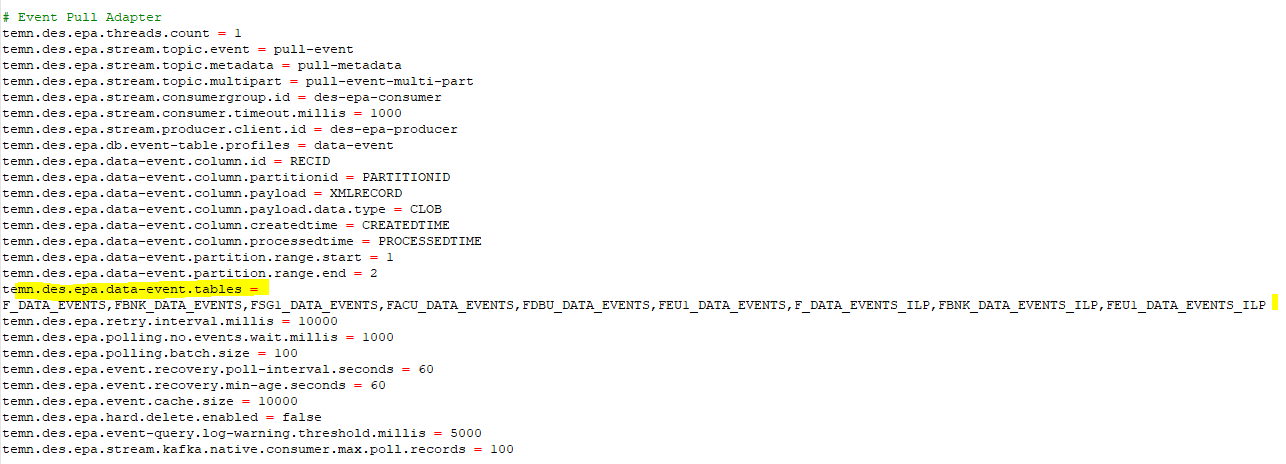
- Open the des-kafka-t24.properties file from DES\des-docker\src\main\resources\des-config.
- Update the following property in the Event Pull Adapter section. This configuration enables DES to understand from which Temenos Transact tables it should pull data and post into kafka.
 NOTE: The mentioned file name changes based on the company mnemonic.
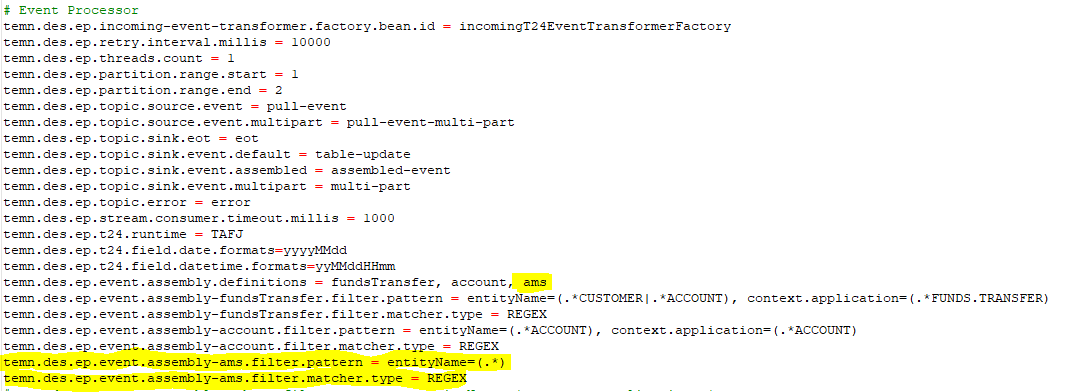
 - Update the Event Processor section, add new assembly definition for Arrangement microservice. This enables DES to understand from the regex pattern which event should be posted into assembled-event topic.
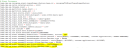
 RR.PARAM Configuration
This section helps you to configure the files in RR.PARAM to enable transact events.
Temenos Data Events streaming (DES) component captures all the required Data Events from Temenos Transact for AMS data ingestion. Here, DES streams the changed data to Kafka or Kinesis stream once it is captured.
To enable transact events (DES), you should configure the following files in the RR.PARAM application of Temenos Transact.
|
S.No |
Temenos Transact Application List |
Order (Group) |
|---|---|---|
|
1 |
COMPANY |
1 |
|
2 |
POSTING.RESTRICT |
2 |
|
3 |
DEPT.ACCT.OFFICER |
2 |
|
4 |
AA.PRODUCT |
2 |
|
5 |
CUSTOMER |
3 |
|
6 |
AA.ARRANGEMENT |
4 |
|
7 |
AA.ACCOUNT.DETAILS |
5 |
|
8 |
AA.ARR.ACCOUNT |
5 |
|
9 |
AA.CUSTOMER |
5 |
|
10 |
AA.ARR.OFFICERS |
5 |
|
11 |
ACCOUNT.CLOSED |
6 |
The ID of the record must be the full file name of these applications (for example, F.DATE, FBNK.ACCOUNT etc). You should setup a separate record for each FIN level file with the company mnemonic, such as FBNK.ACCOUNT, FEU1.ACCOUNT etc. Same has to be done for CUS level files as well.
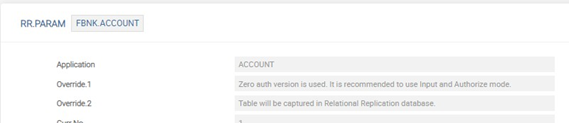
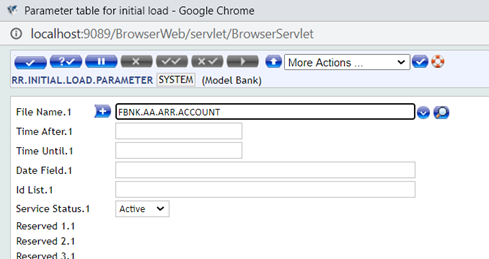
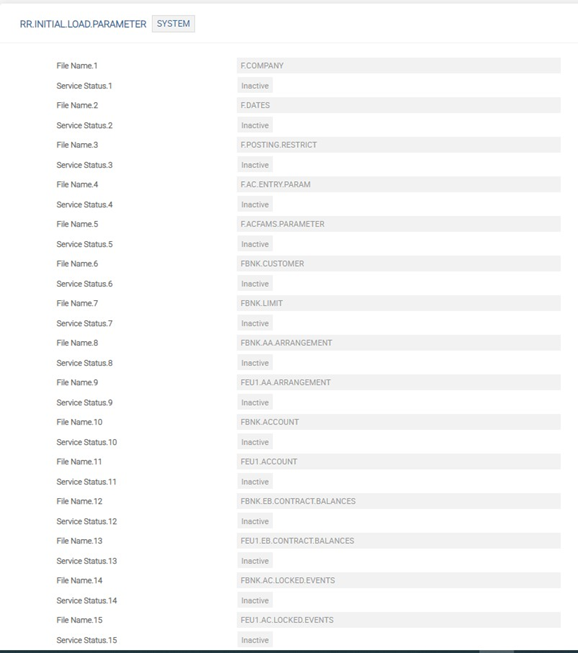
You should setup the Initial Load Processing (ILP) parameter to trigger the initial upload of the data. You should define and load the tables in the same order shown in the table above.
Sample screen capture of RR.INITIAL.LOAD.PARAMETER is given below.
Configuring Arrangement Microservice in Docker and J2EE
Once the above DES and RR.PARAM configuration is done, you need to configure AMS to listen to kafka and the topic from which it should pool for data.
To configure in Docker,
- Open the yml file.
- In the ingestert24 container section, update the following property:
- In extra_hosts section, update the kafka and schema-registry IP address pointing to DES running system.
temn.msf.ingest.source.stream : assembled-event ( topic from which the arrangement micro service should pool data ) ,
To configure in J2EE,
- Open the dataIngester.properties file from ms-arrangement-data-ingester.war\WEB-INF\classes\properties\.
- update the properties temn.msf.schema.registry.url and temn.msf.stream.kafka.bootstrap.servers with IP and port of DES.
temn.msf.ingest.source.stream : assembled-event ( topic from which the arrangement micro service should pool data ) ,
NOTE: Once the above settings are done, you can create or amend a record that belongs to the application records created in RR.PARAM. DES will publish the record in topic and AMS will pool the data and ingest.
Configuring ILP
ILP allows ingesting the legacy records into AMS.
Procedure
- Configure RR.INITIAL.LOAD.PARAMETER for applications for which ILP needs to be run.

- Once RR.INITIAL.LOAD.PARAMETER is configured, start TSM and BNK/RR.INITIAL.LOAD.SERVICE (name of the service changes based on the company).
- Run the service for ILP.
Below table shows the order of ILP execution.
Order Number Application 1 F.COMPANY 1 F.POSTING.RESTRICT
1 F.DEPT.ACCT.OFFICER 1 FBNK.AA.PRODUCT 2 FBNK.CUSTOMER 3 FBNK.AA.ARRANGEMENT 4 FBNK.AA.ARR.ACCOUNT 4 FBNK.AA.ARR.OFFICERS 4 FBNK.AA.ARR.CUSTOMER 4 FBNK.AA.ACCOUNT.DETAILS 5 FBNK.ACCOUNT.CLOSED
Add Bookmark
save your best linksView Bookmarks
Visit your best links BACK
BACK


Are you sure you want to log-off?